Whether you’re reading this online, or in a book, welcome to our collection of notes about operating systems development! We’ve written these while writing (and re-writing) our own kernels, with the intent of guiding a reader through the various stages of building an operating system from scratch. We’ve tried to focus more on the concepts and theory behind the various components, with the code only provided to help solidify some concepts.
The main purpose of this book is to explore the whole process from a beginners point of view: we decided to keep things as simple as possible for this reason. Readers with more experience will notice that some design decisions and comments are not the optimal way to implement some things, or that some descriptions are over simplified - this is on purpose. The intent here is to provide a jumping-off point for the readers to continue on from.
We hope you enjoy, and find something interesting here!
The book is divided in parts and every part is composed by one or more chapter. Each numbered chapter adds a new layer to the kernel, expanding its capabilities. While it’s not strictly necessary to read them in order, it is encouraged as some later chapters may reference earlier ones.
There is also a series of appendices at the end of the book, covering some extra topics that may be useful along the way. The appendices are intended to be used as a reference, and can be read at any time.
As we’ve already mentioned, our main purpose here is to guide the
reader through the general process of building a kernel (and surrounding
operating system). We’re using x86_64 as our reference
architecture, but most of the concepts should transfer to other
architectures, with the exception of the very early stages of
booting.
Below the list of parts that compose the book:
In the appendices we cover various topic, from debugging tips, language specific information, troubleshooting, etc.
This book is written for beginners in operating system development, but some prior experience with programming is recommended. It is not intended to teach you C, or how to use a compiler or linker.
Code can have bugs and freestanding code can be hard (or impossible) to debug in some cases. Some hardware does not include serial ports, real CPUs can have bugs in hardware, or architectural quirks you’re unaware of that interfere with developing for them.
As such, below is a list of the recommended prior experience before continuing with this book:
If you feel confident in your knowledge of the above, please read on! If not, don’t be discouraged. There are plenty of resources available for learning, and you can always come back later.
Nerd and in free time programmer!! - I just love software development and everything is about computer, the lower level the better. My main job is software developer, as well as my main hobby (not the only one). I wanted to write my own kernel since I discovered programming. Even though it took years to understand how to do it. My first attempt in writing a kernel was DreamOS (32 bit kernel). My main programming language is C, although I used also Java, Python, Go, Assembly. - Ivan.
I’m a hobbyist programmer, and have been working on my operating system kernel since 2021, called northport. I’ve experimented with a few other projects in that time, namely a micro-kernel and a window manager. Before getting into osdev my programming interests were game engines and system utilities. My first programming project that I finished was a task manager clone in C#. These days C++ is my language of choice, I like the freedom the language offers, even if its the freedom to cause a triple fault. - Dean.
An OS like any other project needs to be built and packaged, but it is different from any other programs, we don’t only need it to be compiled, but it needs different tools and steps in order to have an image that can be loaded by a bootloader. And booting it requires another step.
In this part we are going to explore all the tools and steps that are needed in order to have an initial set of building scripts for our os, and also will explore some options for the compilers and the bootloader that can be used for our kernel.
In this chapter we will have a global overview of the build process, touching briefly what are the steps involved, and the tools that are going to be used.
Then in the Boots Protocols and Bootloaders chapter we will explore in detail how to boot a kernel, and describe two options that can be used for the boot process: Multiboot and Limine.
The Makefiles chapter will explain how to build a process, even if initially is just a bunch of file and it can be done manually, it soon grow more complex, and having the process automated will be more than useful, we will use Makefile for our build script.
One of the most obscure, that is always present while building any software, but is hidden to us until we start to roll up our own kernel is the linking process. The Linker Scripts chapter will introduce us to the world of linking files and explain how to write a linker script.
Finally the kernel is built but not ready to run yet, we need to copy it into a bootable media, the Generating A Bootable Iso chapter will show how to create a bootable iso of our kernel, and finally being able to launch it and see the results of our hard work.
For the rest of this part a basic knowledge of compiling these languages is assumed.
If we build a C file with no extra flags, we’ll end up with an
executable that starts running code at the function
void main(int argc, char** argv, char** envp). However,
this is actually not where our program starts executing! A number of
libraries from the host os, compiler and sometimes specific to the
language will be added to our program automatically. This eases
development for regular applications, but complicates life a little for
developing a kernel.
A userspace program actually begins executing at
void _start(), which is part of the c standard library, and
will setup things like some global state, and parts of the environment.
It will also call _init() which calls global constructors
for languages like C++. Things like environment variables don’t
automatically exist in a program’s memory space, they have to be fetched
from somewhere. Same with the command line. This all happens in
_start().
Since we will be writing the operating system, we can’t depend on any functionality that requires our host operating system, like these libraries. A program like this is called a freestanding program. It has no external dependencies.
Authors note: technically your kernel can depend on some utility libraries, or sections of the compiler runtime. However the idea is you should build your code with nothing extra added by default, and only add things back in that are also freestanding.
In a freestanding environment, we should assume nothing. That includes the standard library (as it requires os support to work). Our program will also need a special linker script in order to run properly, since the linker wont know where to start the program. Linker scripts are expanded on below, as well as in their own chapter.
Both C and C++ have several freestanding headers. The common ones are
stdint.h, stddef.h for C/C++, and
utility and type_traits for C++. There are a
few others, and compiler vendors will often supply extra freestanding
headers. GCC and Clang provide ones like cpuid.h as a
helper for x86 cpuid functions, for example.
Often this is not necessary for hobby os projects, as we are running our code on the same cpu architecture that we’re compiling on. However it’s still recommended to use one as we can configure the cross compiler to the specs we want, rather than relying on the one provided by the host os.
A cross compiler is always required when building the os for a
different cpu architecture. Building code for a risc-v cpu,
while running on an x86 cpu would require a cross compiler
for example.
The two main compiler toolchains used are gcc and clang. They differ a lot in philosophy, but are comparable for a lot of the things we care about. GCC is much older and so it established a lot of the conventions used, such as the majority of compiler flags, inline assembly and some language extensions. Clang honours most (if not all) of these, and the two seem to be feature equivalent, with the exception of some experimental features.
The main difference is that GCC requires a completely separate set of binaries (meaning a separate build) for each target architecture, while clang is designed in a modular fashion and will swap out the parts for each target architecture as needed. This ultimately means we will need to build (or download) a separate gcc toolchain for each target platform, while clang only needs a single toolchain setup.
However, each GCC toolchain will use the platform-specific headers by default, where as clang seems to have insane defaults in this area. We’ll generally always want to have the platform-specific headers GCC supplies regardless of which toolchain we build with.
Compiling GCC from source doesn’t take too long on a modern CPU (~10 minutes for a complete build on a 7th gen intel mobile cpu, 4 cores), however there are also prebuilt binaries online from places like bootlin, see the useful links appendix for .
Setting up a proper build environment can be broken down into a few steps:
The easiest approach here is to simply use clang. Clang is designed
to be a cross compiler, and so any install of clang can compile to any
supported platform. To compile for another platform simply invoke clang
as normally would, additionally passing --target=xyz, where
xyz is the target triplet for the target platform.
For x86_64 the target triplet would be
--target=x86_64-elf. Target triplets describe the
hardware instruction set + operating system + file format of
what we want to compile for. In this case we are the operating system so
that part can be omitted.
Setting up a GCC cross compiler is a little more hands on, but still very simple. The first approach is to simply download a pre-compiled toolchain (see the link above). This is super simple, with the only major disadvantage being that we may not be getting the latest version.
The other approach is to compile GCC. This takes more time, but it’s worth understanding the process (it is explained in the appendices section). The osdev wiki has a great guide on this, a link is available in the appendices section.
The following sections will use the common shorthands to keep things simple:
| Shorthand | Meaning |
|---|---|
| $(CC) | C Compiler (cross compiler version we just setup) |
| $(CXX) | C++ compiler (cross-compiler version) |
| $(LD) | Linker (again, cross compiler version) |
| $(C_SRCS) | All the C source files to compile |
| $(OBJS) | All the object files to link |
If using clang be sure to remember to pass --target=xyz
with each command. This is not necessary with GCC.
Now that we have a toolchain setup we can test it all works by compiling a C file. Create a C source file, its contents don’t matter here as we wont be running it, just telling it compiles.
Run the following to compile the file into an object file, and then to link that into the final executable.
$(CC) hello_world.c -c -o hello_world.o -ffreestanding
$(LD) hello_world.o -o hello_world.elf -nostdlib
If all goes well, there should be no errors. At this point we can try
running the executable, which will likely result in a segfault if its
for our native platform, or it wont run if it has been compiled for
another platform. The commands readelf or
objdump can be used to inspect the compiled elf.
Regarding the flags used above, -ffreestanding tells the
compiler that this code is freestanding and should not reference outside
code. The option -nostdlib tells the linker a similar
thing, and tells it not to link against any of the standard libraries.
The only code in the final executable now is ours.
Now there are still several things to be aware of: for example the
compiler will make the assumption that all of the cpu’s features are
available. On x86_64 it’ll assume that the FPU and sse(2)
are available. This is true in userspace, but not so for the kernel, as
we have to initialize parts of the cpu hardware for those features to be
available.
Telling the compiler to not use these features can be done by passing some extra flags:
-mno-red-zone: disables the red-zone, a 128 byte region
reserved on the stack for optimizations. Hardware interrupts are not
aware of the red-zone, and will clobber it. So we need to disable it in
the kernel or we’ll lose data.-mno-80387: Not strictly necessary, but tells the
compiler that the FPU is not available, and to process floating point
calculations in software instead of hardware, and to not use the FPU
registers.-mno-mmx: Disables using the FPU registers for 64-bit
integer calculations.-mno-3dnow: Disables 3dnow! extensions, similar to
MMX.-mno-sse -mno-sse2: Disables SSE and SSE2, which use
the 128-bit xmm registers, and require setup before use.-mcmodel=kernel: The compiler uses ‘code models’ to
help optimize code generation depending on where in memory the code
might run. The medium code model runs in the lower 2GiB,
while the large runs anywhere in the 64-bit address space.
We could use large for our kernel, but if the kernel is
being loaded loading in the top-most 2GiB kernel value can
be used which allows similar optimizations to medium.There are also a few other compiler flags that are useful, but not necessary:
-fno-stack-protector: Disables stack protector checks,
which use the compiler library to check for stack smashing attacks.
Since we’re not including the standard libraries, we can’t use this
unless we implement the functions ourselves. Not really worth it.-fno-omit-frame-pointer: Sometimes the compiler will
skip creating a new stack frame for optimization reasons. This will mess
with stack traces, and only increases the memory usage by a few bytes
here and there. Well worth having.-Wall and -Wextra: These flags need no
introduction, they just enable all default warnings, and then extra
warnings on top of that. Some people like to use -Wpedantic
as well, but it can cause some false positives.This section should be seen as an extension to the section above on compiling C files, compiler flags included.
When compiling C++ for a freestanding environment, there are a few extra flags that are required:
-fno-rtti: Tells the compiler not to generate runtime
type information. This requires runtime support from the compiler
libraries, and the os. Neither of which we have in a freestanding
environment.-fno-exceptions: Requires the compiler libraries to
work, again which we don’t have. Means we can’t use C++ exceptions in
your code. Some standard functions (like the delete
operator) still require you to declare them noexcept so the
correct symbols are generated.And a few flags that are not required, but can be nice to have:
-fno-unwind-tables and
-fno-asynchronous-unwind-tables: tells the compiler not to
generate unwind tables. These are mainly used by exceptions and runtime
type info (rtti, dynamic_cast and friends). Disabling them just
cleans up the resulting binary, and reduces its file size.The GCC Linker (ld) and the compatible clang linker
(lld.ld) can accept linker scripts. These describe the
layout of the final executable to the linker: what things go where, with
what alignment and permissions. This is incredibly important for a
kernel, as it’s the file that will be loaded by the bootloader, which
may impose certain restrictions or provide certain features.
These are their own topic, and have a full chapter dedicated to them later in this chapter. We likely haven’t used these when building userspace programs, as our compiler/os installation provides a default one. However since we’re building a freestanding program (the kernel) now we need to be explicit about these things.
A linker script can be simply added appending the
-T script_name_here.ld to the linker command.
Outside of linker scripts, the linking process goes as following:
$(LD) $(OBJS) -o output_filename_here.elf
    -nostdlib -static -pie --no-dynamic-linker
For an explanation of the above linker flags used:
-nostdlib: this is crucial for building a freestanding
program, as it stops the linker automatically including the default
libraries for the host platform. Otherwise the program will contain a
bunch of code that wants to make syscalls to the host OS.-static: A safeguard for linking against other
libraries. The linker will error if we try to dynamically link with
anything (i.e static linking only). Because again there is no runtime,
there is no dynamic linker.-pie and --no-dynamic-linker: Not strictly
necessary, but forces the linker to output a relocatable program with a
very narrow set of relocations. This is useful as it allows some
bootloaders to perform relocations on the kernel.One other linker option to keep in mind is -M, which
displays the link map that was generated. This is a description of how
and where the linker allocated everything in the final file. It can be
seen as a manual symbol table.
Now compiling and building one file isn’t so bad, but the same process for multiple files can quickly get out of hand. This is especially true when we only want to build files that have been modified, and use previously compiled versions of other files.
Make is a common tool used for building many pieces of
software due to how easy and common make is. Specifically
GNU make. GNU make is also chosen as it comes installed by default in
many linux distros, and is almost always available if it’s not already
installed.
There are other make-like tools out there (xmake, nmake) but these are less popular, and therefore less standardized. For the lowest common denominator we’ll stick with the original GNU make, which is discussed later on in its chapter.
There are more details to this, however most bootloaders will provide
a tool that lets us create a bootable iso, with the kernel, the
bootloader itself and any other files we might want. For grub this is
grub-mkrescue and limine provides
limine-install for version 2.x or
limine-deploy for version 3.x.
While the process of generating an iso is straightforward enough when using something like xorriso, the process of installing a bootloader into that iso is usually bootloader dependent. This is covered more in detail in its own chapter.
If just here for a quick reference, grub uses
grub-mkrescue and a grub.cfg file, limine
reqiures us to build the iso by yourselves with a
limine.cfg on it, and then run
limine-deploy.
Now we have an iso with our bootloader and kernel installed onto it, how do we test this? Well there’s a number of emulators out there, with varying levels of performance and debug utility. Generally the more debug functionality an emulator provides, the slower it will run. A brief comparison of some common x86 emulators is provided below.
--enable-kvm flag for hardware-assisted virtualization.
Qemu also provides a wide range of supported platforms.We’ll be using qemu for this example, and assuming the output
filename of the iso is contained in the makefile variable
ISO_FILENAME.
# runs our kernel
run:
    qemu-system-x86_64 -cdrom $(ISO_FILENAME)
run-with-kvm:
    qemu-system-x86_64 -cdrom $(ISO_FILENAME) --enable-kvm
There are a few other qemu flags we might want to be aware of:
-machine xyz changes the machine that qemu emulates to
xyz. To get a list of supported machines, use
-machine help. Recommended is to use
-machine -q35 as it provides some modern features like the
mcfg for accessing pci over mmio instead of over IO ports.-smp used to configure how many processors and their
layout. If wanting to support smp, it’s recommended to enable this early
on as it’s easier to fix smp bugs as they are added, rather than fixing
them all at once if we add smp support later. To emulate a simple
quad-core cpu use -smp cores=4.-monitor qemu provides a built in monitor for
debugging. Super useful! It’s always available in it’s own tab (under
view->monitor) but we can move the monitor to terminal that was used
to launch qemu using -monitor stdio. The built in terminal
is fairly basic, so this is recommended.-m xyz is used to set the amount of ram given to the
VM. It supports common suffixes like ‘M’ for MiB, ‘G’ for GiB and so
on.-cpu xyz sets the cpu model to emulate, like
-machine and list can be viewed by running qemu with
-cpu help. There are some special options like ‘host’ which
will try to emulate the host’s cpu, or ‘qemu64’ which provides a generic
cpu with as many host-supported features. There is also ‘max’ which
provides every feature possible either through kvm or software
implementations.-d for enable debug traces of certain things.
-d int is the most useful, for logging the output of any
interrupts that occur. If running with uefi instead of bios we may get a
lot of SMM enter/exit interrupts during boot, these can be disabled (in
the log) by using -d int -M smm=off.-D sets the output for the debug log. If not specified
this is stdout, but we can redirect it to anywhere.-S pauses the emulator before actually running any
code. Useful for attaching a debugger early on.-s creates a gdb server on port 1234. Inside of gdb we
can attach to this server and debug our kernel/bootloader using
target remote :1234.-no-reboot when qemu encounters a triple fault, it will
reset the machine (meaning it restarts, and runs from the bootloader
again). This flag tells qemu to pause the virtual machine immediately
after the faulting instruction. Very useful for debugging!-no-shutdown some configurations of qemu will shutdown
if -no-reboot is specified, instead of pausing the VM. This
flag forces qemu to stay open, but paused.We’ll never know when we need to debug your kernel, especially when
running in a virtualized environment. Having debug symbols included in
the kernel will increase the file size, but can be useful. If we want to
remove them from an already compiled kernel the strip
program can be used to strip excess info from a file.
Including debug info in the kernel is the same as any other program,
simply compile with the -g flag.
There are different versions of DWARF (the debugging format used by elf files), and by default the compiler will use the most recent one for our target platform. However this can be overridden and the compiler can be forced to use a different debug format (if needed). Sometimes there can be issues if the debugger is from a different vendor to our compiler, or is much older.
Getting access to these debug symbols is dependent on the boot protocol used:
Multiboot 2 provides the Elf-Symbols (section 3.6.7 of the spec) tag to the kernel which provides the elf section headers and the location of the string table. Using these is described below in the stivale section.
Limine uses a similar and slightly more complex (but more powerful) mechanism of providing the entire kernel file in memory.
This section is included to show how elf symbols could be loaded and parsed, but it is not a tutorial on the elf format itself. If unfamiliar with the format, give the elf64 specification a read! It’s quite straightforward, and written very plainly. This section makes reference to a number a of structures and fields from the specification.
With that warning out of the way, let’s look at the two fields from
the elf header we’re interested in. If using the multiboot 2 info, we
will be given these fields directly. For stivale 2, we will need to
parse the elf header. We’re interested in e_shoff (the
section header offset) and e_shstrndx (the section header
string index).
The elf section headers share a common format describing their
contents. They can be thought of as an array of Elf64_Shdr
structs.
This array is e_shoff bytes from the start of the elf
file. If we’re coming from multiboot 2, we’re simply given the section
header array.
One particular elf section is the string table (called
.strtab usually), which contains a series of
null-terminated c style strings. Anytime a something in the elf file has
a name, it will store an offset. This offset can be used as a byte index
into the string table’s data, giving the first character of the name
we’re after. These strings are all null-terminated. This applies to
section names as well, which presents a problem: how do we find the
.strtab section header if we need the string table to
determine the name a section header is using?
The minds behind the elf format thought of that, and give us the
field in the elf header e_shstrndx, which is the index of
the string table section header. Then we can use that to determine the
names of other section headers, and debug symbols too.
Next we’ll want to find the .symtab section header,
who’s contents are an array of Elf64_Sym. These symbols
describe various parts of the program, some source file names, to linker
symbols or even local variables. There is also other debug info stored
in other sections (see the .debug section), but again that
is beyond the scope of this section.
Now to get the name of a section, we’ll need to find the matching symbol entry, which will give us the offset of the associated string in the string table. With that we can now access mostly human-readable names for our kernel.
Languages built around the C model will usually perform some kind of name mangling to enable features like function overloading, namespaces and so on. This is a whole topic on its own. Name mangling can be through of as a translation that takes place, to allow things like function overloading and templates to work in the C naming model.
We’ll need to access the data stored in the string table quite
frequently for looking up symbols, so let’s calculate that and store it
in the variable char* strtab_data. For both protocols it’s
assumed that we have found the tag returned by the bootloader that
contains the location of the elf file/elf symbols (for more details, see
the Boot Protocols chapter.
//multiboot 2
multiboot_tag_elf_sections* sym_tag;
const char* strtab_data = sym_tag->sections[sym_tag->shndx].sh_offset;

//Limine Protocol
struct limine_kernel_file_response file_response;
struct limine_file kernel_file = file_response->kernel_file;
Elf64_Ehdr* hdr = (Elf64_Ehdr*) kernel_file->address;
Elf64_Shdr* shdrs = (Elf64_Shdr*) (kernel_file->address + hdr->shoff);
const char* strtab_data = shdrs[hdr->e_shstrndx].sh_offset + kernel_file->address
To find the symbol table, iterate through the section headers until
one with the name .symtab is found. As a reminder, the name
of a section header is stored as an offset into the string table data.
For example:
Elf64_Shdr* example_shdr;
const char* name = strtab_data[example_shdr->sh_name];
Now all that’s left is a function that parses the symbol table. It’s important to note that some symbols only occupy a single address, like a label or a variable, while others will occupy a range of addresses. Fortunately symbols have a size field.
An example function is included below, showing how a symbol can be
looked up by its address. The name of this symbol is then printed, using
a fictional print function.
Elf64_Shdr* sym_tab;
const char* strtab_data;

void print_symbol(uint64_t addr)
{
    Elf64_Sym* syms = sym_tab->sh_offset;

    const size_t syms_count = sym_tab->sh_size / sym_tab->e_entsize;
    for (size_t i = 0; i < syms_count; i++)
    {
        const uint64_t sym_top = syms[i].st_value + syms[i].st_size;

        if (addr < syms[i].st_value || addr > sym_top)
            continue;

        //addr is inside of syms[i], let's print the symbol name
        print(strtab_data[syms[i].st_name]);
        return;
    }
}
A quick note about getting the symbol table data address: On
multiboot sym_tab->sh_offset will be the physical
address of the data, while limine protocol will return the original
value, which is an offset from the beginning of the file. This means for
limine protocol we need to add kernel_file->address to
this address to get its location in memory.
A boot protocol defines the machine state when the kernel is given control by the bootloader. It also makes several services available to the kernel, like a memory map of the machine, a framebuffer and sometimes other utilities like uart or kernel debug symbols.
This chapter covers 2 protocols Multiboot 2 and Limine Protocol:
Multiboot 2 supercedes multiboot 1, both of which are the native protocols of grub. Meaning that anywhere grub is installed, a multiboot kernel can be loaded. making testing easy on most linux machines. Multiboot 2 is quite an old, but very robust protocol.
Limine Protocol (it was preceded by Stivale 1 and 2) is the native protocol of the Limine bootloader. Limine and Stivale protocols were designed many years after Multiboot 2 as an attempt to make hobbyist OS development easier. Limine Protocol is a more complex spec to read through, but it leaves the machine in a more known state prior to handing off to the kernel.
The Limine protocol is based on Stivale2 (it was covered in earlier version of this book), with mainly architectural changes, but similar concepts behind it. If familiar with the concepts of stivale 2, the limine protocol is easy enough to understand.
All the referenced specifications and documents are provided as links at the start of this chapter/in the readme.
Multiboot protocol has an earlier verison (Multiboot 1),
while the limine prorocol was preceded by a different protocol, the
Stivale 1/2. but in both cases. they are not worth bothering
with. Their newer versions are objectively better and available in all
the same places. Multiboot 1 is quite a simple protocol, and a lot of
tutorials and articles online like to use it because of that: however
its not worth the limited feature set we get for the short term gains.
The only thing multiboot 1 is useful for is booting in qemu
via the -kernel flag, as qemu can only process mb1 kernels
like that. This option leaves a lot to be desired in the
x86 emulation, so there are better ways to do that.
It’s a fair question. In the world of testing on qemu/bochs/vmware/vbox, its easy to write a bootloader directly against UEFI or BIOS. Things get more complicated on real hardware though.
Unlike CPUs, where the manufacturers follow the spec exactly and everything works as described, manufacturers of PCs generally follow most of the specs, with every machine having its minor caveats. Some assumptions can’t be assumed everywhere, and some machines sometimes outright break spec. This leads to a few edge cases on some machines, and more or less on some others. It’s a big mess.
This is where a bootloader comes in: a layer of abstraction between the kernel and the mess of PC hardware. It provides a boot protocol (often many we can choose from), and then ensures that everything in the hardware world is setup to allow that protocol to function. This is until the kernel has enough drivers set up to take full control of the hardware itself.
Authors note: Writing a good bootloader is an advanced topic in the osdev world. If new, please use an existing bootloader. It’s a fun project, but not at the same time as an os. Using an existing bootloader will save you many issues down the road. And no, an assembly stub to get into long mode is not a bootloader.
For this section we’ll mainly be talking about grub 2. There is a previous version of grub (called grub legacy), and if we have hardware that must run grub legacy, there are patches for legacy that add most of the version 2 features to it. This is highly recommended.
One such feature is the ability for grub to load 64-bit elf kernels. This greatly simplifies creating a 64-bit OS with multiboot 2, as previously we would have needed to load a 32-bit elf, and the 64-bit kernel as a module, and then load the 64-bit elf manually. Effectively re-writing stage3 of the bootloader.
Regardless of what kind of elf is loaded, multiboot 2 is well defined and will always drop us into 32-bit protected mode, with the cpu in the state as described in the specification. If writing a 64-bit kernel this means that we will need a hand-crafted 32-bit assembly stub to set up and enter long mode.
One of the major differences between the two protocols is how info is passed between the kernel and bootloader:
Multiboot 1 has a fixed size header within the kernel, that is read by the bootloader. This limits the number of options available, and wastes space if not all options are used.
Multiboot 2 uses a fixed sized header that includes a
size field, which contains the number of bytes of the
header + all of the following requests. Each request contains an
identifier field and then some request specific fields.
This has slightly more overhead, but is more flexible. The requests are
terminated with a special null request (see the specs on
this).
Multiboot 1 returns info to the kernel via a single large structure, with a bitmap indicating which sections of the structure are considered valid.
Multiboot 2 returns a pointer to a series of tags. Each
tag has an identifier field, used to determine its
contents, and a size field that can be used to calculate the address of
the next tag. This list is also terminated with a special
null tag.
One important note about multiboot 2: the memory map is essentially the map given by the bios/uefi. The areas used by bootloader memory (like the current gdt/idt), kernel and info structure given to the kernel are all allocated in free regions of memory. The specification does not say that these regions must then be marked as used before giving the memory map to the kernel. This is actually how grub handles this, so should definitely do a sanity check on the memory map.
The major caveat of multiboot when first getting started is that it drops us into 32-bit protected mode, meaning that long mode needs to be manually set-up. This also means we’ll need to create a set of page tables to map the kernel into the higher half, since in pmode it’ll be running with paging disabled, and therefore no translation.
Most implementations will use an assembly stub, linked at a lower
address so it can be placed in physical memory properly. While the main
kernel code is linked against the standard address used for higher half
kernels: 0xFFFFFFFF80000000. This address is sometimes
referred to as the -2GB region (yes that’s a minus), as a catch-all term
for the upper-most 2GB of any address space. Since the exact address
will be different depending on the number of bits used for the address
space (32-bit vs 64-bit for example), referring to it as an underflow
value is more portable.
Entering long mode is fairly easy, it requires setting 3 flags:
If unfamiliar with paging, there is a chapter that goes into more detail in the memory management chapter.
Since we have enabled paging, we’ll also need to populate
cr3 with a valid paging structure. This needs to be done
before setting the PG bit. Generally these initial page tables can be
set up using 2mb pages with the present and writable flags set. Nothing
else is needed for the initial pages.
We will be operating in compatibility mode, a subset of long mode that pretends to be a protected mode cpu. This is to allow legacy programs to run in long mode. However we can enter full 64-bit long mode by reloading the CS register with a far jump or far return. See the GDT notes for details on doing that.
It’s worth noting that this boot shim will need its own linker sections for code and data, since until we have entered long mode the higher half sections used by the rest of the kernel won’t be available, as we have no memory at those addresses yet.
Multiboot 2 has a header available at the bottom of its specification that we’re going to use here.
We’ll need to modify our linker script a little since we boot up in protected mode, with no virtual memory:
SECTIONS
{
    . = 1M;

    KERNEL_START = .;
    KERNEL_VIRT_BASE = 0xFFFFFFFF8000000;

    .mb2_hdr :
    {
        /* Be sure that the multiboot2 header is at the beginning */
        KEEP(*(.mb2_hdr))
    }

    .mb2_text :
    {
        /* Space for the assembly stub to get us into long mode */
        .mb2_text
    }

    . += KERNEL_VIRT_BASE

    .text ALIGN(4K) : AT(. - KERNEL_VIRT_BASE)
    {
        *(.text)
    }

    .rodata ALIGN(4K) : AT(. - KERNEL_VIRT_BASE)
    {
        *(.rodata)
    }

    .data ALIGN(4K) : AT(. - KERNEL_VIRT_BASE)
    {
        *(COMMON)
        *(.data)
        *(.bss)
    }
    KERNEL_END = .;
}
This is very similar to a default linker script, but we make use of
the AT() directive to set the LMA (load memory address) of
each section. What this does is allow us to have the kernel loaded at a
lower memory address so we can boot (in this case we set
. = 1M, so 1MiB), but still have most of our kernel linked
as higher half. The higher half kernel will just be loaded at a physical
memory address that is 0xFFFF'FFFF'8000'0000 lower than its
virtual address.
However the first two sections are both loaded and linked at lower memory addresses. The first is our multiboot header, this is just static data, it doesn’t really matter where it’s loaded, as long as it’s in the final file somewhere. The second section contains our protected mode boot shim: a small bit of code that sets up paging, and boots into long mode.
The next thing is to create our multiboot2 header and boot shim. Multiboot2 headers require some calculations that easier in assembly, so we’ll be writing it in assembly for this example. It would look something like this:
.section .mb2_hdr

# multiboot2 header: magic number, mode, length, checksum
mb2_hdr_begin:
.long 0xE85250D6
.long 0
.long (mb2_hdr_end - mb2_hdr_begin)
.long -(0xE85250D6 + (mb2_hdr_end - mb2_hdr_begin))

# framebuffer tag: type = 5
mb2_framebuffer_req:
    .short 5
    .short 1
    .long (mb2_framebuffer_end - mb2_framebuffer_req)
    # preferred width, height, bpp.
    # leave as zero to indicate "don't care"
    .long 0
    .long 0
    .long 0
mb2_framebuffer_end:

# the end tag: type = 0, size = 8
.long 0
.long 8
mb2_hdr_end:
A full boot shim is left as an exercise to the reader, we may want to do extra things before moving into long mode. Or may not, but a skeleton of what’s required is provided below.
.section .data
boot_stack_base:
    .byte 0x1000

# backup the address of mb2 info struct, since ebx may be clobbered
.section .mb_text
    mov %ebx, %edi

    # setup a stack, and reset flags
    mov $(boot_stack_base + 0x1000), %esp
    pushl $0x2
    popf

/* do protected mode stuff here */
/* set up your own gdt */
/* set up page tables for a higher half kernel */
/* don't forget to identity map all of physical memory */

    # load cr3
    mov pml4_addr, %eax
    mov %eax, %cr3

    # enable PAE
    mov $0x20, %eax
    mov %eax, %cr4

    # set LME (this is a good time to enable NX if supported)
    mov $0xC0000080, %ecx
    rdmsr
    orl $(1 << 8), %eax
    wrmsr

    # now we're ready to enable paging, and jump to long mode
    mov %cr0, %eax
    orl $(1 << 31)
    mov %eax, %cr0

    # now we're in compatability mode,
    # after a long-jump to a 64-bit CS we'll be
    # in long-mode proper.
    push $gdt_64bit_cs_selector
    push $target_function
    lret
After performing the long-return (lret) we’ll be running
target_function in full 64-bit long mode. It’s worth noting
that at this point we still have the lower-half stack, so it may be
worth having some more assembly that changes that, before jumping
directly to C.
Some of the things were glossed there, like paging and setting up a gdt, are explained in their own chapters.
We’ll also want to pass the multiboot info structure to the kernel’s main function.
The interface between a higher level language like C and assembly (or
another high level language) is called the ABI (application binary
interface). This is discussed more in the chapter about C, but for now
to pass a single uint64_t (or a pointer of any kind, which
the info structure is) simply move it to rdi, and it’ll be
available as the first argument in C.
Authors Note: If you’re unsure of why we load a stack before jumping to compiled code in the kernel, it’s simply required by all modern languages and compilers. The stack (which operates like the data structure of the same name) is a place to store local data that doesn’t in the registers of a platform. This means local variables in a function or parts of a complex calculation. It’s become so universal that it has also adopted other uses over time, like passing function arguments (sometimes) and being used by hardware to inform the kernel of things (the iret frame on x86).
The Limine Protocol that has replaced the Stivale protocol, is following the same philosophy, and is designed for people making hobby operating systems, it sets up a number of things to make a new kernel developer’s life easy. While Multiboot 2 is about providing just enough to get the kernel going, keeping things simple for the bootloader, Limine creates more work for the bootloader (like initializing other cores, launching kernels in long mode with a pre-defined page map), which leads to the kernel ending up in a more comfortable development environment. The downsides of this approach are that the bootloader may need to be more complex to handle the extra features, and certain restrictions are placed on the kernel. Like the alignment of sections, since the bootloader needs to set up paging for the kernel.
To use this protocol, we’ll need a copy of the Limine bootloader. A link to it and the specification are available in the appendices. There is also a C header file containing all the structs and magic numbers used by the protocol. A link to a barebones example is also provided.
It is centered around the concept of request/response.
For every information that we need from the bootloader, we provide a
request structure, and it will return us with a
response.
Limine has a number of major differences to multiboot 2 though:
hhdm_offset returned in a struct tag when the
kernel runs. The idea is that as long we ensure all the pointers are in
the higher half, we can zero the bottom half of the page tables and
easily be ready for userspace programs. No need to move code/data
around.A request always has three members at the beginning of
the structure:
struct limine_example_request {
    uint64_t id[4];
    uint64_t revision;
    struct limine_example_response *response;
    // the members that follow depends on the request type
};
Where the fields are:
id is a magic number that the bootloader uses to find
and identify the requests within the executable. It is 8 byte aligned.
For every type of request there can be only one. If there are multiple
requests with the same id the bootloader will refuse to start.revision is the revision of the request that the kernel
provides. This number is bumped each time a new member is added to it.
It starts from 0. It’s backward compatible, that means if the bootloader
does not support the revision of the request, it will be processed as if
were the highest revision supported.response this will contain the response by limine, this
field is filled by the bootloader at load time. If there was an error
processing the request, or the request was not supported, the field is
left as it is, so for example if it was set to NULL, it
will stay this way.All the other fields depends on the type of the request.
The response instead, has only one mandatory field, it’s the
revision field, that like in the request, it marks the
revision of the response field. Note that there is no coupling between
response and request revision number.
Limine also provides some more advanced features:
The limine bootloader not only supports x86, but tentatively supports aarch64 as well (uefi is required). There is also a stivale2-compatible bootloader called Sabaton, providing broader support for ARM platforms.
The limine bootloader provides a limine.h file which
contains a number of nice definitions for us, otherwise everything else
here can be placed inside of a c/c++ file.
Authors Note: I like to place my limine header tags in a separate file, for organisation purposes, but as long as they appear in the final binary, they can be anywhere. You can also implement this in assembly if you really want.
First of all, we’ll need an extra section in our linker script, this is where all the limine requests will be placed:
.requests :
{
    KEEP(*(.requests_start_marker))
    KEEP(*(.requests))
    KEEP(*(.requests_end_marker))
} :requests
If not familiar with the KEEP() command in linker
scripts, it tells the linker to keep that section even if it’s not
referenced by anything. Useful in this case, since the only reference
will be the bootloader, which the linker can’t know about at
link-time.
First thing we want to do is set the base revision of the protocol.
Latest version as time of writing is 2, this can be done
with the following line of code:
__attribute__((used, section(".requests")))
static volatile LIMINE_BASE_REVISION(2);
If not familiar with the __attribute__(()) syntax, it’s
a compiler extension (both clang and GCC support it) that allows us to
do certain things our language wouldn’t normally allow. This attribute
specified that this variable should go into the .requests
section, as is required by the Limine spec and it is marked as
used.
The main requirement of any limine protocol variable, request is
that, is that the compiler keep them as they are, without any
optimization optimizing them, for this reason they are declared as
volatile and they should be accessed at least once, or
marked as used.
In this protocol, requests can be placed anywhere, and
there is no need to use any type of list or place them in a specific
memory area. For example, let’s imagine that we want to get the
framebuffer information from the bootloader. In this case we need to
declare the struct limine_framebuffer_request type while
creating a variable for our request:
__attribute__((used, section(".requests")))
static volatile struct limine_framebuffer_request {
    .id = LIMINE_FRAMEBUFFER_REQUEST,
    .revision = 0
};
The requests types are all declared in the limine.h
header.
Any type of information that needs to be requested to the bootloader,
will have it’s own request variable, with it’s own
type.
Finally the requests start and end markers needs to be declared:
__attribute__((used, section(".requests_start_marker")))
static volatile LIMINE_REQUESTS_START_MARKER;

__attribute__((used, section(".requests_end_marker")))
static volatile LIMINE_REQUESTS_END_MARKER;
Again they can be placed anywhere in the code, since their position will be decided by the section they belongs to.
The last detail is to add the kernel start function (declared in the
ENTRY() section in the linker script).
Since all the bootloader information are provided via
static variables, the kernel start function doesn’t require
any particular signature.
Since both multiboot 2 and stivale 2 return their info in linked lists, a brief example of how to traverse these lists is given below. These functions provide a nice abstraction to search the list for a specific tag, rather than manually searching each time.
Multiboot 2 gives us a pointer to the multiboot info struct, which
contains 2x 32-bit fields. These can be safely ignored, as the list is
null-terminated (a tag with a type 0, and size of 8). The first tag is
at 8 bytes after the start of the mbi. All the structures and defines
used here are available in the header provided by the multiboot
specification (check the bottom section, in the example kernel),
including the MULTIBOOT_TAG_TYPE_xyz defines (where xyz is
a feature described by a tag). For example the memory map is
MULTIBOOT_TAG_TYPE_MMAP, and framebuffer is
MULTIBOOT_TAG_TYPE_FRAMEBUFFER.
//placed in ebx when the kernel is booted
multiboot_info* mbi;

void* multiboot2_find_tag(uint32_t type)
{
    multiboot_tag* tag = (multiboot_tag*)(uintptr_t)mbi + 8);
    while (1)
    {
        if (tag->type == 0 && size == 8)
            return NULL; //we've reached the terminating tag

        if (tag->type == type)
            return tag;

        uintptr_t next_addr = (uintptr_t)tag + tag->size;
        next_addr = (next_addr / 8 + 1) * 8;
        tag = (multiboot_tag*)next_addr;
    }
}
Lets talk about the last three lines of the loop, where we set the
tag variable to the next value. The multiboot 2 spec says
that tags should always be 8-byte aligned. While this is not a problem
most of the time, it is possible we could get a misaligned
pointer by simply adding size bytes to the current pointer.
So to be on safe side, and spec-compliant, we’ll align the value up to
the nearest 8 bytes.
Accessing the bootloader response is very simple, and it doesn’t
require iterating any list. We just need to read the content of the
.response field of the request structure:
//somewhere in the code
if ( framebuffer_request->response != NULL) {
    // Do something with the response
}
Is important to note, for every type of request the
response field have a different type, in this case it is a
pointer to a struct limine_framebuffer_response, for more
info on all the available requests, and repsonses refer to the protocol
documentation.
There’s a million and one excellent resources on makefiles out there, so this chapter is less of a tutorial and more of a collection of interesting things.
There’s multiple different make-like programs out there, a lot of them share a common base, usually the one specified in posix. GNU make also has a bunch of custom extensions it adds, which can be quite useful. These will render our Makefiles only usable for gnu make, which is the most common version. So this is fine, but if we care about being fully portable between make versions, we’ll have to avoid these.
If we want to use gnu make extensions, we now have a makefile that
wont run under every version of make. Fortunately the folks at gnu allow
us to name our makefile GNUmakefile instead, and this will
run as normal. However other versions of make won’t see this file,
meaning they wont try to run it.
Below is an example of a basic Makefile.
#toolchain
CC = x86_64-elf-gcc
CXX = x86_64-elf-g++
AS = x86_64-elf-as
LD = x86_64-elf-ld

#inputs
C_SRCS = kernel_main.c util.c
ASM_SRCS = boot.S
TARGET = build/kernel.elf

#flags
CC_FLAGS = -g -ffreestanding
LD_FLAGS = -T linker_script.lds

#auto populated variables
OBJS = $(patsubst %.c, build/%.c.o, $(C_SRCS))
OBJS += $(patsubst %.S, build/%.S.o, $(ASM_SRCS))

.PHONY: all clean

all: $(OBJS)
    @echo "Linking program ..."
    $(LD) $(LD_FLAGS) $(OBJS) -o $(TARGET)
    @echo "Program linked, placed @ $(TARGET)"

clean:
    @echo "Cleaning build files ..."
    -rm -r build/
    @echo "Cleaning done!"

build/%.c.o: %.c
    @echo "Compiling C file: $<"
    @mkdir -p $(@D)
    $(CC) $(CC_FLAGS) $< -c -o $@

build/%.S.o: %.S
    @echo "Assembling file: $<"
    @mkdir -p $(@D)
    $(AS) $< -c -o $@
Okay! So there’s a lot going on there. This is just a way to organise
makefiles, and by no means a definitive guide. Since we may be using a
cross compiler or changing compilers (it’s a good idea to test with both
gcc and clang) we’ve declared some variables representing the various
programs we’ll call when compiling. CXX is not used here,
but if using c++ it’s the common name for the compiler.
Following that we have our inputs, C_SRCS is a list of
our source files. Anytime we want to compile a new file, we’ll add it
here. The same goes for ASM_SRCS. Why do we have two lists
of sources? Because they’re going to be processed by different tools (c
files -> c compiler, assembly files -> assembly
compiler/assembler). TARGET is the output location and name
of the file we’re going to compile.
Authors Note: In this example I’ve declared each input file in
C_SRCS manually, but you could also make use the builtin function
$(shell) to use a program like find to search for you
source files automatically, based on their file extension. Another level
of automation! An example of what this might look like, when searching
for all files with the extension ‘.c’, is given below:
C_SRCS = $(shell find -name "*.c")Next up we have flags for the c compiler (CC_FLAGS) and
the linker (LD_FLAGS). If we wanted flags for the
assembler, we could create a variable here for those too. After the
flags we have our first example of where make can be really useful.
The linker wants a list of compiled object files, from the c compiler
or assembler, not a list of the source files they came from. We already
maintain a list of source files as inputs, but we don’t have a list of
the produced object files that the linker needs to know what to link in
the final binary. We could create a second list, and keep that up to
date, but that’s more things to keep track off. More room for error as
well. Make has built in search and replace functionality, in the form of
the patsubst (pattern substitution) function.
patsubst uses the wildcard (%) symbol to
indicate the section of text we want to keep. Anything specified outside
of the wildcard is used for pattern matching. It takes the following
arguments:
Using patsubst we can transform the list of source files
into a list of object files, that we can give to the linker. The second
line OBJS += ... functions in the same way as the first,
but we use the append operator instead of assign. Similar to how they
work in other languages, here we append to the end of the
variable, instead of overwriting it.
Next up is an important line: .PHONY:. Make targets are
presumed to output a file of the same name by default. By adding a
target as a dependency of the .PHONY target, we tell make that this
target is more of a command, and not a real file it should look for. In
simple scenarios it serves little purpose, but it’s an issue that can
catch us by surprise later on. Since phony targets don’t
have a time associated with them, they are assumed to be always out of
date and thus are run everytime they are called.
The all and clean targets work as we’d
expect, building the final output or cleaning the build files. It’s
worth noting the ‘@’ symbol in front of echo. When at the start of a
line, it tells make not to echo the rest of the line to the shell. In
this case we’re using echo because we want to output text without the
shell trying to run it. Therefore we tell make not to output the echo
line itself, since echo will already write the following text to the
shell.
The line -rm -r build/ begins with a minus/hyphen.
Normally if a command fails (returns a non-zero exit code), make will
abort the sequence of commands and display an error. Beginning a line
with a hyphen tells make to ignore the error code. Make will still tell
if an error occurred, but it won’t stop the executing the make file. In
this case this is what we want.
The last two rules tell make how it should create a
*.c.o or *.S.o file if it needs them. They
have a dependency on a file of the same name, but with a different
extension (*.c or *.S). This means make will
fail with an error if the source file does not exist, or if we forget to
add it to the SRCS variables above. We do a protective
mkdir, to ensure that the filepath used for output actually exists.
Make has a few built-in symbols that are used through the above example makefile. These are called automatic variables, and are described in the makefile manual.
That’s a lot of text! But here we can see an example of a number of make functions being used. This provides a simple, but very flexible build system for a project, even allowing the tools to be swapped out by editing a few lines.
There are other built in functions and symbols that have useful meanings, however discovering them is left as an exercise to the reader.
Make includes a few special built in variables (make calls them automatic variables). This list is not complete, but is most of the common ones, with the rest being available in the documentation. Remember variables are evaluated, and then replaced by their contents before the actual command containing them is run.
The following group use the following as their example:
output.o: input.c build_dir
@echo "doing stuff"$@: Evaluates to the target name of the current rule,
in the example this would be output.o.$<: Evaluates to the first prerequisite, in the
example this would be input.c.$^: Evaluates to a list of the all the prerequisites,
in the example this would be input.c build_dir.For the following, the example used is a file path:
/project/build/file.o$(@D): Contains the directory path, in this case
/project/build. Note the trailing slash is not
present.$(@F): Contains the filename in the path, in this case
file.o.What about bigger projects? Well we aren’t limited to a single
makefile, one makefile can include another one (essentially copy-pasting
it into the current file) using the include keyword. For
example, to include extras.mk (.mk is a common extension
for non-primary makefiles) into Makefile we would add the
line somewhere:
include extras.mkThis would place the contents of the included file (extras.mk) at
the line where it was included. This means the usual top to bottom
reading of a makefile is followed as well. You can think of this as how
#define works in C/C++, it’s a glorified copy-and-paste
mechanism.
One important note about using import is to
remember that the included file will run with the current working
directory of the file that used the import, not the directly of the
where the included file is.
You can also run make itself as part of a command to
build a target. This opens the door to a whole new world of makefiles
calling further makefiles and including others.
Authors Note: This chapter is written using a personal project as a reference, there are definitely other ways to approach this, but I thought it would be an interesting example to look at how I approached this for my kernel/OS. - DT.
Now what about managing a large project with many sub-projects, custom and external libraries that all interact? As an example lets look at the northport os, it features the following structure of makefiles:
northport/
    | - initdisk/
    |   \ - Makefile
    |
    | - kernel/
    |   | - arch/x86_64/
    |   |   \ - Local.mk
    |   | - arch/rv64/
    |   |   \ - Local.mk
    |   \ - Makefile
    |
    | - libs/
    |   | - Makefile
    |   |
    |   | - np-syslib/
    |   |   \ - Makefile
    |   |
    |   | - np-graphics/
    |   |   \ - Makefile
    [ ... other northport libs here]
    |
    | - userland/
    |   | - Makefile
    |   |
    |   | - startup/
    |   |   \ - Makefile
    |   |
    |   | - window-server/
    |   |   \ - Makefile
    [ ... other northport apps here]
    |
    | - misc/
    |   | - UserlandCommon.mk
    |   \ - LibCommon.mk
    |
    | - BuildPrep.mk
    | - Run.mk
    \ - Makefile
Whew, there’s a lot going on there! Let’s look at why the various parts exist:
When the user runs make in the shell, the root
makefile is run. This file is mostly configuration, specifying the
toolchain and the options it’ll use.
This makefile then recursively calls make on each of the sub-projects.
There are a few extra makefiles:
make clean
target, automatically copying the output to a global ‘apps’ directory,
rules for building c++ object files from source, etc. This saves having
to write those rules per project. They can instead be written once, and
then included into each makefile.The kernel/arch dir contains several local.mk files. Only one of these is included at a time, and they include any platform-specific source files. These are also contained in the same directory. This is a nice way to automate what gets built.
CPU_ARCH which
contains either x86_64 or rv64g. If using the
gcc toolchain, the tools are selected by using the CPU_ARCH
variable (g++ is actually named $(CPU_ARCH)-elf-g++, or
x86_64-elf-g++), and for the clang toolchain it’s passed to
the --target= argument.This allows us to piggy-back on the variable, and place
include arch/$(CPU_ARCH)/local.mk inside the kernel
makefile. Now the kernel changes what is built based on the same rule,
ensuring we’re always using the correct files. Cool!
If never done any kind of low level programming before, it’s unlikely we’ve had to deal with linker scripts. The compiler will provide a default one for the host cpu and operating system. Most of the time this is exactly what we need, however since we are the operating system, we’ll need our own!
A linker script is just a description of the final linked binary. It tells the linker how we want the various bits of code and data from our compiled source files (currently they’re unlinked object files) to be laid out in the final executable.
For the rest of this chapter we’ll assume we’re using elf as
the file format. If building a UEFI binary we’ll need to use PE/COFF+
instead, and that’s a separate beast of its own. There’s nothing
x86 specific here, but it was written with x86
in mind, other architectures may have slight differences. We also
reference some fields of structs, these are described very plainly in
the elf64 base specification.
A linker script is made up of 4 main areas:
OPTION_NAME(VALUE).These sections are commonly placed in the above order, but don’t have to be.
Since the memory section doesn’t see too much use on x86, it’s not explained here, the ld and lld manuals cover this pretty well.
Within the sections area of the linker script, sections are described using two addresses. They’re defined as:
Most of the time these are the same, however this is not always true. One use case of setting these to separate values would be creating a higher half kernel that uses the multiboot boot protocol. Since mb leaves us in protected mode with paging disabled, we can’t load a higher half kernel, as no one would have enough physical memory to have physical addresses in the range high enough.
So instead, we load the kernel at a lower physical memory address (by setting LMA), run a self-contained assembly stub that is linked in its own section at a lower VMA. This stub sets up paging, and jumps to the higher half region of code once paging and long mode are set up. Now the code is at the address it expects to be in, and will run correctly, all done within the same kernel file.
If not familiar with the idea of a symbol, it’s a lower level concept that simply represents a thing in a program. A symbol has an address, and some extra details to describe it. These details tell us if the symbol is a variable, the start of a function, maybe a label from assembly code, or even something else. It’s important to note that when being used in code, a symbol is the address associated with it.
A symbol can be seen as a pointer.
Why is this useful though? Well we can add symbols to the linker script, and the linker will ensure any references to that symbol in our code point to the same place. That means we can now access info that is only known by the linker, such as where the code will be stored in memory, or how big the read-only data section in our kernel is.
Although not useful on x86, on some embedded platforms physical RAM does not start at address 0. These platforms usually don’t have an equivalent to the bios/uefi. Since we would need a different linker script for each of those platforms anyway, we could also include a symbol that tells the kernel where physical ram starts, and how much of it is available, letting the code remain more generic.
Keep reading to see how we use symbols later in the example makefile.
A program header can be seen as a block of stuff that the
program loader will need in order to load the program properly. What
this stuff is, and how it should be interpreted depend on the
p_type field of a program header. This field can contain a
number of values, the common ones being:
| Name | Value | Description |
|---|---|---|
| PT_NULL | 0 | Just a placeholder, a null value. Does nothing. |
| PT_LOAD | 1 | Means this program header describes that should be loaded, in order for the program to run. The flags specify read/write/execute permissions. |
| PT_DYNAMIC | 2 | Advanced use, for dynamically linking functions into a program or relocating a program when it is loaded. |
| PT_INTERP | 3 | A program can request a specific program loader here, often this is just the default for the operating system. |
| PT_NOTE | 4 | Contains non-useful data, often the linker name and version. |
Modern linkers are quite clever, and will often deduce which program
headers are needed, but it never hurts to specify these. A freestanding
kernel will need at least three program headers, all of type
PT_LOAD:
But what about the bss, and other zero-initialized data? Well that’s stored in the data program header. Program headers have two variables for their size, one is the file size and the other is their memory size. If the memory size is bigger than the file size, that memory is expected to be zeroed (as per the elf spec), and thus the bss can be placed there!
An example of what a program headers section might look like:
/* This declares our program headers */
PHDRS
{
    text   PT_LOAD;
    rodata PT_LOAD;
    data   PT_LOAD;
}
This example is actually missing the flags field that sets the
permissions, but modern linkers will see these common names like
text and rodata and give them default
permissions.
Of course, they can (and in best practice, should) be set manually
using the keyword FLAGS:
PHDRS
{
    /* flags bits: 0 = execute, 1 = write, 2 = read */
    text   PT_LOAD FLAGS((1 << 0) | (1 << 2));
    rodata PT_LOAD FLAGS((1 << 2));
    data   PT_LOAD FLAGS((1 << 1) | (1 << 2));
}
The flags set p_flags field of the program header, for
more detail on it refer to the Executable Linker Format
chapter.
While program headers are a fairly course mechanism for telling the program loader what it needs to do in order to get our program running, sections allow us a lot of control over how the code and data within those areas is arranged.
When working with sections, we’ll want to control where sections are
placed in memory. We can use absolute addresses, however this means
we’ll potentially need to update the linker script every time the code
or data sections change in size. Instead, we can use the dot operator
(.). It represents the current VMA (remember this is the
runtime address), and allows us to perform certain operations on it,
without specifying exactly what the address is.
We can align it to certain values, add relative offsets based on its current address and a few other things.
The linker will automatically increment the VMA when placing sections. The current VMA is read/write, so we have complete control over this process if we want.
Often simply setting it at the beginning (before the first section) is enough, like so:
SECTIONS
{
    . = 0xFFFFFFFF80000000;
    /* section descriptions go here */
}
If wondering why most higher half kernels are loaded at this address, it’s because it’s the upper-most 2GB of the 64-bit address space
A section description has 2 parts: incoming sections (all our object files), and how they are placed into outgoing sections (the final output file).
Let’s consider the following example:
.text :
{
    *(.text*)
    /* ... more input sections ... */
} :text
First we give this output section a name, in this case its
.text. To the right of the colon is where we would place
any extra attributes for this section or override the LMA. By default
the LMA will be the same as the VMA, but if required it can be
overridden here using the AT() syntax. Two examples are
provided below: the first sets the LMA of a section to an absolute
address, and the second shows the use of another operator
(ADDR()) in combination with AT() to get the
VMA of a section, and then use it for calculating where to place the
LMA. This results in a section with an LMA relative to it’s VMA.
/* absolute LMA, set to 0x1234 */
.text : AT(0x1234)
{}

/* relative LMA, set to (VMA - 0x1234) */
.text = AT(ADDR(.text) - 0x1234)
{}
Note that in the above examples the VMA is undefined. Again, unless we know we need to change the LMA leaving it blank (and therefore it will be set to the VMA) is best.
Next up we have a number of lines describing the input sections, with
the format FILES(INPUT_SECTIONS). In this case we want all
files, so we use the wildcard *, and then all sections from
those files that begin with .text, so we make use of the
wildcard again.
After the closing brace is where we tell the linker what program
header this section should be in, in this case its the text
phdr. The program header name is prefixed with a colon in this case.
Similarly to the program headers we should specify the following sections in our script:
It is a good practice, even if not mandatory, to add a .bss
section too, it should include also the COMMON symbol. For
more details have a look at the complete example at the end of the
chapter.
Keep in mind that the order is not important on how you declare them, but it affects how they are placed in memory.
ENTRY(): Tells the linker which symbol should be used as
the entry point for the program. This defaults to _start,
but can be set to whatever function or label we want our program to
start.
OUTPUT_FORMAT(): Tells the linker which output format to
use. For x86_64 elf, we can use elf64-x86-64,
however this can be inferred from by the linker, and is not usually
necessary.
OUTPUT_ARCH(): Like OUTPUT_FORMAT, this is
not necessary most of the time, but it allows for specifying the target
cpu architecture, used in the elf header. This can safely be
omitted.
To illustrate what a more complex linker script for an x86 elf kernel might look like:
OUTPUT_FORMAT(elf64-x86-64)
ENTRY(kernel_entry_func)

PHDRS
{
    /* bare minimum: code, data and rodata phdrs. */
    text   PT_LOAD FLAGS((1 << 0) | (1 << 2));
    rodata PT_LOAD FLAGS((1 << 2));
    data   PT_LOAD FLAGS((1 << 1) | (1 << 2));
}

SECTIONS
{
    /* start linking at the -2GB address. */
    . = 0xFFFFFFFF80000000;

    /* text output section, to go in 'text' phdr */
    .text :
    {
        /* we can use these symbols to work out where */
        /* the .text section ends up at runtime. */
        /* Then we can map those pages appropriately. */
        TEXT_BEGIN = .;
        *(.text*)
        TEXT_END = .;
    } :text

    /* a trick to ensure the section next is on the next physical */
    /* page so we can use different page protection flags (r/w/x). */
    . += CONSTANT(MAXPAGESIZE);

    .rodata :
    {
        RODATA_BEGIN = .;
        *(.rodata*)
        RODATA_END = .;
    } :rodata

    . += CONSTANT(MAXPAGESIZE);

    .data :
    {
        DATA_BEGIN = .;
        *(.data*)
    } :data

    .bss :
    {
        /* COMMON is where the compiler places its internal symbols */
        *(COMMON)
        *(.bss*)
        DATA_END = .;
    } :data

    /* we can use the '.' to determine how large the kernel is. */
    KERNEL_SIZE = . - 0xFFFFFFFF80000000;
}
In the script above we are configuring the required sections
.text, .rodata, .data, and
.bss , for every section include all the symbols that start
with the secion name (consider that .bss and
.bss.debug are two different symbols, but we want them to
be included in the same section. We also create two extra symbols, that
will be available to the kernel at runtime as variables, the content
will be the start and address of the section.
We also create another symbol to contain the kernel size, where
. is the memory address when the script has reached that
point, and 0xFFFFFFFF80000000 is the starting address as
you can see at the beginning of SECTIONS.
This example doesn’t explicitly set the LMAs of any sections, and assumes that each section can be loaded at its requested VMA (or relocated if we can’t do that). For userspace programs or maybe loadable kernel modules (if we support these) this is usually no problem, but if this is a linker script for the kernel we must be careful as paging may not be enabled yet. In this case we need the sections to be loaded somewhere in physical memory. This is where setting the LMA can come in handy - it allows us to still link parts of the kernel as higher half (based on their VMA), but have them loaded at a known physical address. For more details about a scenario like this see how we boot using multiboot 2, as it starts the kernel with paging disabled. If you do this, don’t forget to set the VMA to the higher half before the higher half sections of the kernel.
Generating a bootable iso is specific to the bootloader of choice, both grub and limine are outlined below! The generated iso can then be used as a cdrom in an emulator, or burnt to a real disk or usb thumb drive as we would do for installing any other operating system.
Xorriso is a tool used to create iso disk images. Iso is actually quite a complex format, as it aims to be compatible with a lot of different formats and ways of booting.
A walkthrough of xorriso is outside the scope of this chapter, but just know it’s the standard tool for working with the iso format.
Grub provides a tool called grub-mkrescue. Originally it
was intended for making rescue disks (hence the name), but it works just
fine for our purposes.
The tool is very straight forward, just create a root folder and
populate that with what we want to appear on the final iso. In our case
we’ll need grub.cfg and our kernel (called
kernel.elf for now), so we’ll create the following
directory layout:
disk/
  \-boot/
      |-grub/
      |   \-grub.cfg
      \-kernel.elf
We can now run grub-mkrescue -o my_iso.iso disk, and it
will generate an iso called my_iso.iso with the contents of
disk/ as the root directory.
This file contains some global config options for grub (setting boot timeouts, etc…) as well as a list of boot options for this disk. In our case we only have the one option of our kernel.
Global options can be changed using the set option=value
syntax, and a list is available from the grub documentation.
For each boot option, a menu entry needs to be created within
grub.cfg. A menu entry consists of a header, and then a
body containing a series of grub commands to boot the operating system.
This allows grub to provide a flexible interface for more complex
setups.
However in our case, we just want to boot our kernel using the
standard multiboot2 protocol. Fortunately grub has a built in command
(multiboot2) for doing just that:
menuentry "My Operating System" {
    multiboot2 /boot/kernel.elf
    boot
}
Note the last command boot, this tells grub to complete
the boot process and actually run our kernel.
The process for limine is a little more manual: we must build the iso ourselves, and then use the provided tool to install limine onto the iso we created.
To get started we’ll want to create a working directory to use as the
root of our iso. In this case we’ll use disk/. Next we’ll
need to clone the latest binary branch of limine that at time of writing
is at version 8.x (using
git clone https://github.com/limine-bootloader/limine.git --branch=v8.x-binary --depth=1)
and copy ‘limine.sys’, ‘limine-cd.bin’, and ‘limine-cd-efi.bin’ into
disk/limine/, creating that directory if it doesn’t
exist.
Now we can copy our limine.conf and kernel into the
working directory. The limine.conf file needs to be in one
of a few locations in order to be found, the best place is the root
directory.
Now we’re ready to run the following xorriso command:
xorriso -as mkisofs -b limine-cd.bin -no-emul-boot \
    -boot-load-size 4 -boot-info-table --efi-boot \
    limine-cd-efi.bin -efi-boot-part --efi-boot-image \
    --protective-msdos-label disk -o my_iso.iso
That’s a lot of flags! Because of how flexible the iso format is, we need to be quite specific when building one. If curious about how crazy things can get, take a look at the flags grub-mkrescue generates behind the scenes.
Now we have an iso with our kernel, config and bootloader files on it
that can boot if using uefi. If we want to make it bootable also using
the bios an extra step is required, we need to install
limine into the boot partitions, it can be done using the
limine command like so:
./limine/limine bios-install my_iso.isoThat took a little more work than grub, but this can (and should) be
automated as part of the build system. If can’t find limine
inside the cloned limine directory, we may need to run
make -C limine from there for it to be build.
Similar to grub, limine also uses a config file. This config file has its own documentation, which is available in the limine repository.
The limine.conf file lists each boot entry as a title,
followed by a series of key-value pairs. To boot our example from above
using stivale 2, our config might look like the following:
# The entry name that will be displayed in the boot menu.
/My Operating System
    # We use the Limine boot protocol.
    protocol: limine

    # Path to the kernel to boot. boot():/ represents the partition on which limine.conf is located.
    kernel_path: boot():/boot/kernel.elf
One thing to note is how the kernel’s path is specified. It uses the
URI-like format, which begins with a protocol and then a
protocol-specific path. In our case we’re using the boot disk
(boot():), and then an absolute path
(/boot/kernel.elf)
This part is going to cover all the tools and steps that are needed in order to have an initial set of building scripts for our os, and also will explore some options for the compilers and the bootloader that can be used for our kernel.
Below the list of chapters for this part:
Before going beyond a basic “hello world” and implementing the first real parts of our kernel, there are some key concepts about how the CPU operates that we have to understand. What is an interrupt, and how do we handle it? What does it mean to mask them? What is the GDT and what is its purpose?
It’s worth noting that we’re going to focus exclusively on
x86_64 here, and some concepts are specific to this
platform (the GDT, for example), while some concepts are transferable
across most platforms (like a higher half kernels). Some, like
interrupts and interrupt handlers, are only partially transferable to
other platforms.
Similarly to the previous part, this chapter will be a high level introduction of the concept that will be explained later.
The Hello World chapter will guide through the implementation of some basic serial i/o functions to be used mostly for debugging purpose (especially with an emulator), we will see how to send characters, strings and how to read them.
Many modern operating systems place their kernel in the Higher Half of the virtual memory space, what it is, and how to place the kernel there is explained in the Higher Half chapter.
In the GDT we will explain one of the
x86 structures used to describe the memory to the
CPU, although is a legacy structures its usage is still required in
several part of the kernel (especially when dealing with userspace)
Then the chapters Interrupt
Handling, ACPI Tables and APIC will discuss how the x86 cpu
handle the exceptions and interrupts, and how the kernel should deal
with them.
The Timers chapter will use one of the Interrupts handling routines to interrupt the kernel execution at regular intervals, this will be the ground for the implementation of the multitasking in our kernel.
The final three chapters of this part: PS2 Keyboard Overview, PS2 Keyboard Interrupt Handling, PS2 Keyboard Driver implementation will explain how a keyboard work, what are the scancodes, how to translate them into character, and finally describe the steps to implement a basic keyboard driver.
If we’ve never programmed at a low level before, we’ll likely only deal with a single address space: the virtual address space the program lives in. However, there are actually many other address spaces to be aware of!
This brings up the idea that an address is only useful in a particular address space. Most of the time we will be using virtual addresses, which is fine before our program lives in a virtual address space, but at times we will use physical addresses which, as we might have guessed, deal with the physical address space.
These are not the same, as we’ll see later on we can convert virtual addresses to physical addresses (usually the cpu will do this for us), but they are actually separate things.
There are also other address spaces we may encounter in osdev, like:
Most of the time we won’t have to worry about which address space to deal with: hardware will only deal with physical addresses, and the code will mostly deal with virtual addresses. As mentioned earlier we’ll later look at how we use both of these so don’t worry!
The concept of a higher half (and lower half) could be applied to any address space, but they are typically used to refer to the virtual address space. Since the virtual address space has a non-canonical hole, there are two distinct halves to it.
The non-canonical hole is the range of addresses in the middle of the virtual address space that the MMU (memory management unit) considers to be invalid. We’ll look more at the MMU and why this exists in later chapters, but for now just know that the higher half refers to addresses above the hole, and the lower half is everything below it.
Of course like any convention we are free to ignore this and forge our own ways of dividing the address space between user programs and the kernel, but this is the recommended approach: the higher half is the for the kernel, the lower half is for userspace.
The global descriptor table has a lot of legacy on the
x86 architecture and has been used for a lot of things in
the past. At its core we can think of it as a big array of descriptors,
with each descriptor being a magic number that tells the cpu how to
operate. Outside of long mode these descriptors can be used for memory
segmentation on the CPU, but this is disabled in long mode. In long mode
their only important fields are the DPL (privilege level) and their type
(code, data or something else).
It’s easy to be overwhelmed by the number of fields in the GDT, but
most modern x86_64 kernels only use a handful of static
descriptors: 64-bit kernel code, 64-bit kernel data, 64-bit user code,
64-bit user data. Later on we’ll add a TSS descriptor too, which is
required when we try to handle an interrupt while the CPU is running
user code.
The currently active descriptors tell the CPU what mode it is in: if a user code descriptor is loaded - it’s running user-mode code. Data descriptors tell the CPU what privilege level to use when we access memory, which interacts with the user/supervisor bit in the page tables (as we’ll see later).
If unsure where to start, we’ll need a 64-bit kernel code descriptor and 64-bit kernel data descriptor at the bare minimum.
Normally the CPU starts a program, and runs it until the program needs to wait for something. At a time in the future, the program may continue and even eventually exit. This is the typical life cycle of a userspace program.
On bare metal we have more things to deal with, like how do we run more than a single program at once? Or how do we keep track of the time to update a clock? What is the user presses a key or moves the mouse, how do we detect that efficiently? Maybe something we can’t predict happens like a program trying to access memory it’s not supposed to, or a new packet arrives over the network.
These things can happen at any time, and as the operating system kernel we would like to react to them and take some action. This is where interrupts come in.
When an unexpected event happens, the cpu will immediately stop the current code it’s running and start running a special function called an interrupt handler. The interrupt handler is something the kernel tells the cpu about, and the function can then work out what event happened, and then take some action. The interrupt handler then tells the cpu when it’s done, and then cpu goes back to executing the previously running code.
The interrupted code is usually never aware that an interrupt even occurred, and should continue on as normal.
Not device drivers for graphic cards, network interfaces, and other hardware, but on early stages of development we will need some basic drivers to implement some of the future features, for example we will need to have at least one supported Timer to implement the scheduler, we will most likely want to add a basic support for a keyboard in order to implement a cli, these topics will be covered in this section, along with other architecture specific drivers required by the CPU.
During the development of our kernel we will need to debug a lot, and checking a lot of values, but so far our kernel is not capable of doing anything, and having proper video output with scrolling, fonts etc., can take some time, so we need a quick way of getting some text out from our kernel, not necessarily on the screen.
This is where the serial logging came to an aid, we will use the serial port to output our text and numbers.
Many emulators have an option to redirect serial data to a file, if
we are using QEMU (for more information about it refer to the Appendices
section) we need to start it passing the parameter
-serial file:filename:
qemu -serial file:filename.log -cdrom yourosisoThis will save the serial output on the file called
filename.log, if we want the serial output directly on the
screen, we can use stdio instead.
We will use the inb and outb instruction to
communicate with the serial port. But the first thing our kernel should
do is being able to write to serial ports. To do that we need:
The first step is pretty straightforward, using inline assembly we will create two “one-line” functions for inb and outb:
extern inline unsigned char inportb (int portnum)
{
  unsigned char data=0;
  __asm__ __volatile__ ("inb %%dx, %%al" : "=a" (data) : "d" (portnum));
  return data;
}

extern inline void outportb (int portnum, unsigned char data)
{
  __asm__ __volatile__ ("outb %%al, %%dx" :: "a" (data),"d" (portnum));
}
Where portnum is the number of port where we are sending
our data (usually is 0x3f8 or 0xe9), and the data is the
char we want to send in output.
The second part is pretty simple, we just need to send few configuration command for initializing the serial communication, the code below is copied from https://wiki.osdev.org/Serial_Ports#Initialization:
#define PORT 0x3f8          // COM1

static int init_serial() {
   outb(PORT + 1, 0x00);    // Disable all interrupts
   outb(PORT + 3, 0x80);    // Enable DLAB (set baud rate divisor)
   outb(PORT + 0, 0x03);    // Set divisor to 3 (lo byte) 38400 baud
   outb(PORT + 1, 0x00);    //                  (hi byte)
   outb(PORT + 3, 0x03);    // 8 bits, no parity, one stop bit
   outb(PORT + 2, 0xC7);    // Enable FIFO, clear them, with 14-byte threshold
   outb(PORT + 4, 0x0B);    // IRQs enabled, RTS/DSR set
   outb(PORT + 4, 0x1E);    // Set in loopback mode, test the serial chip
   outb(PORT + 0, 0xAE);    // Send a test byte

   // Check that we received the same test byte we sent
   if(inb(PORT + 0) != 0xAE) {
      return 1;
   }

   // If serial is not faulty set it in normal operation mode:
   // not-loopback with IRQs enabled and OUT#1 and OUT#2 bits enabled
   outb(PORT + 4, 0x0F);
   return 0;
}
Notice that usually the com1 port is mapped to address:
0x3f8. The function above is setting just default values for
serial communication. An alternative that does not require any
initialization is to use the port 0xe9, this is also known
as the debugcon or the port e9 hack, and it still uses
the inportb and outportb functions as they
are, but is often faster because is a special port that sends data
directly to the emulator console output.
Last thing to do is to create functions to print string/numbers on the serial. The idea is pretty simple, the current functions we created are handling single bytes/char, what we want is to send strings, so a good idea is to start with a function like:
void log_to_serial (char *string) {
    // Left as exercise
}
The input parameter for this function is a string, so what it will do
is looping through the variable string and printing each
character until the symbol \0 (End Of String) is found.
This is the first function that we want to implement.
Once we are able to print strings is time to print digits. The basic idea is simple, we read every single digit that compose the number, and print the corresponding character, luckily enough the digits symbols are consecutive in the ascii map, so for example:
'0' + 1 // will contain the symbol '1'
'0' + 5 // will contain the symbol '5'
How to get the single digits will depend on what base we are using (the most common are base 8, 10 and 16), let’s assume we want for now just print decimals (base 10).
To get decimal strings we will use a property of division by 10: The remainder of any integer number divided by 10 is always the same as the least significant digit.
As an example consider the number 1235: 1235/10 = 123.5 and 1235 mod 10 = 5, remember that in C (and other programming languages) a division between integers will ignore any decimal digit, so this means that 1235/10 = 123. And what if now we divide 123 by 10? yes we get 3 as remainder, below the full list of divisions for the number 1235:
And as we can see we got all the digits in reverse order, so now the only thing we need to do is reverse them. The implementation of this function should be now pretty straightforward, and it will be left as exercise.
Printing other format like Hex or Octal is a little bit different, but the base idea of getting the single number and converting it into a character is similar. The only tricky thing with the hex number is that now we have symbols for numbers between 10 and 15 that are characters, and they are before the digits symbol in the ascii map, but once that is known it is going to be just an if statement in our function.
If the output to serial is not working, there is no output in the log, try to remove the line that set the serial as loopback:
outb(PORT + 4, 0x1E); // Set in loopback mode, test the serial chipCommonly kernels will place themselves in the higher half of the address space, as this allows the lower half to be used for userspace. It greatly simplifies writing new programs and porting existing ones. Of course this does make it slightly more complex for the kernel, but not by much!
Most architectures that support virtual addressing use an MMU (memory
management unit), and for x86 it’s built into the CPU.
Virtual memory (and paging - which is how the x86 MMU is
programmed) is discussed in more detail in the paging chapter, but for
now think of it as allowing us to map what the code running on
the CPU sees to a different location in physical memory. This allows us
to put things anywhere we want in memory and at any address.
With a higher half kernel we take advantage of this, and place our kernel at a very high address, so that is it out of the way of any user programs that might be running. Commonly we typically claim the entire higher half of the virtual address space for use by the kernel, and leave the entire lower half alone for userspace.
The address that the kernel is loaded at depends on the size of the
address space. For example if it’s a 32-bit address space we might load
the kernel at 0xC0000000 (3GiB), or -1GiB (because it is
1GiB below the top of the address space). For a 64-bit address space
this is typically 0xFFFFFFFF80000000 or -2GiB.
This doesn’t mean the kernel will be physically loaded here, in fact it can be loaded anywhere. If using multiboot it will probably be around 1-2MiB, but with virtual memory we don’t have to care about its physical address.
Depending on the boot protocol used we may already be running in the higher half. If booted via multiboot2 we will need to enter long mode and set up paging before doing it. The steps to do this are outlined in the boot protocols chapter.
It’s worth noting that when we compile and link code for the higher
half we will need to use the -mcmodel=large parameter for
the large code model in gcc, or better yet -mcmodel=kernel
if the kernel is in the upper 2GiB of the address space, like we looked
at earlier.
The GDT is an x86(_64) structure that contains a series
of descriptors. In a general sense, each of these descriptors tell the
cpu about different things it should do. To refer to a GDT descriptor a
selector is used, which is simply the byte offset from the beginning of
the GDT where that descriptor starts ORed with the ring that
selector refers to. The OR operation is necessary for legacy
reasons, but these mechanisms still exist.
It’s important to separate the idea of the bit-width of the cpu (16-bit, 32-bit, 64-bit) from the current mode (real mode, protected mode, long mode). Real mode is generally 16 bit, protected mode is generally 32 bit, and long mode is usually 64 bit, but this is not always the case. The GDT decides the bit-width (affecting how instructions are decoded, and how stack operations work for example), while CR0 and EFER affect the mode the cpu is in.
Most descriptors are 8 bytes wide, usually resulting in the selectors looking like the following:
There is one exception to the 8-byte-per-descriptor rule, the TSS
descriptor, which is used by the ltr instruction to load
the task register with a task state segment. It’s a 16-byte wide
descriptor.
Usually these selectors are for code (CS) and data (DS, SS), which tell the cpu where it’s allowed to fetch instructions from, and what regions of memory it can read/write to. There are other selectors, for example the first entry in the GDT must be all zeroes (called the null descriptor).
The null selector is mainly used for edge cases, and is usually treated as ‘ignore segmentation’, although it can lead to #GP faults if certain instructions are issued. Its usage only occurs with more advanced parts of x86, so we’ll know to look out for it.
The code and data descriptors are what they sound like: the code descriptor tells the cpu what region of memory it can fetch instructions from, and how to interpret them. Code selectors can be either 16-bit or 32-bit, or if running in long mode 64-bit or 32-bit.
To illustrate this point, is possible to run 32 bit code in 2 ways: - in long mode, with a compatibility (32-bit) segment loaded. Paging is required to be used here as we’re in long mode (4 or 5 levels used), and segmentation is also enabled due to compatibility mode. SSE/SSE2 and various other long mode features are always available too. - in protected mode, with a 32-bit segment loaded. Segmentation is mandatory here, and paging is optional (available as 2 or 3 levels). SSE/SSE2 is an optional cpu extension, and may not be supported.
Long mode throws away most of the uses of descriptors (segmentation), instead only using descriptors for determining the current ring to operate in (ring 0 = kernel with full hardware access, ring 3 = user, limited access, rings 1/2 generally unused) and the current bit-width of the cpu.
The cpu treats all segments as having a base of 0, and an infinite limit. Meaning all of memory is visible from every segment.
The various segment registers:
swapgs instruction.When using a selector to refer to a GDT descriptor, we’ll also need to specify the ring we’re trying to access. This exists for legacy reasons to solve a few edge cases that have been solved in other ways. If we need to use these mechanisms, we’ll know, otherwise the default (setting to zero) is fine.
A segment selector contains the following information:
index bits 15-3: is the GDT selector.TI bit 2: is the Table Indicator if clear it means GDT,
if set it means LDT, in our case we can leave it to 0.RPL bits 1 and 0: is the Requested Privilege Level, it
will be explained later.Constructing a segment selector is done like so:
uint8_t is_ldt_selector = 0;
uint8_t target_cpu_ring = 0;
uint16_t selector = byte_offset_of_descriptor & ~(uint16_t)0b111;
selector |= (target_cpu_ring & 0b11);
selector |= ((is_ldt_selector & 0b1) << 2);
The is_ldt_selector field can be set to tell the cpu
this selector references the LDT (local descriptor table) instead of the
GDT. We’re not interested in the LDT, so we will leave this as zero. The
target_cpu_ring field (called RPL in the manuals), is used
to handle some edge cases. This is best set to the same ring the
selector refers to (if the selector is for ring 0, set this to 0, if the
selector is for ring 3, set this to 3).
It’s worth noting that in the early stages of the kernel we only be using the GDT and kernel selectors, meaning these fields are zero. Therefore, this calculation is not necessary, we can simply use the byte offset into the GDT as the selector.
This is also the first mention of the LDT (local descriptor table). The LDT uses the same structure as the GDT, but is loaded into a separate register. The idea being that the GDT would hold system descriptors, and the LDT would hold process-specific descriptors. This tied in with the hardware task switching that existed in protected mode. The LDT still exists in long mode, but should be considered deprecated by paging.
Address types:
It’s worth noting if segmentation is ignored, logical and linear addresses are the same.
If paging is disabled, linear and physical addresses are the same.
Segmentation is a mechanism for separating regions of memory into code and data, to help secure operating systems and hardware against potential security issues, and simplifies running multiple processes.
How it works is pretty simple, each GDT descriptor defines a segment in memory, using a base address and limit. When a descriptor is loaded into the appropriate segment register, it creates a window into memory with the specified permissions. All memory outside of this segment has no permissions (read, write, execute) unless specified by another segment.
The idea is to place code in one region of memory, and then create a descriptor with a base and limit that only expose that region of memory to the cpu. Any attempts to fetch instructions from outside that region will result in a #GP fault being triggered, and the kernel will intervene.
Accessing memory inside a segment is done relative to its base. Let’s
say we have a segment with a base of 0x1000, and some data
in memory at address 0x1100. The data would be accessed at
address 0x100 (assuming the segment is the active DS), as
addressed are translated as segment_base + offset. In this
case the segment base is 0x1000, and the offset is
0x100.
Segments can also be explicitly referenced. To load something at
offset 0x100 into the ES region, an instruction like
mov es:0x100, $rax can be used. This would perform the
translation from logical address to linear address using ES instead of
DS (the default for data), a common example is when an interrupt occurs
while the cpu is in ring 3, it will switch to ring 0 and load the
appropriate descriptors into the segment registers.
The various segment registers and their uses are outlined below. There are some tricks to load a descriptor from the GDT into a segment register. They can’t be mov’d into directly, so we’ll need to use a scratch register to change their value. The cpu will also automatically reload segment registers on certain events (see the manual for these).
To load any of the data registers, use the following:
#example: load ds with the first descriptor
#any register will do, ax is used for the example here
mov $0x8, %ax
mov %ax, %ds

#example: load ss with second descriptor
mov $0x10, %ax
mov %ax, %ss
Changing CS (code segment) is a little trickier, as it can’t be written to directly, instead it requires a far jump. Or in this case, a far return which performs the same job, it just gets its values from the stack instead of from immediate operands.
reload_cs:
    pop %rdi
    push $0x8
    push %rdi
    retfq
In the above example we take advantage of the call
instruction pushing the return address onto the stack before jumping. To
reload %cs we’ll need an address to jump to, so we’ll use
the saved address on the stack. We need to place the selector we want to
load into %cs onto the stack before the return
address though, so we’ll briefly store it in %rdi, push our
example code selector (0x8 in this - the implementation may differ),
then push the return address back onto the stack.
We use retfq instead of ret because we want
to do a far return, and we want to use the 64-bit (quadword)
version of the instruction. Some assemblers have different syntax for
this instruction, and it may be called lretq.
When segmentation and paging are used together, segmentation is applied first, then paging. The process of translation for an address is as follows:
logical_address + segment_base.There are various kinds of segment descriptors, they can be classified a sort of binary tree:
Is it a system descriptor? If yes, it’s a TSS, IDT (not valid in GDT), or gate-type descriptor (unused in long mode, should be ignored). If no, it’s a code or data descriptor.
These are further distinguished with the type field, as
outlined below.
| Start (in bits) | Length (in bits) | Description |
|---|---|---|
| 0 | 16 | Limit bits 15:0 |
| 16 | 16 | Base address bits 15:0 |
| 32 | 8 | Base address bits 23:16 |
| 40 | 4 | Selector type |
| 44 | 1 | Is system-type selector |
| 45 | 2 | DPL: code ring that is allowed to use this descriptor |
| 47 | 1 | Present bit. If not set, descriptor is ignored |
| 48 | 4 | Limit bits 19:16 |
| 52 | 1 | Available: for use with hardware task-switching. Can be left as zero |
| 53 | 1 | Long mode: set if descriptor is for long mode (64-bit) |
| 54 | 1 | Misc bit, depends on exact descriptor type. Can be left cleared in long mode |
| 55 | 1 | Granularity: if set, limit is interpreted as 0x1000 sized chunks, otherwise as bytes |
| 56 | 8 | Base address bits 31: 4 |
For system-type descriptors, it’s best to consult the manual, the Intel SDM volume 3A chapter 3.5 has the relevant details.
The Selector Type is a multibit field, for non-system descriptor types, the MSB (bit 3) is set for code descriptors, and cleared for data descriptors. The LSB (bit 0) is a flag for the cpu to communicate to the OS that the descriptor has been accessed in someway, but this feature is mostly abandoned, and should not be used.
For a data selector, the remaining two bits are: expand-down (bit 2) - causes the limit to grow downwards, instead of up. Useful for stack selectors. Write-allow (bit 1), allows writing to this region of memory. Region is read-only if cleared.
For a code selector, the remaining bits are: Conforming (bit 2) - a tricky subject to explain. Allow user code to run with kernel selectors under certain circumstances, best left cleared. Read-allow (bit 1), allows for read-only access to code for accessing constants stored near instructions. Otherwise, code cannot be read as data, only for instruction fetches.
All the theory is great, but how to apply it? A simple example is outline just below, for a simple 64-bit long mode setup we’d need
For future reference, we should define macros for these selectors. So let’s assume we have the following:
#define NULL_SELECTOR 0x00
#define KERNEL_CS 0x08
#define KERNEL_DS 0x10
#define USER_CS 0x18
#define USER_DS 0x20
To create a GDT populated with these entries we’d do something like the following:
#define NUM_GDT_ENTRIES 5

uint64_t gdt_entries[NUM_GDT_ENTRIES];

//null descriptor, required to be here.
gdt_entries[0] = 0;

uint64_t kernel_code = 0;
kernel_code |= 0b1011 << 8; //type of selector
kernel_code |= 1 << 12; //not a system descriptor
kernel_code |= 0 << 13; //DPL field = 0
kernel_code |= 1 << 15; //present
kernel_code |= 1 << 21; //long-mode segment

gdt_entries[1] = kernel_code << 32;
For the type field we used the magic value 0b1011. Bits
0/1/2 are the accessed, read-enable and conforming bits. Conforming
selectors are an advanced topic and best left disabled for now. Setting
the accessed bit is a small optimization to save the cpu doing it, and
the read-enable bit allows the cpu to fetch small bits of data from the
instruction stream. This is the default that most compilers will assume,
so it’s best enabled.
All the flags we’ve been setting are actually in the upper 32-bits of the descriptor, so we left shift by 32 bits before we place the descriptor in the GDT. The lower 32-bits of the descriptor are the limit and part of the offset fields, which are ignored in long mode.
For the kernel data selector we’d do something similar:
uint64_t kernel_data = 0;
kernel_data |= 0b0011 << 8; //type of selector
kernel_data |= 1 << 12; //not a system descriptor
kernel_data |= 0 << 13; //DPL field = 0
kernel_data |= 1 << 15; //present
kernel_data |= 1 << 21; //long-mode segment
gdt_entries[2] = kernel_data << 32;
Most of this descriptor is unchanged, except for the type field. Bit 4 is cleared to indicate this is a data selector. Creating the user mode selectors is even more straightforward, as we’ll reuse the existing descriptors and just update their DPL fields (bits 13 and 14).
uint64_t user_code = kernel_code | (3 << 13);
gdt_entries[3] = user_code << 32;

uint64_t user_data = kernel_data | (3 << 13);
gdt_entries[4] = user_data << 32;
A more complex example of a GDT is the one used by the stivale2 boot protocol:
To load a new GDT, use the lgdt instruction. It takes
the address of a GDTR struct, a complete example can be seen below. Note
the use of the packed attribute on the GDTR struct. If not used, the
compiler will insert padding meaning the layout in memory won’t be what
we expected.
//populate these as you will.
#define NUM_GDT_ENTRIES 7
uint64_t gdt_entries[NUM_GDT_ENTRIES];

struct GDTR
{
    uint16_t limit;
    uint64_t address;
} __attribute__((packed));

GDTR example_gdtr =
{
    .limit = NUM_GDT_ENTRIES * sizeof(uint64_t) - 1;
    .address = (uint64_t)gdt_entries;
};

void load_gdt()
{
    asm("lgdt %0" : : "m"(example_gdtr));
}
If not familiar with inline assembly, check the appendix on using
inline assembly in C. The short of it is we use the “m” constraint to
tell the compiler that example_gdtr is a memory address.
The lgdt instruction loads the new GDT, and all that’s left
is to reload the current selectors, since they’re using cached
information from the previous GDT. This is done in the function
below:
void flush_gdt()
{
    asm volatile("\
        mov $0x10, %ax \n\
        mov %ax, %ds \n\
        mov %ax, %es \n\
        mov %ax, %fs \n\
        mov %ax, %gs \n\
        mov %ax, %ss \n\
        \n\
        pop %rdi \n\
        push $0x8 \n\
        push %rdi \n\
        lretq \n\
    ");
}
In this example we assume that the kernel code selector is 0x8, and kernel data is 0x10. If these are different in our GDT, change these accordingly.
At this point we’ve successfully changed the GDT, and reloaded all the segment registers!
As the title implies, this chapter is purely focused on
x86_64. Other platforms will have different mechanisms for
handling interrupts.
If not familiar with the term interrupt, it’s a way for the cpu to tell our code that something unexpected or unpredictable has happened, and that it needs to be handled. When an interrupt is triggered, the cpu will serve the interrupt by loading the interrupt handler specified. The handler itself is just a function, but with a few special conditions.
Interrupts get their name because they interrupt the normal flow of execution, stop whatever code was running on the cpu, execute a handler function, and then resume the previously running code. Interrupts can signal a number of events from the system, from fatal errors to a device telling us it has some data ready to be read.
The x86 architecture makes a distinction between
hardware interrupts and software interrupts. Don’t
worry though, this is only something we’ll need to worry about, if we
deliberately use it. A software interrupt is one that’s triggered by the
int instruction, anything else is considered a hardware
interrupt. The difference is that some hardware interrupts will store an
error code (and some will not), but a software interrupt will
never store an error code. Meaning if the
int instruction is used to trigger an interrupt which
normally has an error code, there won’t be one present, and most likely
run into bugs if the handler function is not prepared for this.
There will be situations where we don’t want to be interrupted,
usually in some kind of critical section. In this case, x86
actually provides a flag that can be used to disable almost all
interrupts. Bit 9 of the flags register is the interrupt
flag, and like other flag bits it has dedicated instructions for
clearing/setting it:
cli: Clears the interrupt flag, preventing the cpu from
serving interrupts.sti: Sets the interrupt flag, letting the cpu serve
interrupts.When the interrupt flag is cleared, most interrupts will be masked, meaning they will not be served. There is a special case where an interrupt will still be served by the cpu: the non-maskable interrupt or NMI. These are extremely rare, and often a result of a critical hardware failure, therefore it’s perfectly acceptable to simply have the operating system panic in this case.
Authors note: Don’t let NMIs scare you, we’ve never actually run into one on real hardware. You do need to be aware that they exist and can happen at any time, regardless of the interrupt flag.
Now we know the theory behind interrupts, let’s take a look at how we
interact with them on x86. As expected, it’s a descriptor
table! We will be referencing some GDT selectors in this, so a GDT
loaded is required. We’re also going to introduce a few new terms:
To handle interrupts, we need to create a table of descriptors, called the Interrupt Descriptor Table. We then load the address of this IDT into the IDTR, and if the entries of the table are set up correctly we should be able to handle interrupts.
The protected mode IDT descriptors have a different format to their long mode counterparts. Since we’re focusing on long mode, they are what’s described below. The structure of an interrupt descriptor is as follows:
struct interrupt_descriptor
{
    uint16_t address_low;
    uint16_t selector;
    uint8_t ist;
    uint8_t flags;
    uint16_t address_mid;
    uint32_t address_high;
    uint32_t reserved;
} __attribute__((packed));
Note the use of the packed attribute! Since this structure is
processed by hardware, we don’t want the compiler to insert any padding
in our struct, we want it to look exactly as we defined it (and be
exactly 128 bits long, like the manual says). The three
address_ fields represent the 64-bit address of our handler
function, split into different parts: with address_low
being bits 15:0, address_mid is bits 31:16 and
address_high is bits 63:32. The reserved field
should be set to zero, and otherwise ignored.
The selector field is the code selector the cpu will load
into %cs before running the interrupt handler. This should
be our kernel code selector. Since the kernel code selector should be
running in ring 0, there is no need to set the RPL field. This selector
can just be the byte offset into the GDT we want to use.
The ist field can safely be left at zero to disable the
IST mechanism. For the curious, this is used in combination with the TSS
to force the cpu to switch stacks when handling a specific interrupt
vector. This feature can be useful for certain edge cases like handling
NMIs. ISTs and the TSS are covered later on when we go to userspace.
The flags field is a little more complex, and is
actually a bitfield. Its format is as follows:
| Bits | Name | Description |
|---|---|---|
| 3:0 | Type | In long mode there are two types of descriptors we can put here: trap gates and interrupt gates. The difference is explained below. |
| 4 | Reserved | Set to zero. |
| 6:5 | DPL | The Descriptor Privilege Level determines the highest cpu ring that can trigger this interrupt via software. A default of zero is fine. |
| 7 | Present | If zero, means this descriptor is not valid and we don’t support handling this vector. Set this bit to tell the cpu we support this vector, and that the handler address is valid. |
Let’s look closer at the type field. We have two options here, with
only one difference between them: an interrupt gate will clear the
interrupt flag before running the handler function, and a trap gate will
not. Meaning if a trap gate is used, interrupts can occur while inside
of the handler function. There are situations where this is useful, but
we will know those when we encounter them. An interrupt gate should be
used otherwise. They have the following values for the type
field:
0b1110.0b1111.The DPL field is used to control which cpu rings can trigger this
vector with a software interrupt. On x86 there are four
protection rings (0 being the most privileged, 3 the least). Setting DPL
= 0 means that only ring 0 can issue a software interrupt for this
vector, if a program in another ring tries to do this it will instead
trigger a general protection fault. For now, we have no use for
software interrupts, so we’ll set this to 0 to only allow ring 0 to
trigger them.
That’s a lot of writing, but in practice it won’t be that complex. Let’s create a function to populate a single IDT entry for us. In this example we’ll assume the kernel code selector is 0x8, but it may not be.
interrupt_descriptors idt[256];

void set_idt_entry(uint8_t vector, void* handler, uint8_t dpl)
{
    uint64_t handler_addr = (uint64_t)handler;

    interrupt_descriptor* entry = &idt[vector];
    entry->address_low = handler_addr & 0xFFFF;
    entry->address_med = (handler_addr >> 16) & 0xFFFF;
    entry->address_high = handler_addr >> 32;
    //your code selector may be different!
    entry->selector = 0x8;
    //trap gate + present + DPL
    entry->flags = 0b1110 | ((dpl & 0b11) << 5) |(1 << 7);
    //ist disabled
    entry->ist = 0;
}
In the above example we just used an array of descriptors for our IDT, because that’s really all it is! However, a custom type that represents the array can be created.
We can fill in the IDT, now we need to tell the cpu where it is. This
is where the lidt instruction comes in. It’s nearly
identical to how the lgdt instruction works, except it
loads the IDTR instead of the GDTR. To use this instruction we’ll need
to use a temporary structure, the address of which will be used by
lidt.
struct idtr
{
    uint16_ limit;
    uint64_t base;
} __attribute__((packed));
Again, note the use of the packed attribute. In long mode the
limit field should be set to 0xFFF (16 bytes
per descriptor * 256 descriptors, minus 1). The base field
needs to contain the logical address of the idt. This is
usually the virtual address, but if the segmentation have been
re-enabled in long mode (some cpus allow this), this address ignores
segmentation.
Authors Note: The reason for subtracting one from the size of the idt is interesting. Loading an IDT with zero entries would effectively be pointless, as there would be nothing there to handle interrupts, and so no point in having loaded it in the first place. Since the size of 1 is useless, the length field is encoded as one less than the actual length. This has the benefit of reducing the 12-bit value of 4096 (for a full IDT), to a smaller 11-bit value of 4096. One less bit to store!
void load_idt(void* idt_addr)
{
    idtr idt_reg;
    idt_reg.limit = 0xFFF;
    idt_reg.base = (uint64_t)idt_addr;
    asm volatile("lidt %0" :: "m"(&idt_reg));
}
In this example we stored idtr on the stack, which gets
cleaned up when the function returns. This is okay because the IDTR
register is like a segment register in that it caches whatever value was
loaded into it, similar to the GDTR. So it’s okay that our
idtr structure is no longer present after the function
returns, as the register will have a copy of the data our structure
contained. Having said that, the actual IDT can’t be on the
stack, as the cpu does not cache that.
At this point we should be able to install an interrupt handler into the IDT, load it, and set the interrupts flag. The kernel will likely crash as soon as an interrupt is triggered though, as there are some special things we need to perform inside of the interrupt handler before it can finish.
Since an interrupt handler uses the same general purpose registers as the code that was interrupted, we’ll need to save and then restore the values of those registers, otherwise we may crash the interrupted program.
There are a number of ways we could go about something like this,
we’re going to use some assembly (not too much!) as it gives us the fine
control over the cpu we need. There are other ways, like the infamous
__attribute__((interrupt)), but these have their own issues
and limitations. This small bit of assembly code will allow us to add
other things as we go.
Authors Note: Using __attribute__((interrupt)) may
seem tempting with how simple it is, and it lets you avoid assembly!
This is easy mistake to make (one I made myself early on). This method
is best avoided as covers the simple case of saving all the general
purpose registers, but does nothing else. Later on you will want to do
other things inside your interrupt stub, and thus have to abandon the
attribute and write your own stub anyway. Better to get it right from
the beginning. - DT.
There are a number of places where the state of the general purpose
registers could be stored, we’re going to use the stack as it’s
extremely simple to implement. In protected mode there are the
pusha/popa instructions for this, but they’re
not present in long mode, so we have to do this ourselves.
There is also one other thing: when an interrupt is served the cpu will store some things on the stack, so that when the handler is done we can return to the previous code. The cpu pushes the following on to the stack (in this order):
%ss: The previous stack selector.%rsp: The previous stack-top.%rflags: The previous value of the flags register,
before the cpu modified any flags for serving the interrupt.%cs: The previous code selector.%rip: The previous instruction pointer.Optionally, for some vectors the cpu will push a 64-bit error code
(see the table below for specifics). This structure is known as an
iret frame, because to return from an interrupt we use the
iret instruction, which pops those five values from the
stack.
Hopefully the flow of things is clear at this point: the cpu serves
the interrupt, pushes those five values onto the stack. Our handler
function runs, and then executes the iret instruction to
pop the previously pushed values off the stack, and returns to the
interrupted code.
Armed with the above information, now we should be able to implement
our own handler stubs. One common way to do this is using an assembler
macro. Here we would create one macro that pushes all registers, calls a
C function and then pops all registers before executing
iret. What about the optional error code? Well, the easiest
solution is to define two macros, one like the previous one,
and another that pushes a pretend error code of 0, before pushing all
the general registers. Because we know which vectors push an error code
and which don’t, we can change which macro we use.
The benefit of this is our stack will always look the same regardless of whether a real error was used or not. This allows us to do all sorts of things later on.
Another solution, is to only write a single assembly stub like the first macro. Then for each handler function we could either just jump to the stub function (if an error code was pushed by the cpu), or push a dummy error code and then jump to the stub function. We’ll go with the second option.
First of all, let’s write a generic stub. We’re going to route all
interrupts to a C function called interrupt_dispatch(), to
make things easier in the future. That does present the issue of knowing
which interrupt was triggered since they all call the same function, but
we have a solution! We’ll just push the vector number to the stack as
well, and we can access it from our C function.
interrupt_stub:
push %rax
push %rbx
//push other registers here
push %r14
push %r15

call interrupt_dispatch

pop %r15
pop %r14
//pop other registers here
pop %rbx
pop %rax

//remove the vector number + error code
add $16, %rsp

iret
A thing to notice is that we added 16 bytes to the stack before the
iret. This is because there will be an error code (real or
dummy) and the vector number that we need to remove, so that the iret
frame is at the top of the stack. If we don’t do this, iret
will use the wrong data and likely trigger a general protection
fault.
As for the general purpose registers, the order they’re pushed
doesn’t really matter, as long as they’re popped in reverse. You can
skip storing %rsp, as its value is already preserved in the
iret frame. That’s the generic part of our interrupt stub,
now we just need the handlers for each vector. They’re very simple!
We’re also going to align each handler’s function to 16 bytes, as this will allow us to easily install all 256 handlers using a loop, instead of installing them individually.
.align 16
vector_0_handler:
//vector 0 has no error code
pushq $0
//the vector number
pushq $0
jmp interrupt_stub

//align to the next 16-byte boundary
.align 16
vector_1_handler:
//also needs a dummy error code
pushq $0
//vector number
pushq $1
jmp interrupt_stub

//skipping ahead

.align 16
vector_13_handler:
//vector 13(#GP) does push an error code
//so we wont. Just the vector number.
pushq $13
jmp interrupt_stub
There’s still a lot of repetition, so we could take advantage of our
assembler macro features to automate that down into a few lines. That’s
beyond the scope of this chapter though. Because of the 16-byte
alignment, we know that handler number xyz is offset by
xyz * 16 bytes from the first handler.
extern char vector_0_handler[];

for (size_t i = 0; i < 256; i++)
    set_idt_entry(i, vector_0_handler + (i * 16), 0);
The type of vector_0_handler isn’t important, we only care about the address it occupies. This address gets resolved by the linker, and we could just as easily use a pointer type instead of an array here.
With that done, we can now enter and return from interrupt handlers correctly! We should keep in mind that this is just handling interrupts from the cpu’s perspective. The cpu usually does not send interrupts to itself, it receives them from an external device like the local APIC. APICs are discussed in their own chapter, but we will need to tell the local APIC that we have handled the latest interrupt. This is called sending the EOI (End Of Interrupt) signal.
The EOI can be sent at any point inside the interrupt handler, since even if the local APIC tries to send another interrupt, the cpu won’t serve it until the interrupts flag is cleared. Remember the interrupt gate type we used for our descriptors? That means the cpu cleared the interrupts flag when serving this interrupt.
If we don’t send the EOI, the cpu will return from the interrupt handler and execute normally, but we will never be able to handle any future interrupts because the local APIC thinks we’re still handling one.
Authors Note: This chapter is biased towards how I usually implement my interrupt handling. I like it because it lets me collect all interrupts in one place, and if something fires an interrupt I’m not ready for, I can log it for debugging. As always, there are other ways to go about this, but for the purposes of this chapter and the chapters to follow, it’s assumed that your interrupt handling looks like the following (for simplicity of the explanations). -DT
We introduced the interrupt_dispatch function before,
and had all of our interrupts call it. The
dispatch part of the name hints that its purpose is to call
other functions within the kernel, based on the interrupt vector. There
is also a hidden benefit here that we don’t have to route one interrupt
to one kernel function. An intermediate design could maintain a list for
each vector of functions that wish to be called when something occurs.
For example there might be multiple parts of the kernel that wish to
know when a timer fires. This design is not covered here, but it’s
something to think about for future uses. For now, we’ll stick with a
simple design which just calls a single kernel function directly.
void interrupt_dispatch()
{
    switch (vector_number)
    {
        case 13:
            log("general protection fault.");
            break;
        case 14:
            log("page fault.");
            break;
        default:
            log("unexpected interrupt.");
            break;
    }
}
There’s an immediate issue with the above code though: How do we
actually get vector_number? The assembly stub stored it on
the stack, and we need it here in C code. The answer might be obvious if
worked with assembly and C together before, but if not: read on.
Each platform has at least one psABI (Platform-Specific Application Binary Interface). It’s a document that lays out how C structures translate to the specific registers and memory layouts of a particular platform, and it covers a lot of things. What we’re interested in is something called the calling convention. For x86 there are a few calling conventions, but we’re going to use the default one that most compilers (gcc and clang included) use: system V x86_64. Note that the x86_64 calling convention is different to the x86 (32-bit) one.
Calling conventions are explored more in the appendix chapter about
the C language, but what we care about is how to pass an argument to a
function, and how to access the return value. For the system V x86-64
calling convention the first argument is passed in %rdi,
and the return value of a function is left in %rax.
Excellent, we can pass data to and from our C code now. As for what we’re going to pass? The stack pointer.
The logic behind this is that all of our saved registers, the vector
number, error code and iret frame are all saved on the stack. So by
passing the stack pointer, we can access all of those values from our C
code. We’re also going to return the stack pointer from
interrupt_dispatch to our assembly stub. This serves no
purpose currently, but is something that will be used by future chapters
(scheduling and system calls).
Passing the stack pointer is useful, but we can do better by creating
a C structure that mirrors what we’ve pushed onto the stack. This way we
can interpret the stack pointer as a pointer to this structure, and
access the fields in a more familiar way. We’re going to call this
structure cpu_status_t, it has been called all sorts of
things from context_t to registers_t. What’s
important about it is that we define the fields in the
reverse order of what we push to the stack. Remember
the stack grows downwards, so the earlier pushes will have higher memory
addresses, meaning they will come later in the struct’s definition. Our
struct is going to look like the following:
struct cpu_status_t
{
    uint64_t r15;
    uint64_t r14;
    //other pushed registers
    uint64_t rbx;
    uint64_t rax;

    uint64_t vector_number;
    uint64_t error_code;

    uint64_t iret_rip;
    uint64_t iret_cs;
    uint64_t iret_flags;
    uint64_t iret_rsp;
    uint64_t iret_ss;
};
The values pushed by the cpu are prefixed with iret_,
which are also the values that the iret instruction will
pop from the stack when leaving the interrupt handler. This is another
nice side effect of having our stack laid out in a standard way, because
of the dummy error code we pushed we know we can always use this
structure.
Our modified interrupt_dispatch now looks like:
void interrupt_dispatch(cpu_status_t* context)
{
    switch (vector_number)
    {
        case 13:
            log("general protection fault.");
            break;
        case 14:
            log("page fault.");
            break;
        default:
            log("unexpected interrupt.");
            break;
    }
    return context;
}
All that’s left is to modify the assembly interrupt_stub
to handle this. It’s only a few lines:
//push other registers here
push %r15

mov %rsp, %rdi
call interrupt_dispatch
mov %rax, %rsp

pop %r15
//pop other registers here
That’s it! One thing to note is that whatever is returned from
interrupt_dispatch will be loaded as the new stack, so only
return things we know are valid. Returning the existing stack is fine,
but don’t try to return NULL or anything as an error.
There’s one piece of housekeeping to take care of! On x86 there first 32 interrupt vectors are reserved. These are used to signal certain conditions within the cpu, and these are well documented within the Intel/AMD manuals. A brief summary of them is given below.
| Vector Number | Shorthand | Description | Has Error Code |
|---|---|---|---|
| 0 | #DE | Divide By Zero Error | No |
| 1 | #DB | Debug | No |
| 2 | #NMI | Non-Maskable Interrupt | No |
| 3 | #BP | Breakpoint | No |
| 4 | #OF | Overflow | No |
| 5 | #BR | Bound Range Exceeded | No |
| 6 | #UD | Invalid Opcode | No |
| 7 | #NM | Device not available | No |
| 8 | #DF | Double Fault | Yes (always 0) |
| 9 | Unused (was x87 Segment Overrun) | - | |
| 10 | #TS | Invalid TSS | Yes |
| 11 | #NP | Segment Not Present | Yes |
| 12 | #SS | Stack-Segment Fault | Yes |
| 13 | #GP | General Protection | Yes |
| 14 | #PF | Page Fault | Yes |
| 15 | Currently Unused | - | |
| 16 | #MF | x87 FPU error | No |
| 17 | #AC | Alignment Check | Yes (always 0) |
| 18 | #MC | Machine Check | No |
| 19 | #XF | SIMD (SSE/AVX) error | No |
| 20-31 | Currently Unused | - |
While some of these vectors are unused, they are still reserved and might be used in the future. So consider using them as an error. Most of these are fairly rare occurrences, however we will quickly explain a few of the common ones:
%cr2 register will also contain the virtual address that
was being translated.iret
(it modifies cs/ss), and others like lidt/ltr.
It also pushes an error code, which is described below. A GP fault can
also come from trying to execute a privileged instruction outside when
it’s not allowed to be. This case is different to an undefined opcode,
as the instruction exists, but is just not allowed.A number of the reserved interrupts will not be fired by default,
they require certain flags to be set. For example the x87 FPU error only
occurs if CR0.NE is set, otherwise the FPU will silently
fail. The SIMD error will only occur if the cpu has been told to enable
SSE. Others like bound range exceeded or device not available can only
occur on specific instructions, and are generally unseen.
A Page Fault will push a bitfield as its error code. This is not a complete description of all the fields, but it’s all the common ones. The others are specific to certain features of the cpu.
| Bit | Name | Description |
|---|---|---|
| 0 | Present | If set, means all the page table entries were present, but translation failed due to a protection violation. If cleared, a page table entry was not present. |
| 1 | Write | If set, page fault was triggered by a write attempt. Cleared if it was a read attempt. |
| 2 | User | Set if the CPU was in user mode (CPL = 3). |
| 3 | Reserved Bit Set | If set, means a reserved bit was set in a page table entry. Best to walk the page tables manually and see what’s happening. |
| 4 | Instruction Fetch | If NX (No-Execute) is enabled in EFER, this bit can be set. If set the page fault was caused by trying to fetch an instruction from an NX page. |
The other interrupts that push an error code (excluding the always-zero ones) use the following format to indicate which selector caused the fault:
| Bits | Name | Description |
|---|---|---|
| 0 | External | If set, means it was a hardware interrupt. Cleared for software interrupts. |
| 1 | IDT | Set if this error code refers to the IDT. If cleared it refers to the GDT or LDT (Local Descriptor Table - mostly unused in long mode). |
| 2 | Table Index | Set if the error code refers to the LDT, cleared if referring to the GDT. |
| 31:3 | Index | The index into the table this error code refers to. This can be seen as a byte offset into the table, much like a GDT selector would. |
This is touched on more in the APIC chapter, but before the current layout of the IDT existed there were a pair of devices called the PICs that handled interrupts for the cpu. They can issue 8 interrupts each, and by default they send them as vectors 0-7 and 8-15. That was fine at the time, but now this interferes with the reserved vectors, and can lead to the cpu thinking certain events are happening when they’re actually not.
Fortunately the PICs allow us to offset the vectors they issue to the cpu. They can be offset anywhere about 0x20, and commonly are placed at 0x20 and 0x28.
If a hlt call has been placed at the end of the kernel,
and are suddenly getting errors after successfully handling an
interrupt, read on. There’s a caveat to the halt instruction that’s
easily forgotten: this instruction works by telling the cpu to stop
fetching instructions, and when an interrupt is served the cpu fetches
the instructions required for the interrupt handler function. Now, since
the cpu is halted, it must un-halt itself to execute the interrupt
handler. This is what we expect, and we are fine so far. However, when
we return from the interrupt, we have already run the hlt
instruction, so we return to the next instruction. See the
issue? There’s usually nothing after we halt, in fact that memory is
probably data instead of code. Therefore, we end up executing
something, and ultimately trigger some sort of error. The
solution is to use the halt instruction within a loop, so that after
each instruction we run hlt again, like so:
//this is what you want
while (true)
    asm("hlt");

//not good!
asm("hlt");
ACPI (Advanced Configuration and Power Interface) is a Power Management and configuration standard for the PC, it allows operating systems to control many different hardware features, like the amount of power on each device, thermal zones, fan control, IRQs, battery levels, etc.
We need to access the ACPI Tables in order to read the IO-APIC information, used to receive hardware interrupts (it will be explained later).
Most of the information is organized and accessible through different data structures, but since the ACPI spec is quite big, and covers so many different components, we focus only on what we need to get the information about the APIC.
Before proceeding, let’s keep in mind that all addresses described below are physical, so if we we have enabled paging, we need to ensure they are properly mapped in the virtual memory space.
The RSDP (Root System Description Pointer) used in the ACPI programming interface is the pointer to the RSDT (Root System Descriptor Table), the full structure depends on whether the version of ACPI used is 1 or 2, the newer version is just extending the previous one.
The newer version is backward compatible with the older.
Accessing the RSDP register depends on the boot system used, if we are using grub, we get a copy of the RSDT/XSDT in one of the multiboot2 header tags. The specs contains two possible tags for the RSDP value, which one is used depend on the version:
MULTIBOOT_TAG_TYPE_ACPI_OLD is
used (type 14)MULTIBOOT_TAG_TYPE_ACPI_NEW is
used (type 15)Both headers are identical, with the only difference being in the type value, they are composed of just two fields:
And is followed by the RSDP itself.
As already mentioned there are two different version of RSDP, basic data structure for RSDP v1 is:
struct RSDPDescriptor {
    char Signature[8];
    uint8_t Checksum;
    char OEMID[6];
    uint8_t Revision;
    uint32_t RsdtAddress;
} __attribute__ ((packed));
Where the fields are:
The structure for the v2 header is an extension of the previous one, so the fields above are still valid, but in addition it has also the following extra-fields:
struct RSDP2Descriptor {
    //v1 fields
    uint32_t Length;
    uint64_t XSDTAddress;
    uint8_t ExtendedChecksum;
    uint8_t Reserved[3];
};Before proceeding, let’s explain a little bit better the validation.
For both version what we need to check is that the sum of all bytes
composing the descriptor structure have last byte equals to 0. How is
possible to achieve that, and keep the same function for both? That is
pretty easy, we just need cast the RSDP*Descriptor to a
char pointer, and pass the size of the correct struct. Once we have done
that is just matter of cycling a byte array. Here the example code:
bool validate_RSDP(char *byte_array, size_t size) {
    uint32_t sum = 0;
    for(int i = 0; i < size; i++) {
        sum += byte_array[i];
    }
    return (sum & 0xFF) == 0;
}
Having last byte equals 0, means that
result mod 0x100 is 0. Now there are two ways to test
it:
mod instruction, and check the result, if is
0 the structure is valid, otherwise it should be ignored.uint_8 if the content after casting is 0 the struct is
valid, or use bitwise AND with 0xFF value
(0xFF is equivalent to the 0b11111111 byte)
sum & 0xFF, if it is 0 the struct is valid otherwise it
has to be ignored.The function above works perfectly with both versions of descriptors. In the XSDT, since it has more fields, the previous checksum field won’t offset them properly (because it doesn’t know about them), so this is why an extended checksum field is added.
RSDT (Root System Description Table) is a data structure used in the ACPI programming interface. This table contains pointers to many different table descriptor (SDTs). Explaining all the tables is beyond of the scope of these notes, and for our purpose we are going to need only one of those table (the APIC table that we will encounter later).
Since every SDT table contains different type of information, they are all different from each other, we can define an RSDT table by the composition of two parts:
struct ACPISDTHeader {
    char Signature[4];
    uint32_t Length;
    uint8_t Revision;
    uint8_t Checksum;
    char OEMID[6];
    char OEMTableID[8];
    uint32_t OEMRevision;
    uint32_t CreatorID;
    uint32_t CreatorRevision;
};It’s important to note that the Length field contains
the size of the table, header included.
These 2 tables have the same purpose and are mutually exclusive. If the latter exists, the former is to be ignored, otherwise use the former.
The RSDT is an SDT header followed by an array of
uint32_ts, representing the address of another SDT
header.
The XSDT is the same, except the array is of
uint64_ts.
struct RSDT {
    ACPISDTHeader sdtHeader; //signature "RSDT"
    uint32_t sdtAddresses[];
};

struct XSDT {
    ACPISDTHeader sdtHeader; //signature "XSDT"
    uint64_t sdtAddresses[];
};
This means that if we want to get the n-th SDT table we just need to access the corresponding item in the *SDT array:
//to get the sdt header at n index
ACPISDTHeader* header = (ACPISDTHeader*)(use_xsdt ? xsdt->sdtAddresses[n] : (uint64_t)rsdt->sdtAddresses[n]);Signature the signature in any of the
ACPI tables are not null-terminated. This means that if we try to print
it, you will most likely end up in printing garbage in the best case
scenario.uint32_t addresses while
the XSDT data is an array of uint64_t addresses. The number
of items in the RSDT and XSDT can be computed in the following way://for the RSDT
size_t number_of_items = (rsdt->sdtHeader.Length - sizeof(ACPISDTheader)) / 4;
//for the XSDT
size_t number_of_items = (xsdt->sdtHeader.Length - sizeof(ACPISDTHeader)) / 8;APIC stands for Advanced Programmable Interrupt Controller, and it’s the device used to manage incoming interrupts to a processor core. It replaces the old PIC8259 (that remains still available), and it offers more functionalities, especially when dealing with SMP. In fact one of the limitations of the PIC was that it was able to deal with only one cpu at time, and this is also the main reason why the APIC was introduced.
It’s worth noting that Intel later developed a version of the APIC called the SAPIC for the Itanium platform. These are referred to collectively as the xapic, so if this term is used in documentation know that it just means the local APIC.
There are two types of APIC:
Both types of APIC are accessed by memory mapped registers, with 32-bit wide registers. They both have well-known base addresses, but rather than hardcoding these they should be fetched from the proper places as firmware (or even the bootloader) may move these around before our kernel boots.
When a system boots up, the cpu starts in PIC8259A emulation mode for legacy reasons. This simply means that instead of having the LAPIC and I/O APIC up and running, we have them working to emulate the old interrupt controller, so before we can use them properly we should disable the PIC8259 emulation.
This part should be pretty straightforward, and we will not go deep into explaining the meaning of all command sent to it. The sequence of commands is:
void disable_pic() {
    outportb(PIC_COMMAND_MASTER, ICW_1);
    outportb(PIC_COMMAND_SLAVE, ICW_1);
    outportb(PIC_DATA_MASTER, ICW_2_M);
    outportb(PIC_DATA_SLAVE, ICW_2_S);
    outportb(PIC_DATA_MASTER, ICW_3_M);
    outportb(PIC_DATA_SLAVE, ICW_3_S);
    outportb(PIC_DATA_MASTER, ICW_4);
    outportb(PIC_DATA_SLAVE, ICW_4);
    outportb(PIC_DATA_MASTER, 0xFF);
    outportb(PIC_DATA_SLAVE, 0xFF);
}
The old x86 architecture had two PIC processor, and they were called “master” and “slave”, and each of them has its own data port and command port:
0x20 and data port:
0x21.0xA0 and data port
0xA1.The ICW values are initialization commands (ICW stands for Initialization Command Words), every command word is one byte, and their meaning is:
0x11) is a word that indicates a start of
initialization sequence, it is the same for both the master and slave
PIC. (Bit 0 selects x86 mode, and bit 7 identifies the ICW_1.)0x20 for master, and 0x28 for
slave) are just the interrupt vector address value (IDT entries), since
the first 31 interrupts are used by the exceptions/reserved, we need to
use entries above this value (remember that each pic has 8 different
irqs that can handle.0x4 for master, 0x2 for
slave) is used to indicate if the pin has a slave or not (since the
slave pic will be connected to one of the interrupt pins of the master
we need to indicate which one is), or in case of a slave device the
value will be its id. On x86 architectures the master IRQ pin connected
to the slave is the second, this is why the value of ICW_3_M is
1<<2, and ICW_3_S is 2.0xFF is used to mask all interrupts for the
pic.The first step needed to configure the LAPIC is getting access to it.
The APIC registers are memory mapped, and to get their location we need
to read the MSR (model specific register) that contains its
base address, using the rdmsr instruction. This
instruction reads the content of the MSR specified in ecx,
the result is placed in eax and edx (with
eax containing the lower 32-bits, and edx
container the upper 32-bits).
In our case the MSR that we need to read is called IA32_APIC_BASE and
its value is 0x1B.
This register contains the following information:
0xFEE00, then the address is
0xFEE00000, just with bits 0:11 zeroed out.Note that the registers are given as a physical address, so
to access these we will need to map them somewhere in the virtual
address space. This is true for the addresses of any I/O APICs we obtain
as well. When the system boots, the base address is usually
0xFEE00000 and often this is the value we read from
rdmsr. For correct operation the local APIC registers
should be mapped as ‘strong uncachable’.
A complete list of local APIC registers is available in the Intel/AMD software development manuals, but the important ones for now are:
0xF0.0xB0.0x320.0x20.The spurious vector register also contains some miscellaneous config for the local APIC, including the enable/disable flag. This register has the following format:
| Bits | Value |
|---|---|
| 0-7 | Spurious vector |
| 8 | APIC Software enable/disable |
| 9 | Focus Processor checking |
| 10-31 | Reserved |
The functions of the fields in the registers are as follows:
The Spurious Vector register is writable only in the first 9 bits,
the rest is read only. In order to enable the LAPIC we need to set bit
8, and set up a spurious vector entry for the idt. In modern processors
the spurious vector can be any vector, however old CPUs have the upper 4
bits of the spurious vector forced to 1, meaning that the vector must be
between 0xF0 and 0xFF. For compatibility, it’s
best to place the spurious vector in that range. Of course, we need to
set up the corresponding idt entry with a function to handle it, but for
now printing an error message is enough.
The ID register contains the physical id of the local APIC in the system. This is unique and assigned by the firmware when the system is first started. Often this ID is used to distinguish each processor from the others due to them being unique. This register is allowed to be read/write in some processors, but it’s recommended to treat it as read-only.
The version register contains some useful (if not really needed) information. Exploring this register is left as an exercise to the reader.
The local vector table allows the software to specify how the local
interrupts are delivered. There are 6 items in the LVT starting from
offset 0x320 to 0x370:
0x320.0x330.0x340.0x350.0x360.0x370.The LINT0 and LINT1 pins are mostly used
for emulating the legacy PIC, but they may also be used as NMI sources.
These are best left untouched until we have parsed the MADT, which will
tell how the LVT for these pins should be programmed.
Most LVT entries use the following format, with the timer LVT being the notable exception. Its format is explained in the timers chapter. The thermal sensor and performance entries ignore bits 15:13.
| Bit | Description |
|---|---|
| 0:7 | Interrupt Vector. This is the IDT entry we want to trigger when for this interrupt. |
| 8:10 | Delivery mode (see below) |
| 11 | Destination Mode, can be either physical or logical. |
| 12 | Delivery Status (Read Only), whether the interrupt has been served or not. |
| 13 | Pin polarity: 0 is active-high, 1 is active-low. |
| 14 | Remote IRR (Read Only) used by the APIC for managing level-triggered interrupts. |
| 15 | Trigger mode: 0 is edge-triggered, 1 is level-triggered. |
| 16 | Interrupt mask, if it is 1 the interrupt is disabled, if 0 is enabled. |
The delivery mode field determines how the APIC should present the interrupt to the processor. The fixed mode (0b000) is fine in almost all cases, the other modes are for specific functions or advanced usage.
The X2APIC is an extension of the XAPIC (the local APIC in its regular mode). The main difference is the registers are now accessed via MSRs and some the ID register is expanded to use a 32-bit value (previously 8-bits). While we’re going to look at how to use this mode, it’s perfectly fine to not support it.
Checking whether the current processor supports the X2APIC or not can
be done via cpuid. It will be under leaf 1, bit 21 in
ecx. If this bit is set, the processor supports the
X2APIC.
Enabling the X2APIC is done by setting bit 10 in the IA32_APIC_BASE MSR. It’s important to note that once this bit is set, we cannot clear it to transition back to the regular APIC operation without resetting the system.
Once enabled, the local APIC registers are no longer memory mapped
(trying to access them there is now an error) and can instead be
accessed as a range of MSRs starting at 0x800. Since each
MSR is 64-bits wide, the offset used to access an APIC register is
shifted right by 4 bits.
As an example, the spurious interrupt register is offset
0xF0. To access the MSR version of this register we would
shift it right by 4 (0xF0 >> 4 = 0xF) and then add
the base offset (0x800) to get the MSR we want. That means
the spurious interrupt register is MSR 0x80F.
Since MSRs are 64-bits, the upper 32 bits are zero on reads and ignored on writes. As always there is an exception to this, which is the ICR register (used for sending IPIs to other cores) which is now a single 64-bit register.
Once an interrupt for the local APIC is served, it won’t send any further interrupts until the end of interrupt signal is sent. To do this write a 0 to the EOI register, and the local APIC will resume sending interrupts to the processor. This is a separate mechanism to the interrupt flag (IF), which also disables interrupts being served to the processor. It is possible to send EOI to the local APIC while IF is cleared (disabling interrupts) and no further interrupts will be served until IF is set again.
There are few exceptions where sending an EOI is not needed, this is mainly spurious interrupts and NMIs.
The EOI can be sent at any time when handling an interrupt, but it’s
important to do it before returning with iret. If we enable
interrupts and only receive a single interrupt, forgetting to send EOI
may be the reason.
If we want to support symmetric multiprocessing (SMP) in our kernel, we need to inform other cores that an event has occurred. This is typically done by sending an inter-processor interrupt (IPI). Note that IPIs don’t carry any information about what event occurred, they simply indicate that something has happened. To send data about what the event is a struct is usually placed in memory somewhere, sometimes called a mailbox.
To send an IPI we need to know the local APIC ID of the core we wish to interrupt. We will also need a vector in the IDT set up for handling IPIs. With these two things we can use the ICR (interrupt command register).
The ICR is 64-bits wide, and therefore we access it as two registers (a higher and lower half). The IPI is sent when the lower register is written to, so we should set up the destination in the higher half first, before writing the vector in the lower half.
This register contains a few fields but most can be safely ignored and left to zero. We’re interested in bits 63:56 which is the ID of the target local APIC (in X2APIC mode it is bits 63:32) and bits 7:0 which contain the interrupt vector that will be served on the target core.
An example function might look like the following:
void lapic_send_ipi(uint32_t dest_id, uint8_t vector) {
    lapic_write_reg(ICR_HIGH, dest_id << 24);
    lapic_write_reg(ICR_LOW, vector);
}
At this point the target core would receive an interrupt with the vector we specified (assuming that core is set up correctly).
There is also a shorthand field in the ICR which overrides the destination id. It’s available in bits 19:18 and has the following definition:
The I/O APIC primary function is to receive external interrupt events from the systems, and is associated with I/O devices, and relay them to the local APIC as interrupt messages. With the exception of the LAPIC timer, all external devices are going to use the IRQs provided by it (like it was done in the past by the PIC).
To configure the I/O APIC we need to:
Read I/O APIC information from the MADT (the MADT is available within the RSDT data, we need to search for the MADT item type 1). The contents of the MADT for the I/O APIC type are:
| Offset | Length | Description |
|---|---|---|
| 2 | 1 | I/O APIC ID |
| 3 | 1 | Reserved (should be 0) |
| 4 | 4 | I/O APIC Address |
| 8 | 4 | Global System Interrupt Base |
The I/O APIC ID field is mostly fluff, as we’ll be accessing the I/O APIC by its MMIO address, not its ID.
The Global System Interrupt Base is the first interrupt number that the I/O APIC handles. In the case of most systems, with only a single I/O APIC, this will be 0.
To check the number of inputs an I/O APIC supports:
uint32_t ioapicver = read_ioapic_register(IOAPICVER);
size_t number_of_inputs = ((ioapicver >> 16) & 0xFF) + 1;
The number of inputs is encoded as bits 23:16 of the IOAPICVER register, minus one.
The I/O APIC has 2 memory mapped registers for accessing the other I/O APIC registers:
| Memory Address | Mnemonic Name | Register Name | Description |
|---|---|---|---|
| FEC0 0000h | IOREGSEL | I/O Register Select | Is used to select the I/O Register to access |
| FEC0 0010h | IOWIN | I/O Window (data) | Used to access data selected by IOREGSEL |
And then there are 4 I/O Registers that can be accessed using the two above:
| Name | Offset | Description | Attribute |
|---|---|---|---|
| IOAPICID | 00h | Identification register for the I/O APIC | R/W |
| IOAPICVER | 01h | I/O APIC Version | RO |
| IOAPICARB | 02h | It contains the BUS arbitration priority for the I/O APIC | RO |
| IOREDTBL | 03h-3fh | The redirection tables (see the IOREDTBL paragraph) | RW |
There are basically two addresses that we need to use in order to write/read data from apic registers and they are:
The format of the IOREGSEL is:
| Bit | Description |
|---|---|
| 31:8 | Reserved |
| 7:0 | APIC Register Address, they specifies the I/O APIC Registers to be read or written via the IOWIN Register |
So basically if we want to read/write a register of the I/O APIC we need to:
The actual read or write operation is performed when IOWIN is accessed. Accessing IOREGSEL has no side effects.
They contain differences between the IA-PC standard and the dual 8259 interrupt definitions. The isa interrupts should be identity mapped into the first I/O APIC sources, but most of the time there will be at least one exception. This table contains those exceptions.
An example is the PIT Timer is connected to ISA IRQ 0, but when apic is enabled it is connected to the I/O APIC interrupt input pin 2, so in this case we need an interrupt source override where the Source entry (bus source) is 0 and the global system interrupt is 2 The values stored in the I/O APIC Interrupt source overrides in the MADT are:
| Offset | Length | Description |
|---|---|---|
| 2 | 1 | bus source (it should be 0) |
| 3 | 1 | irq source |
| 4 | 4 | Global System Interrupt |
| 8 | 2 | Flags |
Flags are defined as follows:
They can be accessed via memory-mapped registers. Each entry is composed of 2 registers (starting from offset 10h). So for example the first entry will be composed by registers 10h and 11h.
The content of each entry is:
The number of items is stored in the I/O APIC MADT entry, but usually on modern architectures is 24.
Timers are useful for all sorts of things, from keeping track of real-world time to forcing entry into the kernel to allow for pre-emptive multitasking. There are many timers available, some standard and some not.
In this chapter we’re going to take a look at the main timers used on x86 and what they’re useful for.
At a high level, there a few things we might want from a timer:
At first most of these questions might seem unnecessary, as all we really need is a periodic timer to generate interrupts for the scheduler right? Well that can certainly work, but as we do more things with the timer we may want to accurately determine the length of time between two points of execution. This is hard to do with interrupts, and it’s easier to do with polling. A periodic mode is also not always available, and sometimes we are stuck with a one-shot timer.
For x86, the common timers are:
We’re going to focus on setting up the local APIC timer, and calibrating it with either the PIT or HPET. We’ll also have a look at a how we could also use the TSC with the local APIC to generate interrupts.
There are some timers that we aren’t told the frequency of, and must determine this ourselves. The local APIC timer and TSC (up until recently) are examples of this. In order to use these, we have to know how fast each ‘tick’ is in real-world time, and the easiest way to do this is with another time that we do know the frequency of.
This is where timers like the PIT can still be useful: even though it’s very simple and not very flexible, it can be used to calibrate more advanced timers like the local APIC timer. Commonly the HPET is also used for calibration purposes if it’s available, since we can know its frequency without calibration.
Actually calibrating a timer is straightforward. We’ll refer to the timer we know the frequency of as the reference timer and the one we’re calibrating as the target timer. This isn’t common terminology, it’s just useful for the following description.
Sometimes running our kernel in a virtual machine, or on less-stable hardware can give varying results, so it can be useful to calibrate a timer multiple times and compare the results. If some results are odd, don’t use them. It can also be helpful to continuously calibrate timers while using them, which will help correct small errors over time.
The PIT is actually from the original IBM PC, and has remained as a standard device all these years. Of course these days we don’t have a real PIT in our computers, rather the device is emulated by newer hardware that pretends to be the PIT until configured otherwise. Often this hardware is the HPET (see below).
On the original PC the PIT also had other uses, like providing the clock for the RAM and the oscillator for the speaker. Each of these functions is provided by a ‘channel’, with channel 0 being the timer (channels 1 and 2 are the other functions). On modern PITs it’s likely that only channel 0 exists, so the other channels are best left untouched.
Despite it being so old the PIT is still useful because it provides several useful modes and a known frequency. This means we can use it to calibrate the other timers in our system, which we don’t always know the frequency of.
The PIT itself provides several modes of operation, although we only really care about a few of them:
To access we PIT we use a handful of IO ports:
| I/O Port | Description |
|---|---|
| 0x40 | Channel 0 data Port |
| 0x41 | Channel 1 data Port |
| 0x42 | Channel 2 data Port |
| 0x43 | Mode/Command register |
As mentioned the PIT runs at a fixed frequency of 1.19318MHz. This is an awkward number, but it makes sense in the context of the original PC. The PIT contains a pair of registers per channel: the count and reload count. When the PIT is started the count register is set to value of the reload count, and then every time the main clock ticks (at 1.19318MHz) the count is decremented by 1. When the count register reaches 0 the PIT sends an interrupt. Depending on the mode the PIT may then set the count register to the reload register again (in mode 2 - periodic operation), or simple stay idle (mode 0 - one shot operation).
The PIT’s counters are only 16-bits, this means that the PIT can’t count up to 1 second. If we wish to have timers with a long duration like that, we will need some software assistance by chaining time-outs together.
As an example let’s say we want the PIT to trigger an interrupt every 1ms (1ms = 1/1000 of a second). To figure out what to set the reload register to (how many cycles of the PIT’s clock) we divide the clock rate by the duration we want:
$$\frac{1,193,180 (clock frequency)}{1000 (duration wanted)} = 1193.18 (Hz for duration)$$
One problem is that we can’t use floating point numbers for these counters, so we truncate the result to 1193. This does introduce some error, and it can be corrected for this over a long time if we want. However, for our purposes it’s small enough to ignore, for now.
To actually program the PIT with this value is pretty
straightforward, we first send a configuration byte to the command port
(0x43) and then the reload value to the channel port
(0x40).
The configuration byte is actually a bitfield with the following layout:
| Bits | Description |
|---|---|
| 0 | Selects BCD/binary coded decimal (1) or binary (0) encoding. If unsure, leave this as zero. |
| 1 - 3 | Selects the mode to use for this channel. |
| 4 - 5 | Select the access mode for the channel: generally it should be 0b11 which means we send the low byte, then the high byte of the 16-bit register. |
| 6 - 7 | Select the channel we want to use, we always want channel 0. |
For our example we’re going to use binary encoding, mode 2 and
channel 0 with the low byte/high byte access mode. This results in the
following config byte: 0b00110100.
Now it’s a matter of sending the config byte and reload value to the PIT over the IO ports, like so:
void set_pit_periodic(uint16_t count) {
    outb(0x43, 0b00110100);
    outb(0x40, count & 0xFF); //low-byte
    outb(0x40, count >> 8); //high-byte
}
Now we should be getting an interrupt from the PIT every millisecond! By default, the PIT appears on irq0, which may be remapped to irq2 on modern (UEFI-based) systems. Also be aware that the PIT is system-wide device, and if using the APIC we will need to program the IO APIC to route the interrupt to one of the LAPICs.
The HPET was meant to be the successor to the PIT as a system-wide timer, with more options however its design has been plagued with latency issues and occasional glitches. With all that said it’s still a much more accurate and precise timer than the PIT, and provides more features. It’s also worth noting the HPET is not available on every system, and can sometimes be disabled via firmware.
To determine if the HPET is available we’ll need access to the ACPI tables. Handling these is covered in a separate chapter, but we’re after one particular SDT with the signature of ‘HPET’. If not familiar with ACPI tables yet, feel free to come back to the HPET later.
This SDT has the standard header, followed by the following fields:
struct HpetSdt {
    ACPISDTHeader header;
    uint32_t event_timer_block_id;
    uint32_t reserved;
    uint64_t address;
    uint8_t id;
    uint16_t min_ticks;
    uint8_t page_protection;
}__attribute__((packed));
Authors note: the reserved field before the address field is actually some type information describing the address space where the HPET registers are located. In the ACPI table this reserved field is the first part of a ‘generic address structure’, however we can safely ignore this info because the HPET spec requires the registers to be memory mapped (thus in memory space).
We’re mainly interested in the address field which gives
us the physical address of the HPET registers. The other fields are
explained in the HPET specification but are not needed for our purposes
right now.
As with any MMIO we will need to map this physical address into the virtual address space, so we can access the registers with paging enabled.
The HPET consists of a single main counter (that counts up) with some global configuration, and a number of comparators that can trigger interrupts when certain conditions are met in relation to the main counter. The HPET will always have at least 3 comparators, but may have up to 32.
The HPET is similar to the PIT in that we are told the frequency of its clock. Unlike the PIT, the HPET spec does not give us the frequency directly, we have to read it from the HPET registers.
Each register is accessed by adding an offset to the base address we obtained before. The main registers we’re interested in are:
0x0.0x10.0xF0.We can read the main counter at any time, which is measured in timer ticks. We can convert these ticks into realtime by multiplying them with the timer period in the general capabilities register. Bits 63:32 of the general capabilities register contain the number of femtoseconds for each tick. A nanosecond is 1’000’000 femtoseconds, and 1 second is 1015 femtoseconds.
We can also write to the main counter, usually we would write a 0 here when initializing the HPET in order to be able to determine uptime, but this is not really necessary.
The general capabilities register contains some other useful information, briefly summarized below. If interested in more details, all of this is available in the public specification.
In order for the main counter to actually begin counting, we need to enable it. This is done by setting bit 0 of the general configuration register. Once this bit is set, the main counter will increment by one every time its internal clock ticks. The period of this clock is what’s specified in the general capabilities register (bits 63:32).
The general configuration register also contains one other interesting setting: bit 1. If this bit is set the HPET is in legacy replacement mode, where it pretends to be the PIT and RTC timer. This is the default setting, and if we want to use the HPET as described above this bit should be cleared.
The main counter is only suitable for polling the time, but it cannot generate interrupts. For that we have to use one of the comparators. The HPET will always have at least three comparators, but may have up to 32. In reality most vendors use the stock intel chip which comes with 3 comparators, but there are some other vendors of compatible hardware out there which may support more.
By default, the first two comparators are set up to mimic the PIT and RTC clocks, but they can be configured like the others.
It’s worth noting that all comparators support one-shot mode, but periodic mode is optional. Testing if a comparator supports periodic mode can be done by checking if bit 4 is set in the capabilities register for that comparator.
Speaking of which: each comparator has its own set of registers to
control it. These registers are accessed as an offset from the HPET
base. There are two registers we’re interested in: the comparator config
and capability register (accessed at offset
0x100 + N * 0x20), and the comparator value register (at
offset 0x108 + N * 0x20). In those equations N
is the comparator number we want. As an example to access the config and
capability register for comparator 2, we would determine its location
as: 0x100 + 2 * 0x20 = 0x140. Meaning we would access the
register at offset 0x140 from the HPET mmio base
address.
The config and capabilities register for a comparator also contains some other useful fields to be aware of:
Let’s look at two examples of using the HPET timer: polling the main counter and setting up a one-shot timer. In case a periodic timer is needed, more work is needed, and check that a comparator supports periodic mode.
We’re going to assume that the HPET registers are mapped into virtual
memory, and that address is stored in a variable
void* hpet_regs.
Polling the main counter is very straightforward:
uint64_t poll_hpet() {
    volatile uint64_t* caps_reg = hpet_regs;
    uint32_t period = *caps_reg >> 32;

    volatile uint64_t* counter_reg = hpet_regs + 0xF0;
    return *counter_reg * period;
}
This function returns the main counter of the hpet as a number of femtoseconds since it was last reset. You may want to convert this to a more manageable unit like nano or even microseconds.
Next let’s look at setting up an interrupt timer. This requires the use of a comparator, and a bit of logic. We’ll also need the IO APIC set up, and we’re going to use some dummy functions to show what we need to do. We’re going to use comparator 0, but this could be any comparator.
#define COMPARATOR_0_REGS 0x100

void arm_hpet_interrupt_timer(size_t femtos) {
    volatile uint64_t* config_reg = hpet_regs + COMPARATOR_0_REGS;

    //first determine allowed IO APIC routing
    uint32_t allowed_routes = *config_reg >> 32;
    size_t used_route = 0;
    while ((allowed_routes & 1) == 0) {
        used_route++;
        allowed_routes >>= 1;
    }

    //set route and enable interrupts
    *config_reg &= ~(0xFul << 9);
    *config_reg |= used_route << 9;
    *config_reg |= 1ul << 2;
    //the io apic routing here should be configured here.
    //this interrupt will appear on the pin 'used_route'.

    volatile uint64_t* counter_reg = hpet_regs + 0xF0;
    uint64_t target = *counter_reg + (femtos / hpet_period);
    volatile uint64_t* compare_reg = hpet_regs + COMPARATOR_0_REGS + 8;
    *compare_reg = target;
}The next timer on our list is the local APIC timer. This timer is a bit special as a processor can only access its local timer, and each core gets a dedicated timer. Very cool! Historically these timers have been quite good, as they’re built as part of the CPU, meaning they get the same treatment as the rest of that silicon.
However not all local APIC timers are created equal! There are a few feature flags to check for before using them:
The timer is managed by registers within the local APIC MMIO area.
The base address for this can be obtained from the lapic MSR (MSR
0x1B). See the APIC chapter for more info on this. We’re
interested in three registers for the timer: the divisor (offset
0x3E0), initial count (offset 0x380) and timer
entry in the LVT (offset 0x320). There is also a current
count register, but we don’t need to access that right now.
Unfortunately we’re not told the frequency of this timer (except for some very new cpus which include this in cpuid), so we’ll need to calibrate this timer against one we already know the speed of. Other than this, using the local APIC is very simple: simply set the mode needed in the LVT entry, set the divisor and initial count and it should work.
Calibrating a timer is explained above, so we’re going to assume
there is a function called lapic_ms_to_ticks that converts
a number of milliseconds into the number of local APIC timer ticks. This
may not be necessary, but it serves for the example. We’re also going to
assume that the divisor register is set to the desired value. If not
sure what this does, it divides the incoming clock pulses, reducing the
rate the timer ticks. This is useful in case longer clock durations are
needed. Starting with a value of 2 or 4 is recommended.
Other than setting the initial count, we also have to set up the timer LVT entry. There’s a few fields here, but we’re mostly interested in the following:
The intel and AMD manuals contain the full description if interested in exploring the other functionality offered.
void arm_lapic_interrupt_timer(size_t millis, uint8_t vector) {
    volatile uint32_t* lvt_reg = lapic_regs + 0x320;
    //note this clears bits 16 (mask) and 18:17 (mode)
    *lvt_reg = vector;

    uint32_t ticks = lapic_ms_to_ticks(millis);
    volatile uint32_t* init_reg = lapic_regs + 0x380;
    *init_reg = ticks;
}The TSC is a bit more modern than the LAPIC timer, but still pre-dates most long mode processors, so this is another timer that should always be present. Having said that, it can be checked for using cpuid leaf 1, edx bit 4.
The TSC is probably the simplest timer we’ve covered so far: it’s
simply a 64-bit counter that increments every time the base clock of the
processor pulses. To read this counter we can use the rdtsc
instruction which places the low 33-bits in eax and high 32-bits in edx.
Similar to how the MSR instructions work.
There are some issues with this version of the TSC however: modern processors will change their base speed depending on power/performance requirements, which means that the rate the TSC ticks at will change dynamically! This makes it pretty useless as a timer, and a newer version was quickly implemented, called the invariant TSC.
The I-TSC ticks at the base speed the processor is supposed to run at, not what it’s actually running at, meaning the tick-rate is constant. Most processors support the I-TSC nowadays, and most emulators also do, even if they don’t advertise it through cpuid (qemu has invariant TSC, but doesn’t set the bit). To test if the TSC is invariant can be done via cpuid once again: leaf 7, edx bit 8.
How about generating interrupts with the TSC? This is also an option
feature (that’s almost always supported) called TSC deadline. We can
test for its existence via cpuid leaf 1, ecx, bit 24. To use TSC
deadline we write the absolute time (in TSC ticks) of when we want the
interrupt to a special MSR, called IA_32_TSC_DEADLINE (MSR
0x6E0).
When the TSC passes the tick value in this MSR, it tells the local
APIC, and if TSC deadline mode is selected in the timer LVT an interrupt
is generated. Selecting TSC deadline mode can be done by using mode
0b10 instead of 0b00/0b01 in the
timer LVT register.
As we’ve seen there are lots of timers with varying capabilities. Some of these have analogies on other platforms, while some don’t. If intend to support all of these timers, or go cross-platform it can be worth implementing an abstract timer API, and then hiding the implementation of these timers behind it. Start with an API that at least provides the following:
polled_sleep(): this functions spins until the
requested time has passed.poll_timer(): gets an absolute value of a timer, useful
for timing short sections of code. Also, useful for keeping track of
time when an interrupt timer is not armed.arm_interrupt_timer(): sets a timer to trigger an
interrupt at a point in the future, immediately returns control to the
calling function. Arguably the most of these functions, and what will be
used to implement scheduling or other clock-based functions.Writing an OS is great fun, but instead of only printing stuff to the screen, it would be better if we could interact with the user, right?
In the next chapters we will see how to interact with keyboard, and get the user input.
The topics we are going to cover are:
Before proceeding further let’s have a quick high level overview of a keyboard.
We’ll be dealing with the PS/2 keyboard in this chapter, which communicates with us via the PS/2 controller in our system. Other keyboard running over more complex protocols (like USB) can be used to emulate a PS/2 keyboard, but this requires support from the device and motherboard. The good news for laptop developers is that most laptop keyboards (and trackpads) are actually still using PS/2 internally.
Keyboards can accept several commands and generate interrupts, placing a byte on the communication port.
Whenever a key is pressed or released the keyboard sends some data to us via the communication port, this data is called a scancode, and is composed of one or more bytes.
There are three different sets of scancodes available (1, 2 and 3). Sets 1 and 2 are the most widely supported, set 3 was a later addition and is rare to see in the wild. Set 1 was the first, and a lot of software at the time was hardcoded to support it. This prevented an interesting problem when set 2 was introduced later on, and then standardized as being the default set for a keyboard. The solution was to keep set 2 as the default, but the ps/2 controller will translate set 2 scancodes into set 1 scancodes. To ensure compatability with older software, and confuse future os developers, this feature is enabled by default.
The scancode that is generated when a key is pressed is called the make code, while the scancode generated by a key release is called the break code.
In order to develop our keyboard driver we’ll need to do the following:
Translating the scancode to a printable character is not in the list above, we’ll touch on how to do this briefly, although it’s not really related to the keyboard driver.
Either the PIC or IOAPIC can be used to set up the keyboard irq. For this chapter we’ll use the IOAPIC as it’s more modern and the LAPIC + IOAPIC is the evolution of the PIC. However, if using the PIC, most of the theory still applies, we’ll need to adjust the irq routing code accordingly.
To keep the examples below simple, we’ll assume only a single IOAPIC is present in the system. This is true for most desktop systems, and is only something to worry about in server hardware.
redtbl_offset = 0x10 + (entry_number * 2)In this case then we have the offset for our entry at:
0x12 and 0x13 (called IOREDTBL1 in the spec),
where 0x12 is the lower 32-bits of the table entry.
Before unmasking the keyboard interrupt, we need an entry in the IDT,
and a function (we can leave it empty for now) for the IDT entry to
call. We will call the function keyboard_irq_handler:
void keyboard_irq_handler() {

}
Once we have a valid IDT entry, we can clear the mask bit in the IOAPIC redirect entry for the ps/2 keyboard. Be sure that the destination LAPIC id is set to the cpu we want to handle the keyboard interrupts. This id can be read from the LAPIC registers.
The ps2 keyboard uses two IO ports for communication:
| IO Port | Access Type | Purpose |
|---|---|---|
| 0x60 | R/W | Data Port |
| 0x64 | R/W | On read: status register. On Write: command register |
Since there are three different scancode sets, it’s a good idea to check what set the keyboard is currently using.
Usually the PS/2 controller, the device that the OS is actually
talking to on ports 0x60 and 0x64, converts
set 2 scancodes into set 1 (for legacy reasons).
We can check if the translation is enabled, by sending the command
0x20 on the command register (port 0x64), and
then read the byte returned on the data port (0x60). If the
6th bit is set than the translation is enabled.
We can disable the translation if we want, in that case we need to do
the following steps: - Read current controller configuration byte, by
sending command 0x20 to port 0x64 (the reply
byte will be sent on port 0x60). - Clear the 6th bit on the
current controller configuration byte. - To send the modified config
byte back to the controller, send the command 0x60 (to port
0x64), then send the byte to port 0x60.
For our driver we will keep the translation enabled, since we’ll be using set 1.
The only scancode set guaranteed to be supported by keyboards is the set 2. Keep in mind that most of the time the kernel communicate with a controller compatible with the intel 8042 PS2 controller. In this case the scancodes can be translated into set 1.
This can look tricky, but when we are sending command to the PS2
Controller we need to use the port 0x64, but if we want to
send commands directly to the PS/2 keyboard we need to send the bytes
directly to the data port 0x60 (instead of the PS/2
controller command port).
As mentioned in the introduction, what we’ll need to know to implement our keyboard support is the scancode set being used by the system, and do one of the following things:
The keyboard command to get/set the scancode set used by the
controller is 0xF0 followed by another byte:
| Value | Description |
|---|---|
| 0 | Get current set |
| 1 | Set scancode set 1 |
| 2 | Set scancode set 2 |
| 3 | Set scancode set 3 |
The command has to be sent to the device port (0x60),
and reply will be composed by two bytes: if we are setting the scancode,
the reply will be: 0xFA 0xFE. If we are reading the current
used set the response will be: 0xFA followed by one of the
below values:
| Value | Description |
|---|---|
| 0x43 | Scancode set 1 |
| 0x41 | Scancode set 2 |
| 0x3f | Scancode set 3 |
The scancode can be one of the following types:
The value of those code depends on the set in use.
For example if using scancode set 1, the BREAK code is composed by
adding 0x80 to the MAKE code.
When a key is pressed/released the keyboard pushes the bytes that make up the scancode into the ps2 controller buffer, then triggers an interrupt. We’ll need to read these bytes, and assemble them into a scancode. If it’s a simple scancode, only 1 byte in length then we can get onto the next step.
void keyboard_irq_handler() {
    int scancode = inb(0x60);
    //do_something_with_the_scancode(scancode);

    //Let's print the scancode we received for now
    printf("Scancode read: %s\n", scancode);
}
For set 1, the most significant bit of the scancode indicates whether
it’s a MAKE (MSB = 0) or BREAK (MSB = 1). If not clear why, the answer
is pretty simple, the binary for 0x80 is
0b10000000. For set 2, a scancode is always a MAKE code,
unless prefixed with the byte 0xF0.
Keep in mind that when we have multibyte scancodes (i.e. left ctrl, pause, and others), an interrupt is raised for every byte placed on the data buffer, this means that we need to handle them within 2 different interrupt calls, this will be explained the next chapter, but for now we are fine with just printing the scancode received.
For now this function is enough and what we should expect from it is:
0xE0, the extended byte (the MAKE codes).0xE0 and
the other one is the BREAK code for the key.As an exercise before implementing the full driver, could be interesting try to implement a logic to identify if the IRQ is about a key being pressed or released (remember it depends on the scancode set used).
Now that we can get scancodes from the keyboard (see the previous chapter), we’ll look at building a simple PS/2 keyboard driver.
First of all, the driver is generally not responsible for translating the key presses and releases into printable characters, the driver’s purpose is to deal with the specifics of the device (the PS2 keyboard) and provide a generic interface for getting key presses/releases. However, it does usually involve translating from the keyboard-specific scancode into an os-specific one. The idea is that if more scancode sets or keyboards (like USB) are supported later on, these can be added without having to modify any code that uses the keyboard. Simply write a new driver that provides the same interface and it will work!
Our keyboard driver does care about keeping track of any keyboard events (presses/releases), and making them available to any code that needs them. Quite often these events will be consumed (that is, read by some other code and then removed from the driver’s buffer).
As already mentioned there are 3 scan code sets. We’ll focus on just one (set 1, since by default the ps2 controller translates the other sets to set 1 when the system is powered). We’ll implement the translate function in a generic fashion to make adding other scancode sets easier in the future.
Now let’s see what are the problems we need to solve when developing a keyboard driver:
From now on we will assume that the scancode translation is enabled, so no matter what set is being used it will be translated to set 1.
In the previous chapter we have seen how an interrupt was generated and how to read data from the keyboard. Now we need to write a proper driver, one which addresses the issues listed above (well not all of them since some are a higher level than they will be implemented “using” the driver, not by it).
We will try to build the driver in small steps adding one piece at time, so it will be easier to understand it.
The first thing we’ll want to keep track of in the keyboard driver is what keys were pressed and in what order. For our example driver we’re going to use a circular buffer because it has a fixed memory usage (does not require re-allocating memory) and is similar in speed to an array. The only downside is that we have to decide what happens when the buffer is full: we can either drop the oldest scancodes, or drop the latest one we tried to add. This is not really an issue if the buffer is made large enough, given that some application will be consuming the keyboard events from the buffer shortly after they’re added.
#define MAX_KEYB_BUFFER_SIZE    255

uint8_t keyboard_buffer[MAX_KEYB_BUFFER_SIZE];
uint8_t buf_position = 0;
If we want to store just the scancode we don’t need much more, so we can already implement our new irq handler:
void keyboard_driver_irq_handler() {
    uint8_t scancode = inb(0x60); // Read byte from the Keyboard data port

    keyboard_buffer[buf_position] = scancode;
    buf_position = (buf_position + 1) % MAX_KEYB_BUFFER_SIZE;

}
And we’re done! This first function will keep track of the scancode generated by a key press, and since we’re using set 1 it also will tell us if the button has been pressed (MAKE) or released (BREAK).
Now using uint8_t as the buffer type can work in this
rather simple scenario, but it makes our driver hard to expand for
future updates. For example what if we want to attach some extra
information to each key event? We will actually be doing this in the
future, so we’ll make our lives easier now by using a struct.
typedef struct {
    uint8_t code;
} key_event;
So the updated irq function will be:
#define MAX_KEYB_BUFFER_SIZE    255

key_event keyboard_buffer[MAX_KEYB_BUFFER_SIZE];
uint8_t buf_position = 0;

void keyboard_driver_irq_handler() {
    int scancode = inb(0x60); // Read byte from the Keyboard data port

    keyboard_buffer[buf_position].code = scancode;
    buf_position = (buf_position + 1) % MAX_KEYB_BUFFER_SIZE;
}
There are a few limitations with this implementation, but we have a working skeleton of a driver. We can track key-presses in a circular buffer.
Depending on the scancode set, there are some keys that generate a
scancode with more than one byte. This means that we will have one
interrupt generated for every byte placed on the data port. For example
when using the scancode set 1 there are some keys (i.e. ctrl, shift,
alt) that have the prefix byte 0xE0. Now the problem is
that we can’t read both bytes in one single interrupt, because even if
we do, we still get two interrupts generated. We’re going to solve this
problem by keeping track of the current status of what we’re reading. To
do this we will implement a very simple state machine that has two
states:
0xE0) it will remain in this state. After
being in the prefix state and reading a byte, it will also return to
this state.If we don’t know what a state machine is there’s a link to the
wikipedia page in the Useful Resources appendix chapter.
It’s a straightforward concept: an algorithm can only be in one of
several states, and the algorithm reacts differently in each state. In
our example we’re going to use a global variable to identity the
state:
#define NORMAL_STATE 0
#define PREFIX_STATE 1

uint8_t current_state;
There are some scancodes that have up to 4 or more bytes which we’re not going to cover here.
Author’s note: This is one area where the state-machine
implementation can break down. As you potentially need a separate state
for each byte in the sequence. An alternative implementation, that’s not
covered here, is to have an array of uint8_ts, and a
pointer to the latest byte in the buffer. The idea being: read a byte
from the buffer, place it after the last received byte in the array, and
then increment the variable of the latest byte. Then you can check if a
full scancode has been received, for extended codes beginning with 0xE0
you’re expecting 2 bytes, for normal codes only 1 byte. Once you’ve
detected a full scancode in the buffer, process it, and reset the
pointer in the buffer for the next byte to zero. Therefore, the next
byte gets placed at the start of the buffer. Now it’s just a matter of
making the buffer large enough, which is trivial.
Regarding storing the prefix byte, this comes down to a design decision. In our case we’re not going to store them as they don’t contain any information we need later on, when translating these scancodes into the kernel scancodes. Just to re-iterate: the idea of using a separate, unrelated, scancode set inside the kernel is that we’re not bound to any implementation. Our keyboard driver can support as many sets as needed, and the running programs just use what the kernel provides, in this case its own scancode set. It seems like a lot of work up front, but it’s a very useful abstraction to have!
Now by changing the current_state variable, we can
change how the code will treat the incoming data. We’ll also need an
init function, so we can do some set up like setting the default state
and zeroing the keyboard event buffer:
#define NORMAL_STATE 0
#define PREFIX_STATE 1

uint8_t current_state;

void init_keyboard() {
    // You'll want to do other setup here in your own driver:
    // ensure the input buffer of the keyboard is empty, check which scancode
    // set is in use, enable irqs.
    current_state = NORMAL_STATE;
}

void keyboard_driver_irq_handler() {
    int scancode = inb(0x60); // Read byte from the Keyboard data port
    if (scancode == 0xE0) {
        current_state = PREFIX_STATE
        // We have read a prefix, so update the state and exit.
        return;
    }
    if (current_state == PREFIX_STATE) {
        // Store the next part of the scancode, then return to normal state.
        current_state = NORMAL_STATE;
    }
}For our purposes we’re considering the modifier keys to be ctrl, alt, shift, gui/super. The caps lock could also be considered a modifier key too. These keys are interesting because they can drastically alter the meaning of other key presses. Of course an application can choose any key to be a modifier key, but we will only be supporting the common ones. We’re going to store the state of these modifier keys alongside each keypress inside the struct we created earlier so that an application can quickly tell how to interpret a key event by only looking at a single event, rather than having to track the state of the modifiers themselves. This reduces a lot of duplicate code.
Some examples of how an application might use the modifiers:
shift key is pressed the translation to ascii
mechanism needs to know it because it has to return the shifted/capital
symbol associated with that key.ctrl or alt are pressed the driver
needs to know it because it can trigger either a key combination or some
of the “alt”ernative symbols on some special keyboard keys.Our driver will need to keep track of the current state of all the
modifiers, and then store a snapshot of their state when a key event
happens. Time to update our key_event structure:
typedef struct {
    uint8_t code;
    bool shift_pressed;
    bool alt_pressed;
    // ... etc
} key_event;
Now the above structure will work, but it’s not optimal as each bool takes a full byte. We can do better! Let’s use a bitfield.
Each modifier is represented by a bit, with 1 meaning the modifier was also pressed and 0 meaning it wasn’t.
typedef struct {
    uint8_t code;
    uint8_t status_mask;
} key_event;
Now it’s just a matter of keeping track of which bit represents which
modifier key. The easiest way is to use #defines for each
bit, something like:
#define CTRL_MASK 1
#define ALT_MASK 2
#define SHIFT_MASK 3
We’re not interested in the difference between the left and right versions of the modifier keys for now, but eventually we could store those as separate bits. Updating the state of a modifier key can be done by using standard bitwise operations.
As an example, say we detect the CTRL key is pressed. We would want to update the current modifiers (which we store a copy of whenever we store a new key event):
current_modifiers |= 1 << CTRL_MASK;And to clear the bit when we detect CTRL is released:
current_modifiers &= ~(1 << CTRL_MASK);At this point we just need to identify what key is being
pressed/released and update the status_mask
accordingly.
The case of caps lock can be handled in 2 ways. The first is to add a
boolean variable to the key_event struct which stores the
current state of caps lock. We can also use one of the unused bits in
the status_mask field.
An interesting note is that on ps/2 keyboards the LEDs must be controlled manually, implementing this is as simple as a single command to the keyboard, and is left as an exercise for the reader.
Now that all the core parts of the driver are in place, let’s talk about translation.
There’s two main stages of translation we’re interested in at the moment:
Translation from the keyboard scancode to the kernel one can be done in a number of ways. In our example driver we’re going to use a lookup table in the form of an array.
Our array is going to be an array of kernel scancodes, with the index
into the array being the keyboard scancode. Let’s say get scancode
0x12 from the keyboard, and we know that key is the
F1 key (just an example, check the real scancodes before
implementing this).
We could use the following:
//an example of our kernel-specific scancodes:
//note that these are totally arbitrary and can be whatever you want.
typedef enum kernel_scancodes {
    [ ... ]
    F1 = 0xAABBCCDD,
    [ ... ]
};

//this is our lookup table for converting scancodes
kernel_scancodes scancode_mapping[] = {
    [ ... 0x11 previous entries  ]
    //this is at position 0x12 in the array
    F1,
    [ ... entries 0x13 and onwards ]
};

//now to translate a scancode, we would use:
uint8_t keyboard_scancode = 0x12;
kernel_scancodes translated_scancode = scancode_mapping[keyboard_scancode];
There are a few edge cases here, one of them being: what if a keyboard scancode doesn’t have a kernel scancode to map to? We’ve used the value zero to mean ‘no translation’ and any key events with 0 as the scancode should be ignored. We could also filter them out when an application tries to get any pending key events.
We also don’t check if the keyboard scancode is within the lookup table, which it may not be. This is something to consider.
So now we have our internal representation of a scancode, and the
code field in the key_event structure outlined
above can use it. In the paragraph Store Key Press History we
have seen how the interrupt handler should save the key event in the
circular buffer. However, that was before we had any translation. Using
what we saw above we’ll change the following line to now use the lookup
table instead of storing the scancode directly:
keyboard_buffer[buf_position].code = scancode;becomes
keyboard_buffer[buf_position].code = scancode_mapping[scancode];At this point we have a fully functioning PS/2 keyboard driver! However, we will quickly cover translating a kernel scancode into a printable character, as that’s a useful feature to have at this stage.
There’s a few approaches to getting printable characters from our kernel scancodes:
Using a lookup table like we did before. We could have 2 tables, one for shifted keys and one for non-shifted keys.
Using a big switch statement, with inline if/elses to handle shifting.
A lookup table would work the same as it did above. If we want the scancode with the value 6 to translate to the printable character ‘f’, we would put ‘f’ at the 6th position in the lowercase array, and ‘F’ in the 6th position of the shifted array.
char lower_chars[] = {
    'a', 'b', 'c', 'd', 'e', 'f', [ ... ]
};

char shifted_chars[] = {
    'A', 'B', 'C', 'D', 'E', 'F', [ ... ]
};

char get_printable_char(key_event key)
{
    if (key.status_mask & SHIFT_MASK || key.caps_lock)
        return shifted_chars[key.code];
    else
        return lower_chars[key.code];
}
Instead of having two tables, only the lower_chars one
can be used and an offset (if using basic ascii) can be used to
calculate the shifted key value. This works for simple scenarios, but
will break for any non-us keyboards or symbols. It’s also not very
expandable in the future.
To calculate the offset to apply, we can use
size_t offset = 'a' - 'A';, and then add
offset to the value from the lookup table if it’s a letter,
or just add 0x10 if it’s a digit.
Using the switch statement approach looks like the following:
char get_printable_char(key_event key)
{
    const bool shifted = key.status_mask & SHIFT_MASK || key.caps_lock;
    switch (key.code)
    {
        case KEY_A:
            return shifted ? 'A' : 'a';
        case KEY_B:
            return shifted ? 'B' : 'b';
        [ ... ]
    }
}
And that’s basically it, in this chapter we went through the basic of implementing a Keyboard Driver, and translating a scancode into a readable character. This will let us in the future to implement our own command line interpreter, and other cool stuffs.
In this part we are going to cover the most Architecture specific topic, and some basic drivers that are needed in early stages of development. Below the list of chapters:
One of the first thing we want to do is make our Operating System capable of producing some kind of screen output, even if not strictly necessary (there can be different ways to debug our OS behaviour while developing), it can be useful sometime to visualize something in real time, and probably especially if at the beginning of our project, is probably very motivating having our os print a nice logo, or write some fancy text.
As per many other parts there’s a few ways we can get output on the screen, in this book we’re going to use a linear framebuffer (linear meaning all its pixels are arranged directly after each other in memory), but historically there have been other ways to display output, some of them listed below:
0xB800 address. This buffer is comprised of pairs of bytes,
the first being the ascii character to display, and the second encodes
the foreground and background colour.In these chapters we’re going to use a linear framebuffer, since it’s
the only framebuffer type reliably available on x86_64 and
other platforms.
One way to enable framebuffer is asking grub to do it (this can be done also using uefi but it is not covered in this chapter).
To enable it, we need to add the relevant tag in the multiboot2 header. Simply we just need to add in the tag section a new item, like the one below, to request to grub to enable the framebuffer if available, with the requested configuration:
framebuffer_tag_start:
    dw  0x05    ;Type: framebuffer
    dw  0x01    ;Optional tag
    dd  framebuffer_tag_end - framebuffer_tag_start ;size
    dd  0   ;Width - if 0 we let the bootloader decide
    dd  0   ;Height - same as above
    dd  0   ;Depth  - same as above
framebuffer_tag_end:
In this case we let the bootloader decide for us the framebuffer
configuration. Width and Height field are self
explanatory, while the depth field indicates the number of
bits per pixel in a graphic mode.
Once the framebuffer is set in the multiboot header, when grub loads
the kernel it should add a new tag: the framebuffer_info
tag. As explained in the Multiboot paragraph, if using the header
provided in the documentation, there should already be a struct
multiboot_tag_framebuffer, otherwise we should create our own.
The basic structure of the framebuffer info tag is:
| Size | Description |
|---|---|
| u32 | type = 8 |
| u32 | size |
| u64 | framebuffer_addr |
| u32 | framebuffer_pitch |
| u32 | framebuffer_width |
| u32 | framebuffer_height |
| u8 | framebuffer_bpp |
| u8 | framebuffer_type |
| u8 | reserved |
| varies | color_info |
Where:
color_index.Pitch is the number of bytes on each row. bpp is same as depths.
Depending on the framebuffer_type value there can be
different values for color_info field.
color-info field has the following values:| Size | Description |
|---|---|
| u32 | framebuffer_palette_num_colors |
| varies | framebuffer_palette |
The framebuffer_palette_num_colors is the number of
colors available in the palette, and the framebuffer palette is an array
of colour descriptors, where every colour has the following
structure:
| Size | Description |
|---|---|
| u8 | red_val |
| u8 | green_val |
| u8 | blue_val |
color_type is defined as follows:| Size | Description |
|---|---|
| u8 | framebuffer_red_field_position |
| u8 | framebuffer_red_mask_size |
| u8 | framebuffer_green_field_position |
| u8 | framebuffer_green_mask_size |
| u8 | framebuffer_blue_field_position |
| u8 | framebuffer_blue_mask_size |
Where framebuffer_XXX_field_position is the starting bit
of the color XXX, and the framebuffer_XXX_mask_size is the
size in bits of the color XXX. Usually the format is 0xRRGGBB (is the
same format used in HTML).
framebuffer-bpp = 16 and
framebuffer_pitch is expressed in byte text per line.Everything that we see on the screen with the framebuffer enabled will be done by the function that plot pixels.
Plotting a pixel is pretty easy, we just need to fill the value of a specific address with the colour we want for it. What we need for drawing a pixel then is:
x and y
coordinates)The first thing we need to do when we want to plot a pixel is to compute the address of the pixel at row y and column x. To do it we first need to know how many bytes are in one row, and how many bytes are in one pixel. These information are present in the multiboot framebuffer info tag:
If we want to know the actual row offset we need then to:
row = y * framebufferpitch
and similarly for the column we need to:
column = x * bpp
Now we have the offset in byte for both the row and column byte, to compute the absolute address of our pixel we need just need to add row and column to the base address:
pixelposition = baseaddress + column + row
This address is the location where we are going to write a colour value and it will be displayed on our screen.
Be aware that grub is giving us a physical address for the framebuffer_base. When enabling virtual memory (refer to the Memory Management part) be sure to map the framebuffer somewhere so that it can be still accessible, otherwise a Page Fault Exception will be triggered!
Now that we have a plot pixel function is time to draw something nice
on the screen. Usually to do this we should have a file system
supported, and at least an image format implemented. But some graphic
tools, like The Gimp provide an option to save an image into
C source code header, or C source code.
If we save the image as C source header code, we get a
.h file with a variable
static char* header_data, and few extra attribute variables
that contains the width and height of the image, and also a helper
function called HEADER_PIXEL that extract the pixel and
move to the next at every call:
The helper function is called in the following way:
HEADER_PIXEL(logo_data, pixel)where logo_data is a pointer to the image content and
pixel is an array of 4 chars, that will contain the pixel
values.
Now since each pixel is identified by 3 colors and we have 4 elements
into an array, we know that the last element (pixel[3]) is
always zero. The color is encoded in RGB format with Blue being the
least significant byte, and to plot that pixel we need to fill a 32 bit
address, so the array need to be converted into a uint32_t
variable, this can easily be done with some bitwise operations:
unsigned char pixel[4];
HEADER_PIXEL(logo_data, pixel)
pixel[3] = 0;
uint32_t num = (uint32_t) pixel[3] << 24 |
    (uint32_t)pixel[0] << 16 |
    (uint32_t)pixel[1] << 8  |
    (uint32_t)pixel[2];
Note that we used a unsigned char type, while gimp is
providing for a static char type, the reason is because
char type can be signed or unsigned depending on the
platform. So if values are greater than 127 are used, they may be
intended as negative values, if char is signed, when they
are cast to uint32_t the sign can be extended, leading
unexpected results.
In the code above we are making sure that the value of
pixel[3] is zero, since the HEADER_PIXEL
function is not touching it. Now the value of num will be
the colour of the pixel to be plotted.
With this value we can call the function we have created to plot the
pixel with the color indicated by num.
Using width and height given by the gimp header, and a given starting position x, y to draw an image we just need to iterate through the pixels using a nested for loop, to iterate through rows (x) and columns (y) using height and width as limits.
When framebuffer is enabled, the hardware bios video memory is no longer accessible, and the only things that we can do now is drawing pixels.
So in order to write text we need first to have at least one font available to our operating system and how to store it.
The font can be one of many different available (ttf, psf, etc.) in this tutorial we will use Pc Screen Font v2 aka PSF (keep in mind that v1 has some differences in the header, if we want to support that as well, the code needs to be adapted)
How the font is stored depends on the status of the operating system, there are several way:
If running on linux there are some nearly ready to use fonts in /usr/share/kbd/consolefonts (path can change slightly depending on the linux distribution)
In this chapter we are going to see how to use a font that has been stored into memory.
The steps involved are:
As already said the best place to look for a font if running on linux
is to look into the folder /usr/share/kbd/consolefonts, to
know the psf version the tool gbdfed can be used, just import
the font with it (use the File->Import->console font menu), and
then go to View->Messages, there should be a message similar
to the following:
Font converted from PSF1 to BDF.Once we got the font, it needs first to be converted into an ELF binary file that can be linked to our kernel.
That can be done using the command objcopy (on linux, if on a different operating system search for a suitable alternative):
objcopy -O elf64-x86-64 -B i386 -I binary font.psf font.oThe objcopy command is a tool that copy a source file
into another, and can change its format. The parameters used in the
example above are:
Once converted into binary elf, it can be linked to the kernel like any other compiled file, in this case we just need to add the output file to the linker command:
ld -n -o build/kernel.bin -T src/linker.ld <other_kernel_files> font.o -Map build/kernel.mapWith the font linked, now is possible to access to 3 new variables, like in the following example:
readelf -s font.o

Symbol table '.symtab' contains 5 entries:
   Num:    Value          Size Type    Bind   Vis      Ndx Name
     0: 0000000000000000     0 NOTYPE  LOCAL  DEFAULT  UND
     1: 0000000000000000     0 SECTION LOCAL  DEFAULT    1
     2: 0000000000000000     0 NOTYPE  GLOBAL DEFAULT    1 _binary_font_psf_start
     3: 0000000000008020     0 NOTYPE  GLOBAL DEFAULT    1 _binary_font_psf_end
     4: 0000000000008020     0 NOTYPE  GLOBAL DEFAULT  ABS _binary_font_psf_size
(the variable name depends on the font file name).
Since there are two different version of PSF fonts available, identified with v1, and v2, to know what is the version of the font loaded we need to check the magic number first:
#define PSF1_MAGIC0     0x36
#define PSF1_MAGIC1 0x04#define PSF2_MAGIC0 0x72
#define PSF2_MAGIC1 0xb5
#define PSF2_MAGIC2 0x4a
#define PSF2_MAGIC3 0x86The magic number is stored from the least significant byte (0) to the more significant (2 or 4 depending on the version)
For version 1 of the psf, the data structure is pretty simple and contains only three fields:
All the fields above are declared as unsigned char
variables, except for the magic number that is an array of 2 unsigned
char. For version 1 fonts there are few values that are always the
same:
The font data starts right after the header.
The psf structure header has a fixed size of 32 bytes, with the following information:
All the fields are 4 bytes in size, so creating a structure that can hold it is pretty trivial, except for the magic number that is an array of 4 usnigned char.
Let’s assume from now on that we have a data structure called
PSF_font with all the fields specified above. The first
thing that we need of course, is to access to this variable:
// We have linked _binary_font_psf_start from another .o file so we must
// specify that we are dealing with an external variable.
extern char _binary_font_psf_start;
PSF_font *default_font = (PSF_font *)&_binary_font_psf_start;Now that we have access to our PSF font, we can work with “Glyphs”.
Every character (Glyph) is stored in a bitmap. Each bitmap is
WIDTH x HEIGHT pixel . If for example the glyph is 8x16, it
will be 16 bytes long, every byte encode a row of the glyph. Below an
example of how a glyph is stored:
00000000b  byte  0
00000000b  byte  1
00000000b  byte  2
00010000b  byte  3
00111000b  byte  4
01101100b  byte  5
11000110b  byte  6
11000110b  byte  7
11111110b  byte  8
11000110b  byte  9
11000110b  byte 10
11000110b  byte 11
11000110b  byte 12
00000000b  byte 13
00000000b  byte 14
00000000b  byte 15
(This is the letter A).
The glyphs start right after the psf header, the address of the first character will be then:
uint8_t* first_glyph = (uint8_t*) &_binary_font_psf_start +
    default_font->headersize;
Since we know that every glyph has the same size, and this is
available in the PSF_Header, if we want to access the
i-th character, we just need to do the following:
uint8_t* selected_glyph_v1 = (uint8_t*) &_binary_font_psf_start +
    sizeof(PSFv1_Header_Struct) + (i * default_font->bytesperglyph);

uint8_t* selected_glyph_v2 = (uint8_t*) &_binary_font_psf_start +
    default_font->headersize + (i * default_font->bytesperglyph);
Where in the v1 case, PSFv1_Header_Struct is just the
name of the struct containing the PSFv1 definition.
If we want to write a function to display a character on the framebuffer, what parameters it should expect?
x and y),Before proceeding let’s talk about the position parameters. Now what
they are depends also if we are implementing a gui or not, but let’s
assume that for now we want only to print text on the screen, in this
case X and Y do not represent the pixel coordinates, but characters for
example x=0, y=1 it goes to the column 0 (x)
and to the row y is down 1 * font->height pixel
So our function header will be something like that:
void fb_putchar( char symbol, uint16_t x, uint16_t y, uint32_t fg, uint32_t bg);Clearly what it should do is read the glyph stored in the position given by symbol, and draw it at row x and column y (don’t forget they are “character” coordinates) using colors fg for foreground color and bg for background (we draw the foreground color when the bit in the bitmap is 1, and the bg color when is 0).
We already saw above how to get the selected glyph, but now how we compute the position in the screen? In this case we need first to know:
The number of bytes in each line, assuming that we are using grub and the framebuffer is configured via the multiboot header, is available in the multiboot_tag_framebuffer structure, the field is framebuffer_pitch.
Implementing the function above should be pretty simple and is left as exercise.
This part will cover the basic information on how to get access to a linear framebuffer, draw pixels how to add and render a font on screen.
The chapters are listed below:
Welcome to the first challenge of our osdev adventure! Memory management in a kernel is a big area, and it can easily get very complex. This chapter aims to breakdown the various layers you might use in your kernel, and explain how each of them is useful.
The design and complexity of a memory manger can vary greatly, a lot depends on how the operating system is designed, and its specific goals. For example if only want mono-tasking os, with paging disabled and no memory protection, it will probably be fairly simple to implement.
In this part we will try to cover a more common use case that is probably what nearly all modern operating system uses, that is a 32/64i bits operating system with paging enabled, and various forms of memory allocators for the kernel and one for user space.
In the appendices there is also an additional section on memory protection features available in some CPUs.
We will cover the following topics:
Authors note: don’t worry, we will try to keep it as simple as possible, using basic algorithms and explaining all the gray areas as we go. The logic may sometimes be hard to follow, you will most likely have to go through several reads of this part multiple times.
Each of the layers has a dedicated chapter, however we’ll start with a high level look at how they fit together. Before proceeding let’s briefly define the concepts above:
| Memory Management Layer | Description |
|---|---|
| Physical Memory Manager | Responsible for keeping track of which parts of the available hardware memory (usually ram) are free/in-use. It usually allocates in fixed size blocks, the native page size. This is 4096 bytes on x86. |
| Paging | It introduces the concepts of virtual memory and virtual addresses, providing the OS with a bigger address space, protection to the data and code in its pages, and isolation between programs. |
| Virtual memory manager | For a lot of projects, the VMM and paging will be the same thing. However the VMM should be seen as the virtual memory manager, and paging is just one tool that it uses to accomplish its job: ensuring that a program has memory where it needs it, when it needs it. Often this is just mapping physical ram to the requested virtual address (via paging or segmentation) |
| Heap Allocator | The VMM can handle page-sized allocations just fine, but that is not always useful. A heap allocator allows for allocations of any size, big or small. |
As said at the beginning of this chapter Memory management is one of the most important parts of a kernel, as every other part of the kernel will interact with it in some way. It’s worth taking the extra time to consider what features we want our PMM and VMM to have, and the ramifications. A little planning now can save us a lot of headaches and rewriting code later!
The main features of a PMM are:
Usually this is the lowest level of allocation, and only the kernel should access/use it.
Although Paging and VMM are strongly tied, let’s split this topic into two parts: with paging we refer to the hardware paging mechanism, that usually involves tables, and registers and address translation, while the VMM it refers to the higher level (usually architecture independent).
While writing the support for paging, independently there are few future choices we need to think about now:
The VMM works tight with paging, but it’s a layer above, usually its main features are:
Similarly to paging there are some things we need to consider depending on our future decisions:
There is a distinction to be made here, between the kernel heap and the program heap. Many characteristic are similar between each other, although different algorithm can be used. Usually there is just one kernel heap, while every program will have its own userspace heap.
malloc(xyz).The heap is implemented above the VMM, for the kernel one:
To get a better picture of how things work, let’s describe from a high level how the various components work together with an example. Suppose we want to allocate 5 bytes:
char *a = alloc(5);What happens under the hood?
The picture below identifies the various components of a basic memory management setup and show how they interact in this example scenario.
The physical memory manager is responsible for tracking which parts of physical memory are in use, or free for use. The PMM doesn’t manage individual bytes of memory, rather it keeps track of pages. A page is a fixed size determined by the MMU: in the case of x86 this is 4096 (0x1000) bytes.
There are different ways on how to handle a PMM, one of them is using a bitmap. Where every bit represent a page, if the bit is a 0 the page is available, if is 1 is taken.
What the physical memory manager has to take care of as its bare minimum is:
In this chapter we will explain the bitmap method, because is probably the simplest to understand for a beginner. To keep the explanation simple, we will assume that the kernel will support only one page size.
Now let’s start with a simple example, imagine that we have a very
tiny amount of memory like 256kb of ram, and we want to use
4kb pages, and assume that we have the kernel that takes
the first 3 pages. As said above using the bitmap method it assign 1 bit
to every page, this means that every bytes can keep track of 8 * 4k = 32kb of
memory. If the page is taken the bit is set to 1, if is free the bit is
clear (=0)
This means that a single unsigned char variable can hold the
status of 32kb of memory, to keep track of
256kb of ram we then need 8bytes (They can stay in a single
uint64_t variable, but for this example let’s stick with
the char type), this means that with an array of 8 elements of
unsigned char we can represent the whole amount of memory, so
we are going to have something like this:
| 7 | 6 | 5 | 4 | 3 | 2 | 1 | 0 | |
|---|---|---|---|---|---|---|---|---|
| bitmap[0] | 0 | 0 | 0 | 0 | 0 | 1 | 1 | 1 |
| bitmap[1] | 0 | 0 | 0 | 0 | 0 | 0 | 0 | 0 |
| bitmap[2] | 0 | 0 | 0 | 0 | 0 | 0 | 0 | 0 |
| bitmap[3] | 0 | 0 | 0 | 0 | 0 | 0 | 0 | 0 |
| bitmap[4] | 0 | 0 | 0 | 0 | 0 | 0 | 0 | 0 |
| bitmap[5] | 0 | 0 | 0 | 0 | 0 | 0 | 0 | 0 |
| bitmap[6] | 0 | 0 | 0 | 0 | 0 | 0 | 0 | 0 |
| bitmap[7] | 0 | 0 | 0 | 0 | 0 | 0 | 0 | 0 |
So marking a memory location as free or used is just matter of setting clearing a bit in this bitmap.
But how do we mark a page as taken or free? We need to translate row/column in an address, or the address in row/column. Let’s assume that we asked for a free page and we found the first available bit at row 0 and column 3, how we translate it to an address, well for that we need a few extra infos:
PAGE_SIZEuint32_t for 32bit OS or
uint64_t for 64bit OS) let’s call it
BITS_PER_ROWTo get the address we just need to do:
bit_number = (row * BITS_PER_ROW) + columnaddress = bit_number * PAGE_SIZELet’s pause for a second, and have a look at bit_number,
what it does it represent? Maybe it is not straightforward what it is,
but consider that the memory is just a linear space of consecutive
addresses (just like a long tape of bits grouped in bytes), so when we
declare an array we just reserve NxSizeof(chosendatatype)
contiguous addresses of this space, so the reality is that our array is
just something like:
| bit_number | 0 | 1 | 2 | … | 8 | … | 31 | 32 | … | 63 |
|---|---|---|---|---|---|---|---|---|---|---|
| *bitmap | 1 | 1 | 1 | … | 0 | … | 0 | 0 | … | 0 |
It just represents the offset in bit from &bitmap
(the starting address of the bitmap).
In our example with row=0 column=3 (and page size of 4k) we get:
bit_number = (0 * 8) + 3 = 3address = bit_number * 4k = 3 * 4096 = 3 * 0x1000 = 0x3000Another example: row = 1 column = 4 we will get:
bit_number = (1 * 8) + 4 = 12address = bit_number * 4k = 0xC000But what about the opposite way? Given an address compute the bitmap location? Still pretty easy:
$$bitmap_{location}=\frac{address}{4096}$$
In this way we know the “page” index into a hypothetical array of Pages. But we need row and columns, how do we compute them? That depends on the variable size used for the bitmap, let’s stick to 8 bits, in this case:
bitmap_location / 8bitmap_location % 8So now knowing how the bitmap works, let’s see how to update/test it. We need basically three very simple functions:
bit_number will be used) is clear or setFor all the above functions we are going to use bitwise operators,
and all of them will take one argument that is the
bit_number location (as seen in the previous paragraph),
the implementation is left as exercise.
Paging is a memory management scheme that introduces the concept of logical addresses (virtual address) and virtual memory. On x86_* architectures this is achieved via hardware. Paging enables a layer of translation between virtual and physical addresses, and virtual and physical address spaces, as well as adding a few extra features (like access protection, privilege level protection).
It introduces a few new concepts that are explained below.
A page is a contiguous block of memory, with the exact size depending on what the architecture supports. On x86_64 we have page sizes of 4K, 2M and optionally 1G. The smallest page size is also called a page frame as it represents the smallest unit the memory management unit can work with, and therefore the smallest unit we can work with! Each entry in a page table describes one page.
These are the basic blocks of paging. Depending on the architecture (and requested page size) there can be a different number of them.
What are those directories and tables? Let’s start from the tables:
A special register, CR3 contains the address of the root
page directory. This register has the following format:
Sometimes CR3 (although technically it’s just the data from bits 12+) is referred to as the PDBR, short for Page Directory Base address.
A virtual address is what a running program sees. That’s any program: a driver, user application or the kernel itself.
Sometime in the kernel, a virtual address will map to the same
physical address, this scenario it is called
identity mapping, but this is not always the case though,
we can also have the same physical address that maps to different
virtual addresses.
A virtual address is usually a composition of entry numbers for each level of tables. The picture below shows, with an example, how address translation works:
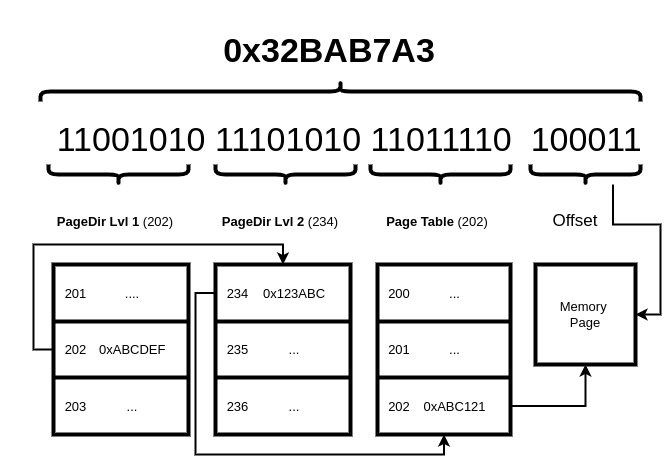
The memory page in the picture refers to a physical memory page (the picture above doesn’t refer to any existing hardware paging, it is just an example scenario). Using logical addresses and paging, we can introduce a whole new address space that can be much bigger than the available physical memory.
For example, we can have that:
phys(0x123'456) = virt(0xFFF'F234'5235)Meaning that the virtual address 0xFFFF2345235 refers to
the physical address 0x123456.
This mapping is usually achieved through the usage of several hierarchical tables, with each item in one level pointing to the next level table. As already mentioned above a virtual address is a composition of entry numbers for each level of the tables. Now let’s assume for example that we have 3 levels paging, 32 bits addressing and the address translation mechanism used is the one in the picture above, and we have the virtual address below:
virtaddress = 0x2F880120Looking at the picture above we know that the bits:
We can translate the above address to:
The above example is just an imaginary translation mechanism, we’ll
discuss the actual x86_64 4-level paging below. If we are
wondering how the first page directory can be accessed, this will be
clear later, but the answer is that there is usually a special register
that contains the base address of the root page directory (in this
example page dir 1).
In 64 bit mode we have up to 4 levels of page tables. The number depends on the size we want to assign to each page. It’s worth noting that newer CPUs do support a feature called la57 (large addressing using 57-bits), this just adds another layer of page tables on top the existing 4 to allow for a larger address space. It’s a cool feature, but not really required unless we’re using crazy amounts of memory.
There are 3 possible scenarios:
To implement paging, is strongly recommended to have already implemented interrupts too, specifically handling #PF (vector 0xE).
The 4 levels of page directories/tables are:
The number of levels depend on the size of the pages chosen. If we
are using 4Kib pages then we will have: PML4, PDPR, PD, PT,
while if we go for 2Mib Pages we have only PML4, PDPR, PD,
and finally 1Gib pages would only use the PML4 and
PDPR.
As we have seen earlier in this chapter, when paging is enabled, a
virtual address is translated into a set of entry numbers in different
tables. In this paragraph we will see the different types available for
them on the x86_64 architecture.
But before proceeding with the details let’s see some of the characteristics common between all table/directory types:
The hierarchy of the tables is:
Is important to note that the x86_64 architecture support mixing page sizes.
In the following paragraphs we will have a look with more detail at how the paging is enabled and the common parts between all of the entries in these tables, and look at what they mean.
Until now, we have explained how address translation works now let’s
see how the Root Table is loaded (in x86_64 is PML4), this
is done by loading the special register CR3, also known as
PDBR, we introduced it at the beginning of the chapter, and
is content is basically the base address of our PML4 table. This can be
easily done with two lines of assembly:
   mov eax, PML4_BASE_ADDRESS
   mov cr3, eax
The first mov is needed because cr3 can be
loaded only from another register. Keep in mind that in order to enter
long mode we should have already paging enabled, so the first page
tables should be loaded very early in the boot process. Once enabled we
can change the content of cr3 to load a new addressing
space.
This can be done using inline assembly too:
void load_cr3( void* cr3_value ) {
    asm volatile("mov %0, %%cr3" :: "r"((uint64_t)cr3_value) : "memory");
}
The inline assembly syntax will be explained in one of the appendices
chapter: C Language
Info. The mov into a register here is hidden, by the
label "r" in front of the variable cr3_value,
this label indicates that the variable value should be put into a
register.
The bits that we need to set to have paging enabled in long mode are,
in order, the: PAE Page Address Extension, bit number 5 in
CR4, the LME Long Mode Enable Bit (Bit 8 in EFER, and has
to be loaded with the rdmsr/wrmsr
instructions), and finally the PG Paging bit number 31 in
cr0.
Every time we need to change a value of a system register,
cr*, and similar we must always load the current value
first and update its content, otherwise we can run into troubles. And
finally the Paging bit must be the last to be enabled.
Setting those bits must be done only once at early stages of boot process (probably one of the first thing we do).
PML4 and PDPR entry structures are identical, while the PD one has few differences. Let’s begin by looking at the structure of the first two types:
| 63 | 62 … 59 | 58 … 52 | 51 … 40 | 39 … 12 | 11 … 9 |
|---|---|---|---|---|---|
| XD | PK or available | Available | Reserved must be 0 | Table base address | Available |
| 8 … 6 | 5 | 4 | 3 | 2 | 1 | 0 |
|---|---|---|---|---|---|---|
| Reserved | A | PCD | PWT | U/S | R/W | P |
Where Table base address is a PDPR table base address if the table is PML4 or the PD base address if the table is the PDPR.
Now the Page Directory (PD) has few differences:
A page table entry structure is still similar to the one above, but it contains few more bits that can be set:
| 63 | 62 … 59 | 58 … 52 | 51 … 40 | 39 … 12 | 11 … 9 |
|---|---|---|---|---|---|
| XD | PK or available | Available | Reserved must be 0 | Page Base Address | Available |
| 8 | 7 | 6 | 5 | 4 | 3 | 2 | 1 | 0 |
|---|---|---|---|---|---|---|---|---|
| G | PAT | D | A | PCD | PWT | U/S | R/W | P |
In this table there are 3 new bits (D, PAT, G) and the page base address, as already explained, is not pointing to a table but to the physical memory this page represents.
In the next section we will go through the fields of an entry.
Below is a list of all the fields present in the table entries, with an explanation of the most commonly used.
Note about PWT and PCD, the definition of those bits depends on whether PAT (page attribute tables) are in use or not. For a better understanding of those two bits please refer to the most updated intel documentation (is in the Paging section of the intel Software Developer Manual vol.3)
If we are using 2MB pages this is how the address will be handled by the paging mechanism:
| 63 …. 48 | 47 … 39 | 38 … 30 | 29 .. 21 | 20 … 0 |
| 1 … 1 | 1 … 1 | 1 … 0 | 0 … 0 | 0 … 0 |
| Sgn. ext | PML4 | PDPR | Page dir | Offset |
Every table has 512 elements, so we have an address space of 512 * 512 * 512 * 0x200000 (that is the page size)
If we are using 4kB pages this is how the address will be handled by the paging mechanism:
| 63 … 48 | 47 … 39 | 38 … 30 | 29 … 21 | 20 … 12 | 11 … 0 |
| 1 … 1 | 1 … 1 | 1 … 0 | 0 … 0 | 0 … 0 | 0 … 0 |
| Sgn. ext | PML4 | PDPR | Page dir | Page Table | Offset |
Same as above: Every table has 512 elements, so we have an address space of: 512 * 512 * 512 * 512 * 0x1000 (that is the page size)
A page fault (exception 14, triggers the interrupt of the same
number) is raised when address translation fails for any reason. An
error code is pushed on to the stack before calling the interrupt
handler describing the situation when the fault occurred. Note that
these bits describe was what was happening, not why the fault occurred.
If the user bit is set, it does not necessarily mean it was a privilege
violation. The CR2 register also contains the address that
caused the fault.
The idea of the page fault handler is to look at the error code and faulting address, and do one of several things: - If the program is accessing memory that it should have, but hasn’t been mapped: map that memory as initially requested. - If the program is attempting to access memory it should not, terminate the program.
The error code has the following structure:
| 31 …. 4 | 4 | 3 | 2 | 1 | 0 |
| Reserved | I/D | RSVD | U/S | W/R | P |
The meanings of these bits are expanded below:
One of the problems that we face while enabling paging is of how to access the page directories and table, in case we need to access them, and especially when we need to map a new physical address.
There are two ways to achieve it:
To use the recursion the only thing we need to do, is reserve an
entry in the root page directory (PML4 in our
case) and make its base address to point to the directory itself.
A good idea is to pick a number high enough, that it will not
interfere with other kernel/hardware special addresses. For example
let’s use the entry 510 for the recursive item.
Creating the self reference is pretty straightforward, we just need to use the directory physical address as the base address for the entry being created:
pml4[510l] = pml4_physical_address | PRESENT | WRITE;This should be done again when setting up paging, on early boot stages.
Now as we have seen above address translation will split the
virtual address in entry numbers for the different tables,
starting from the leftmost (the root). So now if we have for example the
following address:
virt_addr = 0xff7f80005000The entries in this address are: 510 for PML4, 510 for PDPR, 0 for PD and 5 for PT (we are using 4k pages for this example). Now let’s see what happens from the point of view of the address translation:
510th PML4 entry is loaded, that is the
pointer to the PDPR, and in this case its content is PML4 itself.510th, and is again PML4 itself, so it is loaded
as PD too.0, so it loads the first entry from the Page Directory
loaded, that in this case is still PML4, so it loads the PDPR table5, and since
the current PD loaded for translation is actually a PDPR we are going to
get the 5th item of the page directory.This means that by carefully using the recursive item from PML4 we can access all the tables.
Few more examples of address translation:
0xFFFF'FFFF'8000'0000.This technique makes it easy to access page tables in the current address space, but it falls apart for accessing data in other address spaces. For that purpose, we’ll need to either use a different technique or switch to that address space, which can be quite costly.
Another technique for modifying page tables is a ‘direct map’
(similar to an identity map). As we know an identity map is when a
page’s physical address is the same as its virtual address, and we could
describe it as: paddr = vaddr. A direct map is sometimes
referred to as an offset map because it introduces an offset,
which gives us some flexibility. We’re using to have a global variable
containing the offset for our map called dmap_base.
Typically, we’ll set this to some address in the higher half so that the
lower half of the address space is completely free for userspace
programs. This also makes other parts of the kernel easier later on.
How does the direct map actually work though? It’s simple enough, we
just map all of physical memory at the same virtual address plus the
dmap_base offset: paddr = vaddr - dmap_base. Now in
order to access a physical page (from our PMM for example) we just add
dmap_base to it, and we can read and write to it as
normal.
The direct map does require a one-time setup early in your kernel, as
you do need to map all usable physical memory starting at
dmap_base. This is no more work than creating an identity
map though.
What address should you use for the base address of the direct map?
Well you can put it at the lowest address in the higher half, which
depends on how many levels of page tables you have. For 4 level paging
this will 0xffff'8000'0000'0000.
While recursive paging only requires using a single page table entry at the highest level, a direct map consumes a decent chunk of address space. A direct map is also more flexible as it allows the kernel to access arbitrary parts of physical memory as needed. Direct mapping is only really possible in 64-bit kernels due to the large address space made available, 32-bit kernels should opt to use recursive mapping to reduce the amount of address space used.
The real potential of this technique will unveil when we have multiple address spaces to handle, when the kernel may need to update data in different address spaces (especially the paging data structures), in this case using the direct map it can access any data in any address space, by only knowing its physical address. It will also help when we will start to work on device drivers (out of the scope of this book) where the kernel may need to access the DMA buffers, that are stored by their physical addresses.
There are few things to take in account when trying to access paging
structures using the recursion technique for x86_64
architecture:
gcc show a warning message
while compiling if this happens: warning: result of ‘510 << 30’ requires 40 bits to represent, but ‘int’ only has 32 bitsAt first a virtual memory manager might not seem like necessary when we have paging, but the VMM serves as an abstraction on top of paging (or whatever memory management hardware our platform has), as well as abstracting away other things like memory mapping files or even devices.
As mentioned before, a simple kernel only requires a simple VMM which may end up being a glorified page-table manager. However, as our kernel grows more complex, so will the VMM.
What exactly does the virtual memory manager manage? The PMM manages the physical memory installed in a computer, so it would make sense that the VMM manages the virtual memory. What do we mean by virtual memory?
Once we have some kind of address translation enabled, all memory we
can access is now virtual memory. This address translation is usually
performed by the MMU (memory management unit) which we can program in
someway. On x86_64 the MMU parses the page tables we
provide to determine what should happen during this translation.
Even if we create an identity map of physical memory (meaning virtual address = physical address) we’re still accessing physical memory through virtual memory. This is subtle, but important difference.
Virtual memory can be imagined as how the program views memory, as opposed to physical memory which is how the rest of the hardware sees memory.
Now that we have a layer between how a program views memory and how memory is actually laid out, we can do some interesting things:
0xFFFF'FFFF'8000'0000. Placing the kernel at that address
without virtual memory would require an insane amount of physical memory
to be present. This can also be extended to do things like place MMIO at
more convenient locations.We can also add more advanced features later on, like demand paging. Typically, when a program (including the kernel) asks the VMM for memory, and the VMM can successfully allocate it, physical memory is mapped there right away. Immediately backing like this has advantages in that it’s very simple to implement, and can be very fast. The major downside is that we trust the program to only allocate what it needs, and if it allocates more (which is very common) that extra physical memory is wasted. In contrast, demand paging does not back memory right away, instead relying on the program to cause a page fault when it accesses the virtual memory it just allocated. At this point the VMM now backs that virtual memory with some physical memory, usually a few pages at a time (to save overhead on page-faults). The benefits of demand-paging are that it can reduce physical memory usage, but it can slow down programs if not implemented carefully. It also requires a more complex VMM, and the ability to handle page faults properly.
On the topic of advanced VMM features, it can also do other things
like caching files in memory, and then mapping those files into the
virtual address space somewhere (this is what the mmap
system call does).
A lot of these features are not needed in the beginning, but hopefully the uses of a VMM are clear. To answer the original question of what a VMM does: it’s a virtual address space manager and allocator.
As it might be expected, there are many VMM designs out there. We’re
going to look at a simple one that should provide all the functionality
needed for now. First we’ll need to introduce a new concept: a
virtual memory object, sometimes called a virtual memory
range. This is just a struct that represents part of the virtual
address space, so it will need a base address and length, both of these
are measured in bytes and will be page-aligned. This requirement to be
page-aligned comes from the mechanism used to manage virtual memory:
paging. On x86 the smallest page we can manage is
4K, meaning that all of our VM objects must be aligned to
this.
In addition, we might want to store some flags in the vm object, they are like the flags used in the page tables, we could technically just store them there, but having them as part of the object makes looking them up faster, since we don’t need to manually traverse the paging structure. It also allows us to store flags that are not relevant to paging.
Here’s what our example virtual memory object looks like:
typedef struct vm_object {
    uintptr_t base;
    size_t length;
    size_t flags;
    struct vm_object* next;
} vm_object;

#define VM_FLAG_NONE 0
#define VM_FLAG_WRITE (1 << 0)
#define VM_FLAG_EXEC (1 << 1)
#define VM_FLAG_USER (1 << 2)
The flags field is actually a bitfield, and we’ve
defined some macros to use with it.
These don’t correspond to the bits in the page table, but having them
separate like this means they are platform-agnostic. We can port our
kernel to any cpu architecture that supports some kind of MMU and most
of the code won’t need to change, we’ll just need a short function that
converts our vm flags into page table flags. This is especially
convenient for oddities like x86 and its
nx-bit, where all memory is executable by default, and it
must be specified if the memory shouldn’t be to be
executable.
Having it like this allows that to be abstracted away from the rest
of our kernel. For x86_64 our translation function would
look like the following:
uint64_t convert_x86_64_vm_flags(size_t flags) {
    uint64_t value = 0;
    if (flags & VM_FLAG_WRITE)
        value |= PT_FLAG_WRITE;
    if (flags & VM_FLAG_USER)
        value |= PT_FLAG_USER;
    if ((flags & VM_FLAG_EXEC) == 0)
        value |= PT_FLAG_NX;
    return value;
};
The PT_xyz macros are just setting the bits in the page
table entry, for specifics see the paging chapter. Notice how
we set the NX-bit if VM_FLAG_EXEC is not set because of a
quirk on x86.
We’re going to store these vm objects as a linked list,
which is the purpose of the next field.
Since a virtual memory manager only handles a single address space, we’ll need one per address space we wish to have. This roughly translates to one VMM per running program, since each program should live in its own address space. Later on when we implement scheduling we’ll see how this works.
The kernel is a special case since it should be in all address spaces, as it always needs to be loaded to manage the underlying hardware of the system.
There are many ways of handling this, one example is to have a special kernel VMM that manages all higher half memory, and have other VMMs only manage the lower memory for their respective program. In this design we have a single higher half VMM (for the kernel), and many lower-half VMMs. Only one lower half VMM is active at a time, the one corresponding to the running program.
This is where design and reality collide, because our high level VMM
needs to program the MMU. The exact details of this vary by platform,
but for x86(_64) we have paging! See the previous chapter
on how x86 paging works. Each virtual memory manager will need to store
the appropriate data to manage the address space it controls: for paging
we just need the address of the root table.
void* vmm_pt_root;This variable can be placed anywhere, this depends on our design decisions, there is no correct answer, but a good idea is to reserve some space in the VM space to be used by the VMM to store its data. Usually a good idea is to place this space somewhere in the higher half area probably anywhere below the kernel.
Once we got the address, this needs to be mapped to an existing physical address, so we will need to do two things:
vmm_pt_root pointer
(at this point a function to do that should be present)vmm_pt_root.It is important to keep in mind that the all the addresses must be page aligned.
Now we know what a VM object is, let’s look at how we’re going to create them.
We know that a VM object represents an area of the address space, so in order to create a new one we’ll need to search through any existing VM objects and find enough space to hold our new object. In order to find this space we’ll need to know how many bytes to allocate, and what flags the new VM object should have.
We’re going to create a new function for this. Our example function is going to have the following prototype:
void* vmm_alloc(size_t length, size_t flags, void* arg);The length field is how many bytes we want. Internally
we will round this up to the nearest page size, since
everything must be page-aligned. The flags field is the
same bitfield we store in a VM object, it contains a description of the
type of memory we want to allocate.
The final argument is unused for the moment, but will be used to pass data for more exotic allocations. We’ll look at an example of this later on.
The function will return a virtual address, it doesn’t have necessarily to be already mapped and present, it just needs to be an available address. Again the question is: where is that address? The answer again is that it depends on the design decisions. So we need to decide where we want the virtual memory range to be returned is, and use it as starting address. It can be the same space used for the vmm data structures, or another area, that is up to us, of course this decision will have an impact on the design of the algorithm.
For the example code we’re going to assume we have a function to modify page tables that looks like the following:
void map_memory(void* root_table, void* phys, void* virt, size_t flags);And that there is a variable to keep track of the head of the linked list of objects:
vm_object* vm_objs = NULL;Now onto our alloc function. The first thing it will need to do is align the length up to the nearest page. This should look familiar.
length = ((length + PAGE_SIZE - 1) / PAGE_SIZE) * PAGE_SIZE;The next step is to find a space between two VM objects big enough to
hold length bytes. We’ll also want to handle the edge cases
of allocating before the first object, after the last object, or if
there are no VM objects in the list at all (not covered in the example
below, they are left as exercise).
vm_object* current = vm_objs;
vm_object* prev = NULL;
uintptr_t found = 0;

while (current != NULL) {
    uintptr_t base = (prev == NULL ? 0 : prev->base + prev->length);
    if (base + length < current->base) {
        found = base;
        break;
    }

    prev = current;
    current = current->next;
}
This is where the bulk of our time allocating virtual address space will be spent, so it could probably be wise in giving some thought designing this function for the VMM. We could keep allocating after the last item until address space becomes limited, and only then try allocating between objects, or perhaps another allocation strategy.
The example code above focuses on being simple and will try to allocate at the lowest address it can first.
Now that a place for the new VM object has been found, the new object should be stored in the list.
vm_object* latest = malloc(sizeof(vm_object));

if (prev == NULL)
    vm_objs = latest;
else
    prev->next = latest;
latest->next = current;
What happens next depends on the design of the VMM. We’re going to use immediate backing to keep things simple, meaning we will immediately map some physical memory to the virtual memory we’ve allocated.
    //immediate backing: map physical pages right away.
    void* pages = pmm_alloc(length / PAGE_SIZE);
    map_memory(vmm_pt_root, pages, (void*)obj->base, convert_x86_64_vm_flags(flags));

    return obj->base;
}
We’re not handling errors here to keep the focus on the core code,
but they should be handled in a real implementation. There is also the
caveat of using malloc() in the VMM. It may run before the
heap is initialized, in which case another way to allocate memory for
the VM objects is needed. Alternatively if the heap exists outside of
the VMM, and is already set up at this point this is fine.
What about that extra argument that’s gone unused? Right now it serves no purpose, but we’ve only looked at one use of the VMM: allocating working memory.
Working memory is called anonymous memory in the unix world and refers to what most programs think of as just ‘memory’. It’s a temporary data store for while the program is running, it’s not persistent between runs and only the current program can access it. Currently, this is all our VMM supports.
The next thing we should add support for is mapping MMIO (memory mapped I/O). Plenty of modern devices will expose their interfaces via MMIO, like the APICs, PCI config space or NVMe controllers. MMIO is usually some physical addresses we can interact with, that are redirected to the internal registers of the device. The trick is that MMIO requires us to access specific physical addresses, see the issue with our current design?
This is easily solved however! We can add a new VM_FLAG
that specifies we’re allocating a virtual object for MMIO, and pass the
physical address in the extra argument. If the VMM sees this flag, it
will know not to allocate (and later on, not to free) the mapped
physical address. This is important because there’s not any physical
memory there, so we don’t want to try free it.
Let’s add our new flag:
#define VM_FLAG_MMIO (1 << 3)Now we’ll need to modify vmm_alloc to handle this flag.
We’re going to modify where we would normally back the object with
physical memory:
//immediate backing: map physical pages right away.
void* phys = NULL;
if (flags & VM_FLAG_MMIO)
    phys = (void*)arg;
else
    phys = pmm_alloc(length / PAGE_SIZE);
map_memory(vmm_pt_root, phys, (void*)obj->base, convert_x86_64_vm_flags(flags));
Now we have to check for whether an object is MMIO or not. If it is, we don’t allocate physical memory to back it. Instead, we just modify the page tables to point to the physical address we want it too.
At this point our VMM can allocate any object types we’ll need for now, and hopefully we can start to see the purpose of the VMM.
As mentioned previously a more advanced design could allow for memory
mapping files: by adding another flag, and passing the file name (as a
char*) in the extra argument, or perhaps a file descriptor
(like mmap does).
We’ve looked at allocating virtual memory, how about freeing it? This is quite simple! To start with, we’ll need to find the VM object that represents the memory we want to free: this can be done by searching through the list of objects until we find the one we want.
If we don’t find a VM object with a matching base address, something has gone wrong and error for debugging should be emitted. Otherwise, the VM object can be safely removed from the linked list.
At this point the object’s flags need to be inspected to determine
how to handle the physical addresses that are mapped. If the object
represents MMIO, it will only need to remove the mappings from the page
tables. If the object is working (anonymous) memory, which is indicated
by the VM_FLAG_MMIO bit being cleared, the physical
addresses in the page tables are page frames. The physical memory
manager should be informed that these frames are now free after removing
the mappings.
We’re leaving the implementation of this function up to the reader, but it’s prototype would like something like:
void vmm_free(void* addr);Now that we have a virtual memory manager, let’s take a look at how we might use it:
Traditionally malloc() or a variable-length array for
something like this should be used. However, there isn’t a heap yet (see
the next chapter), and allocating from the VMM directly like this gives
few guarantees, we might want, like the memory always being
page-aligned.
void* buffer = vmm_alloc(buffer_length, VM_FLAG_WRITE, NULL);
//buffer now points to valid memory we can use.

//... sometime later on, we free the virtual memory.
vmm_free(buffer);
buffer = NULL;
Usually this is used by the heap allocator to get the memory it needs, and it will take care of allocating more appropriately sized chunks.
The local APIC is a device accessed via MMIO. Its registers are
usually located at the physical address
0xFEE00000, and that’s what we’re going to use for this
example. In the real world this address should be obtained from
the model specific register (MSR) instead of hardcoding it (in x86
architectures).
If not familiar with what the local APIC is, it’s a device for handling interrupts on x86, see the relevant chapter for more detail. All needed to know for this example is that it has a 4K register space at the specified physical address.
Since we know the physical address of the MMIO, we want to map this into virtual memory to access it. We could do this by directly modifying the page tables, but we’re going to use the VMM.
const size_t flags = VM_FLAG_WRITE | VM_FLAG_MMIO;
void* lapic_regs = vmm_alloc(0x1000, flags, (void*)0xFEE0'0000);
//now we can access the lapic registers at this virtual addressWe’ve looked a basic VMM implementation, and discussed some advanced concepts too, but there are some good things that should be implemented sooner rather than later:
vmm_alloc will
search. This can be useful for debugging, or it wants to a split higher
half VMM/lower half VMM design like mentioned previously.As mentioned above all the memory accessed is virtual memory at this point, so unless there is a specific reason to interact with the PMM it can be best to deal with the VMM instead. Then let the VMM manage the physical memory it may or may not need.
Of course there will be cases where this is not possible, and there are valid reasons to allocate physical memory directly (DMA buffers for device drivers, for example), but for the most part the VMM should be the interface to interact with memory.
This VMM design that was explained here is based on a stripped-down version of the Solaris VMM. It’s very well understood and there is plenty of more in depth material out there if interested in exploring further. The original authors have also published several papers on the topic.
Welcome to the last layer of memory allocation, the heap, this is where usually the various alloc functions are implemented. This layer is usually built on top of the other layers of memory management (PMM and VMM), but a heap can be built on top of anything, even another heap! Since different implementations have different characteristics, they may be favoured for certain things. We will describe a way of building a heap allocator that is easy to understand, piece by piece. The final form will be a linked list.
We’ll focus on three things: allocating memory
(alloc()), freeing memory (free()) and the
data structure needed for those to work.
The term ‘heap’ has a few meanings, and if coming from a computer science course the first thought might be the data structure (specialized tree). That can be used to implement a heap allocator (hence the name), but it’s not what we’re talking about here.
This term when used in a memory management/osdev environment has a
different meaning, and it usually refers to the code where memory is
dynamically allocated (malloc() and friends).
There are many kinds of memory allocators in the osdev world (physical, virtual, and others) with various subtypes (page frame, bitmap, etc …). For the next section we assume the following components are present:
If some of these terms need more explanation, they have chapters of their own to explain their purpose and function!
With the above assumptions, what happens under the hood when we want to allocate some memory from the heap?
As with other OS components there are many different algorithms out there for managing memory, each with its pros and cons. Here we’ll explain a simple and efficient algorithm based on linked lists. Another common algorithm used for a heap is the slab allocator. This is a very fast, but potentially more wasteful algorithm. This is not covered here and exploring slab allocators is left as an exercise for the reader.
A heap allocator exposes two main functions:
void *alloc(size_t size); To request memory of size
bytes.void free(void *ptr); To free previously allocated
memory.In user space these are the well known malloc()/free()
functions. However, the kernel will also need its own heap (we don’t
want to put data where user programs can access it!). The kernel heap
usually exposes functions called kmalloc()/kfree().
Functionally these heaps can be the same.
So let’s get started with describing the allocation algorithm.
Authors note: In the following examples we will use
uint8_t for all the pointers, but in a real scenario it
will be better to use a bigger size for the variable keeping track of
the allocated region sizes (so we’re not limited to 255 bytes).
The easiest way to start with creating our allocator is to ask: “What does a heap allocator do?”.
Well the answer is, as we already know: it allocates memory, specifically in bytes. The bytes part is important, because as kernel developers we’re probably used to dealing with pages and page-sized things. If the program asks for X bytes, the allocator will return an address pointing to an area of memory that is at least X bytes. The VMM is allocating memory, but the biggest difference is that the Heap is allocating bytes, while the VMM is allocating Pages.
If we are writing an OS, we already know that RAM can be viewed as a very long array, where the index into this array is the memory address. The allocator is returning these indices. So we can already see the first detail we’ll need to keep track of: next available address.
Let’s start with a simple example, assume that we have an address
space of 100 bytes, nothing has been allocated yet, and the program
makes the following consecutive alloc() calls:
alloc(10);
alloc(3);
alloc(5);
Initially our ram looks like the following:
| 0000 | 0001 | 0002 | … | 0099 | 00100 |
|---|---|---|---|---|---|
| cur |
cur is the variable keeping track of the next address
that can be returned and is initialized to 0, in this example. Now when
the alloc(10) is called, the program is asking for a memory
location of 10 bytes. Since cur = 0, the address to return
is 0, and the next available address will become:
cur + 10.
So now we have the following situation:
| 0000 | 0001 | 0002 | … | 0010 | … | 00100 |
|---|---|---|---|---|---|---|
| X | X | X | cur |
X is just used as marker to convey that memory has been
allocated already. Now when calling alloc(3), the allocator
will return the address currently pointed by cur = 10 and
then move cur 3 bytes forward.
| 0000 | 0001 | 0002 | … | 0010 | … | 0013 | … | 00100 |
|---|---|---|---|---|---|---|---|---|
| X | X | X | X | cur |
Now the third alloc() call will work similarly to the
others, and we can imagine the results. `
What we have so far is already an allocation algorithm, that’s easy to implement and very fast!
uint8_t *cur_heap_position = 0; //Just an example, in the real world you would use
                                //a virtual address allocated from the VMM.
void *first_alloc(size_t size) {
  uint8_t *addr_to_return = cur_heap_position;
  cur_heap_position = cur_heap_position + size;
  return (void*) addr_to_return;
}
Congratulations! We have written our first allocator! It is called the bump allocator, because each allocation just bumps the next address pointer forward.
But what about free()? That’s even easier, let’s have a
look at it:
void first_free(void *ptr) {
    return;
}
Yeah… that’s right, it’s not an error. A bump allocator does not have
free().
Why? Because we are not keeping track of the allocated memory, so we
can’t just update the cur_heap_position variable with the
address of ptr, since we don’t know who is using the memory after ptr.
So we are forced just to do nothing.
Even if probably useless let’s see what are the pros and cons of this approach:
Pros:
Of course the cons are probably pretty clear and make this algorithm pretty useless in most cases:
The main problem with the algorithm outlined above is that we don’t keep track of what we have allocated in the past, so we are not able to free that memory in the future, when it’s no longer used.
Now we’re going to build a new allocator based on the one we just implemented. The first thing to do is try to figure out what are the information we need to keep track of from the previous allocations:
x bytes of
memory, so when we return the address, we know that the next free one
will be at least at: returned_address + x so we need to
keep track of the allocation size.Now the problem is: how do we keep track of this information?
For this example let’s keep things extremely simple: place the size
just before the pointer. Whenever we make an allocation we write the
size to the address pointed by cur_heap_position, increment
the pointer and return that address. The updated code should look like
the following:
uint8_t *heap_start = 0;
uint8_t *cur_heap_position = heap_start; //This is just pseudocode in real word this will be a memory location

void *second_alloc(size_t size) {
  *cur_heap_position = size;
  cur_heap_position = cur_heap_position + 1;
  uint8_t *addr_to_return = cur_heap_position;
  cur_heap_position += size;
  return (void*) addr_to_return;
}
This new function potentially fixes one of the problems we listed above: it can now let us traverse the heap because we know that the heap has the following structure:
| 0000 | 0001 | 0002 | 0003 | … | 0010 | 0011 | 0013 | … | 00100 |
|---|---|---|---|---|---|---|---|---|---|
| 2 | X | X | 7 | … | X | cur | … |
Authors note: just a reminder that the pointer is a uint8_t
pointer, so when we are storing the size, the memory cell pointed by
cur_heap_position will be of type uint8_t, that means that in
this example and the followings, the size stored can be maximum 255. In
a real allocator we want to support bigger allocations, so using at
least a uint32_t or even size_t is
recommended.
In this example, the number indicates the size of the allocated block. There have already been 2 memory allocations, with the first of 2 bytes and the second of 7 bytes. Now if we want to iterate from the first to the last item allocated the code will look like:
uint8_t *cur_pointer = start_pointer;
while(cur_pointer < cur_heap_pointer) {
  printf("Allocated address: size: %d - 0x%x\n", *cur_pointer, cur_pointer+1);
  cur_pointer = cur_pointer + (*cur_pointer) + 1;
}
But are we able to reclaim unused memory with this approach? The answer is no. You may think so, but even if we know the size of the area to reclaim, and we can reach it everytime from the start of the heap, there is no mechanism to mark this area as available or not. If we set the size field to 0, we break the heap (all areas after the one we are trying to free will become unreachable).
So to solve this issue we need to keep track of the new information: whether a chunk of memory is used or free.
So now everytime we will make an allocation we will keep track of:
At this point our new heap allocation will look like:
| 0000 | 0001 | 0002 | 0003 | 0004 | … | 0011 | 0011 | 0013 | … | 00100 |
|---|---|---|---|---|---|---|---|---|---|---|
| 2 | U | X | 7 | U | … | X | cur | … |
Where U is just a label for a boolean-like variable (U = used = false, F = true = free).
At this point we the first change we can do to our allocation function is add the new status variable just after the size:
#define USED 1
#define FREE 0

uint8_t *heap_start = 0;
uint8_t *cur_heap_position = heap_start; //This is just pseudocode in real word this will be a memory location

void *third_alloc(size_t size) {
  *cur_heap_position = size;
  cur_heap_position = cur_heap_position + 1;
  *cur_heap_position = USED;
  cur_heap_position = cur_heap_position + 1;
  uint8_t *addr_to_return = cur_heap_position;
  cur_heap_position += size;
  return (void*) addr_to_return;
}
One thing that might have been noticed so far is that in order to
keep track of all those new information, we are adding an overhead to
our allocator. How big this overhead is depends on the size of the
variables we use in the chunk headers (where we store the alloc size and
status). Even if we keep things small by only using
uint8_t, we have already added 2 bytes of overhead for
every single allocation. The implementation above is not completed yet,
since we haven’t implemented a mechanism to re-use the freed location
but before adding this last piece let’s talk about the free.
Now we know that given a pointer ptr (previously
allocated from our heap, of course) ptr - 1 is the status
(and should be USED) and ptr - 2 is the size.
Using this our free can be pretty simple:
void third_free(void *ptr) {
  if( *(ptr - 1) == USED ) {
    *(ptr - 1) = FREE;
  }
}
Yeah, that’s it! We just need to change the status, and the allocator will be able to know whether the memory location is used or not.
Now that we can free, we should add support for returning from this
freed memory. How the new alloc() works is as follows:
cur_pointer is pointing to the first metadata byte of the
location to be returned (the size in our example) the code to update and
return the current block will be pretty simple:cur_pointer = cur_pointer + 1; //remember cur_pointer is pointing to the size byte, and is different from current_heap end
*cur_pointer = USED;
cur_pointer = cur_pointer + 1;
return cur_pointer;There is also no need to update the cur_heap_end, since it has not been touched.
cur_pointer == cur_heap_position:*cur_pointer = size;
cur_pointer = cur_pointer + 1;
*cur_pointer = USED;
cur_pointer = cur_pointer + 1;
cur_heap_position = cur_pointer + size;
return cur_pointer;We have already seen how to traverse the heap when explaining the second version of the alloc function. Now we just need to adjust that example to this newer scenario where we have now two extra bytes with information about the allocation instead of one. The code for alloc will now look like:
#define USED 1
#define FREE 0

uint8_t *heap_start = 0;
uint8_t *cur_heap_position = heap_start; //This is just pseudocode in real word this will be a memory location

void *third_alloc(size_t size) {
  cur_pointer = heap_start;

  while(cur_pointer < cur_heap_position) {
    cur_size = *cur_pointer;
    status = *(cur_pointer + 1);

    if(cur_size >= size && status == FREE) {
       status = USED;
       return cur_pointer + 2;
    }
    cur_pointer = cur_pointer + (size + 2);
  }

  *cur_heap_position=size;
  cur_heap_position = cur_heap_position + 1;
  *cur_heap_position = USED;
  cur_heap_position = cur_heap_position + 1;
  uint8_t *addr_to_return = cur_heap_position;
  cur_heap_position+=size;
  return (void*) addr_to_return;
}
If we are returning a previously allocated address, we don’t need to
move cur_heap_position, since we are reusing an area of
memory that is before the end of the heap.
Now we have a decent and working function that can free previously allocated memory, and is able to reuse it. It is still not perfect and there are several major problems:
Another thing worth doing is to improve readability of the code by replacing the direct pointer access with a more elegant data structure. This lets us add more fields (as we will in the next paragraph) as needed.
So far our allocator needs to keep track of just the size of the block returned and its status The data structure for this could look like the following:
struct {
    size_t size;
    uint8_t status;
} Heap_Node;
That’s it! That’s what we need to clean up the code and replace the pointers in the latest with the new struct reference. Since it is just matter of replacing few variables, implementing this part is left to the reader.
So now we have a basic memory allocator (woo hoo), and we are nearing the end of our memory journey.
In this part we’ll see how to help mitigate the fragmentation problem. It is not a definitive solution, but this lets us reuse memory in a more efficient way. Before proceeding let’s recap what we’ve done so far.
This solution is known with the name Coalescing, and it simply is an algorithm that merge contiguous smaller block of free memory into a bigger one.
We started from a simple pointer to the latest allocated location, and added information in order to keep track of what was previously allocated and how big it was, needed to reuse the freed memory.
We’ve basically created a list of memory regions that we can traverse to find the next/prev region.
Let’s look at fragmentation a little more closely, in the following example. We assume that we have a heap limited to 25 bytes:
a = third_alloc(6);
b = third_alloc(6);
c = third_alloc(6)
free(c);
free(b);
free(a);
What the heap will look like after the code above?
| 00 | 01 | 02 | .. | 07 | 08 | 09 | 10 | .. | 15 | 16 | 17 | .. | 23 | 24 | 25 |
|---|---|---|---|---|---|---|---|---|---|---|---|---|---|---|---|
| 6 | F | X | .. | X | 6 | F | X | .. | X | 6 | F | .. | X |
Now, all of the memory in the heap is available to allocate (except for the overhead used to store the status of each chunk), and everything looks perfectly fine. But the code keeps executing, and it will arrive at the following instruction:
alloc(7);Pretty small allocation, and we have plenty of space… no wait. The heap is mostly empty, but we can’t allocate just 7 bytes because all the free blocks are too small. That is fragmentation in a nutshell.
How do we solve this issue? The idea is pretty straightforward, every time a memory location is being freed, we do the following:
ptr_to_free + ptr_to_free_size == next_node then
merge the two nodes and create a single node of
ptr_to_free_size + next_node_size (notice we don’t need to
add the size of Heap_node because ptr should
be the address immediately after the struct).prev_node_address + prev_node_size + sizeof(Heap_Node) == ptr_to_free
then merge the two nodes and create a single node of
prev_node_size + ptr_to_free_sizeThere are different ways to implement this:
next and prev pointer to the node
structure. This is the way we’ll use in the rest of this chapter. This
makes checking the next and previous nodes for merge-ability very easy.
It does dramatically increase the memory overhead. Checking if a node
can be merged can be done via
(cur_node->prev).status = FREE and
(next_node->next).status = FREE.ptr_to_free, and if is free we can merge. For the next node
instead things are easier: we just need to check if the node starting at
ptr_to_free + ptr_size if it is free is possible to merge.
By comparison this increases the runtime overhead of
free().Both solutions have their own pros and cons, like previously
mentioned we’ll go with the first one for these examples. Adding the
prev and next pointers to the heap node struct
leaves us with:
typedef struct {
    size_t size;
    uint8_t status;
    Heap_Node *prev;
    Heap_Node *next;
} Heap_Node;
So now our heap node will look like the following in memory:
| 00 | 01 | 02 | 10 | 18 |
|---|---|---|---|---|
| 6 | F/U | PREV | NEXT | X |
As mentioned earlier using the double linked list the check for
merge-ability is more straightforward. For example to check if we can
merge with the left node we just need to check the status of the node
pointed by the prev field, if it is free then they can be merged. To
merge with the previous node, we would apply the logic below to
node->prev:
size field, adding to it the size of
cur_nodenext pointer to point to
cur_node->nextReferring to the next node:
prev pointer to point to the previous node
above (cur_node->prev)Of course merging with the right node is the opposite (update the size and the prev pointer of cur_node->next and update the next pointer of cur_node->next).
Important note: We always want to merge in the order
of current + next and then prev + current as
if the prev node absorbs current, what happens to the memory owned by
the next node when merged with it? Nothing, it’s simply lost. It can be
avoided with clever and careful logic, but the simpler solution is to
simply merge in the right order.
Below a pseudocode example of how to merge left:
Heap_Node *prev_node = cur_pointer->prev //cur_pointer is the node we want to check if can be merged
if (prev_node != NULL && prev_node->status == FREE) {
    // The prev node is free, and cur node is going to be freed so we can merge them
    Heap_Node next_node = cur_pointer->next;
    prev_node->size = prev_node->size + cur_node->size + sizeof(Heap_Node);
    prev_node->next = cur_pointer->next;
    if (next_node != NULL) {
        next_node->prev = prev_node;
    }
}
What we’re describing here is the left node being “swallowed” by the right one, and growing in size. The memory that the left node owns and is responsible for is now part of the right one. To make it easier to understand, consider the portion of a hypothetical heap in the picture below:
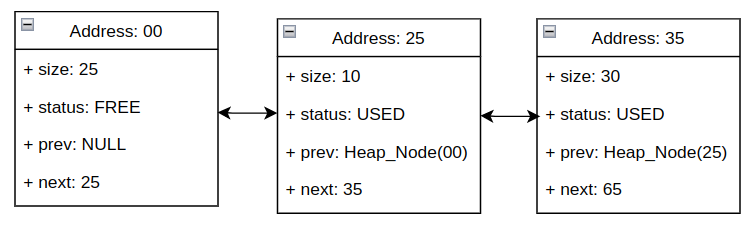
Basically the heap starts from address 0, the first node is marked as
free and the next two nodes are both used. Now imagine that
free() is called on the second address (for this example we
consider size of the heap node structure to be just of 2 bytes):
free(0x27); //Remember the overheadThis means that the allocator (before marking this location as free and returning) will check if it is possible to merge first to the left (YES) and then to the right (NO since the next node is still in use) and then will proceed with a merge only on the left side. The final result will be:
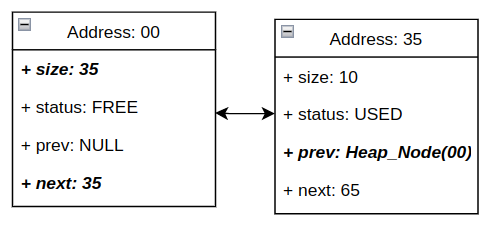
The fields in bold are the fields that are changed. The exact implementation of this code is left to the reader.
Now we have a way to help reduce fragmentation, on to the next major issue: wasted memory from allocating chunks that are too big. In this part we will see how to mitigate this.
Imagine our memory manager is allocating and freeing memory for a while, and we arrive at a moment in time where we have just three nodes:
Now alloc() is called again, like so:
alloc(10);The allocator is going to look for the first node it can return that is at least 10 bytes. Using the example from above, this will be the first node. Everything looks fine, except that we’ve just returned 150 bytes for a 10 byte allocation (i.e. ~140 bytes of memory is wasted). There are a few ways to approach this problem: * The first solution that comes to mind is to scan the entire heap each time and use the smallest (but still big enough for the requested size) node. This is better, but the downside (speed) should be obvious. This will also still not work as well as the second solution because in the above example it would still return 150 bytes. * What we’re going to do is ‘cut’ the space that we need from the node, splitting it into 2 new nodes. The first node will be the request allocation size, and is used to fulfill that. The other will be kept as a free node, inserted into the linked list.
The workflow will be the following:
(uintptr_t)cur_node + requested_bytes. Set this node’s size
to cur_node->size - requested_bytes - sizeof(Heap_Node),
we’re subtracting the size of the Heap_Node struct here because we’re
going to use some memory in the heap to store this new node. This is the
process of inserting into the heap.cut_node->size should now be the requested
size.heap_tail variable should be
updated as well, if it is being used (this depends on design
decisions).After that the allocator can compute the address to return using
(uintptr_t)cur_node + sizeof(Heap_node), since we want to
return the memory after the node, not the node itself
(otherwise the program would put data there and overwrite what we’ve
stored!).
Before wrapping up there’s a few things worth pointing out about implementing splitting:
sizeof(Heap_Node), because otherwise they will never be
allocated.minimum_allocatable_size is
0x20 bytes, and we want to allocate 5 bytes, we will still receive a
memory block of 0x20 bytes. The program may not know it was
returned 0x20 bytes, but that is okay. What exact value
should be used for it is implementation specific, values of
0x10 and 0x20 are popular.sizeof(Heap_Node) bytes while computing sizes that involve
multiple nodes. If we decide to include the overhead size in the node’s
size, remember to also subtract it when checking for suitable
nodes.And that’s it!
Each heap will likely have different requirements for how it’s initialized, depending on whether it’s a heap for a user program, or it’s running as part of a kernel. For a userspace program heap we may want to allocate a bigger initial size if we know the program will need it. As the operating system grows there will be more instances of the heap (usually at least one per program + global kernel heap), and it becomes important to keep track of all the memory used by these heaps. This is often a job that the VMM for a process will take on.
What is really needed to initialize a heap is an initial size (for example 8k), and to create a single starting node:
Heap_Node *heap_start;
Heap_Node *heap_end;
void initialize_heap() {
  heap_start = INITIAL_HEAP_ADDRESS //Remember is a virtual address;
  heap_start->prev = NULL;
  heap_start->next = NULL; // Just make sure that prev and next are not going anywhere
  heap_start->status = FREE;
  heap_start->size = INITIAL_HEAP_SIZE // 8096 = 8k;
  heap_end = heap_start
}
Now the question is, how do we choose the starting address? This really is arbitrary. We can pick any address that we like, but there are a few constraints that we should follow:
For the kernel heap, a good place for it to start is immediately
following the kernel binary in memory. If the kernel is loaded at
0xFFFFFFFF80000000 as is common for higher half kernels,
and the kernel is 0x4321 bytes long. It round up to the
nearest page and then add another page (0x4321 gets rounded
to 0x5000, add 0x1000 now we’re at
0x6000). Therefore, our kernel heap would start at
0xFFFFFFFF80006000.
The reason for the empty page is that it can be left unmapped, and then any buggy code that attempts to access memory before the heap will likely cause a page fault, rather than returning bits of the kernel.
And that’s it, that is how the heap is initialized with a single node. The first allocation will trigger a split from that node… and so on…
One final part that we will be explained briefly, is what happens when we reach the end of the heap. Imagine the following scenario we have done a lot of allocations, most of the heap nodes are used and the few usable nodes are small. The next allocation request will fail to find a suitable node because the requested size is bigger than any free node available. Now the allocator has searched through the heap, and reached the end without success. What happens next? Time to expand the heap by adding more memory to the end of it.
Here is where the virtual memory manager will join the game. Roughly what will happen is:
heap_end + heap_end->size + sizeof(heap_node).And with that we’ve just written a fairly complete heap allocator.
A final note: in these examples we’re not zeroing the memory returned
by the heap, which languages like C++ may expect when new
and delete operators are used. This can lead to
non-deterministic bugs where objects may be initialized with left over
values from previous allocations (if the memory has been used before),
and suddenly default construction is not doing what is expected. Doing a
memset() on each block of memory returned does cost cpu
time, so it’s a trade off, a decision to be made for your specific
implementation.
This part will cover all the topic related on how to build a memory management mechanism, from scratch, all layers will be covered.
Below the list of chapters:
So far our kernel has been running a single stream of code, initializing various parts of the cpu and system hardware in sequence and handling interrupts from few sources.
While it is possible to go further, we’ll begin to run into a handful of problems. Some devices take time to perform actions, and our code may need to wait. If we have a lot of devices, this can lead to things becoming very slow. What if we want to start running multiple threads, or even multiple programs with multiple threads? This is a common scenario, and what the scheduler is responsible for.
The scheduler is similar to a hardware multiplexer (mux) in that it takes multiple inputs (programs or threads) and allows them to share a single output (the cpu executing the code).
The scheduler does this by interrupting the current stream of code, saving its state, selecting the next stream, loading the new state and then returning. If done at a fast enough rate, all programs will get to spend a little time running, and to the user it will appear as if all programs are running at the same time. This whole operation is called a context switch.
For our examples the scheduler is going to do its selection inside of an interrupt handler, as that’s the simplest way to get started. As always, there are other designs out there.
This part will cover the following areas:
The scheduler is the part of the kernel responsible for selecting the next process to run, as well as keeping track of what threads and processes exist in the system.
The primitives used (thread and process) have various names in other kernels and literature: job, task, lightweight task.
There are many selection algorithms out there, ranging from general purpose to special purpose. A real-time kernel might have a selection algorithm that focuses on meeting hard deadlines (required for real-time software), where as a general purpose algorithm might focus on flexibility (priority levels and being extensible).
Our scheduler is going to operate on a first-come first-served (FCFS) bases, commonly known as round-robin.
Before we start describing the workflow in detail, let’s answer a few questions:
The main part of our scheduler is going to be thread selection. Let’s breakdown how we’re going to implement it:
The basic scheduler we are going to implement will have the following characteristics:
As said above we are going to use a linked list, the implementation
of the functions to add, remove and search for processes in the list are
left as an exercise, since their implementation is trivial, and doesn’t
have any special requirement. For our purposes we assume that the
functions: add_process, delete_process,
get_next_process are present.
For our scheduler to work correctly it will need to keep track of some information. The first thing will be a list of the currently active processes (by active we mean that the process has not finished executing yet). This is our linked list, so for it we need a pointer to its root:
process_t* processes_list;We’ll delve into what exactly a process might need to contain in a separate chapter, but for now we’ll define it as the following:
typedef struct process_t {
    status_t process_status;
    cpu_status_t* context;
    struct process_t* next;
} process_t;
If cpu_status_t looks familiar, it’s because the struct
we created in the interrupts chapter. This represents a snapshot of the
cpu when it was interrupted, which conveniently contains everything we
need to resume the process properly. This is our processes’s
context.
As for status_t, it’s a enum representing one of the
possible states a process can be in. This could also be represented by a
plain integer, but this is nicer to read and debug. For now our
processes are just going to have three statuses:
Our enum will look like the following:
typedef enum {
    READY,
    RUNNING,
    DEAD
} status_t;
The scheduler will also need to keep track of which process is currently being executed. How exactly you do this depends on the data structure used to store your processes, in our case using a linked list, we just need a pointer to it:
process_t *current_process;All that remains is to initialize the pointers to NULL,
since we don’t have any process running yet and the linked list is
empty.
As mentioned above we’re going to have the scheduler run in response to the timer interrupt, but it can be triggered however we want. There’s nothing to stop us only running the scheduler when a big red button is pushed, if we want. Having the scheduler attached to the timer interrupt like this is a good first effort to ensuring it gives each process a fair share of cpu time.
For the following sections we assume the interrupt handlers look like
the ones described in the interrupt handling chapter, and all route to a
single function. We’re going to have a function called
scheduler() that will do process selection for us. Patching
that into our interrupt routing function would look something like:
switch (interrupt_number) {
    case KEYBOARD_INTERRUPT:
        //do something with keyboard
        break;
    case TIMER_INTERRUPT:
        //eventually do other stuff here
        schedule();
        break;
    case ANOTHER_INTERRUPT:
        //...
        break;
}
That’s the foundation for getting our scheduler running. As previously mentioned, there may be other times we want to reschedule, but these are left as an exercise.
While we’re not going to implement this here, it’s worth spending a few words on this idea.
Swapping processes quantum is simple, but very wasteful. One way to help deal with this is to store a time-to-live value for the current process. If there are a lot of processes running, the scheduler gives each process a lower time-to-live. This results in more context switches, but also allows more processes to run. There’s a lot of variables here (minimum and maximum allowed values), and how do you determine how much time to give a process? There’s other things that could be done with this approach, like giving high priority processes more time, or having a real-time process run more frequently, but with less time.
This is the main part of the scheduler: selecting what runs next. It’s important to remember that this code runs inside of an interrupt handler, so we want to keep it simple and short. Since we’re using round robin scheduling, our code meets both of these criteria!
The core of the algorithm is deceptively simple, and looks as follows:
void schedule() {
    current_process = current_process->next;
}
Of course it is not going to work like that, and if executed like this the kernel will most likely end up in running garbage, but don’t worry it is going to work later on, the code snippet above is just the foundation of our scheduler.
There are few problems with this implementation, the first is that it doesn’t check if it has reached the end of the list, to fix this we just need to add an if statement:
void schedule() {
    if (current_process->next != NULL) {
        current_process = current_process->next;
    } else {
        current_process = processes_list;
    }
}
The else statement is in case we reached the end, where
we want to move back to the first item. This can vary depending on the
data structure used. The second problem is that this function is not
checking if the current_process is NULL or
not, it will be clear shortly why this shouldn’t happen.
The last problem is: what if there are no processes to be run? In our case our selection function would probably run into garbage, unless we explicitly check that the current_process and/or the list are empty. But there is a more useful and elegant solution used by modern operating systems: having a special process that the kernel run when there are no others. This is called the idle process, and will be looked at later.
Now we have the next process to run, and are ready to load its context and begin executing it. Before we can do that though, we need to save the context of the current process.
In our case, we’re storing all the state we need on the stack, meaning we only need to keep track of one pointer for each process: the stack we pushed all of the registers onto. We can also return this pointer to the interrupt stub and it will swap the stack for us, and then load the saved registers.
In order for this to happen, we need to modify our
schedule() function a little:
cpu_status_t* schedule(cpu_status_t* context) {
    current_process->context = context;

    if (current_process->next != NULL) {
        current_process = current_process->next;
    } else {
        current_process = processes_list;
    }

    return current_process->context;
}rdi
register, as per the calling convention, so it appears as the first
argument for our schedule() function.rax for the new stack value. This is where a return value
is placed according to the calling convention.This whole process is referred to as a context switch, and perhaps now it should be clearer why it can be a slow operation.
While some programs can run indefinitely, most will do some assigned work and then terminate. Our scheduler needs to handle a process terminating, because if it attempts to load the context of a finished program, the cpu will start executing whatever memory comes next as code. This is often garbage and can result in anything happening. Therefore the scheduler needs to know that a process has finished, and shouldn’t be scheduled again.
There is also another scenario to consider: imagine there is a process that is a driver for a slow IO device. A single operation could take a few seconds to run, and if this process is doing nothing the whole time, thats time taken away from other threads that could be doing work. This is something the scheduler needs to know about as well.
Both of these are solved by the use of the status field
of the process struct. The scheduler is going to operate as a state
machine, and this field represents the state of a process. Depending on
the design decisions, the scheduler may have more or less states.
For the purpose of our example the scheduler will only have three states for now:
We’ll modify our selection algorithm to take these new states into account:
cpu_status_t* schedule(cpu_status_t* context) {
    process_t* prempted_process;
    current_process->context = context;
    current_process->status = READY;

    while () {
        process_t *prev_process = current_process;
        if (current_process->next != NULL) {
            current_process = current_process->next;
        } else {
            current_process = processes_list;
        }

        if (current_process != NULL && current_process->STATUS == DEAD) {
            // We need to delete dead processes
            delete_process(prev_process, current_process);
        } else {
            current_process->status = RUNNING;
            break;
        }
    }
    return current_process->context;
}
We’ll look at the DEAD state more in the next chapter, but for now we can set a processes state to DEAD to signal its termination. When a thread is in the DEAD state, it will be removed from the queue the next time the scheduler encounters it.
We mentioned the idle process before. When there are no processes in
the READY state, we’ll run the idle process. Its purpose is
to do nothing, and in a priority-based scheduler it’s always the lowest
priority.
The main function for the idle process is very simple. It can be just three lines of assembly!
loop:
    hlt
    jmp loop
That’s all it needs to do: halt the cpu. We halt inside a loop so that we wake from an interrupt we halt again, rather than trying to execute whatever comes after the jump instruction.
You can also do this in C using inline assembly:
void idle_main(void* arg) {
    while (true)
        asm("hlt");
}
The idle task is scheduled a little differently: it should only run when there is nothing else to run. You wouldn’t want it to run when there is real work to do, because it’s essentially throwing away a full quantum that could be used by another thread.
A common issue is that Interrupts stop working after context switch, in this case make sure to check the value of the flags register (rflags/eflags). You might’ve set it to a value where the interrupt bit is cleared, causing the computer to disable hardware interrupts.
This chapter has covered everything needed to have a basic scheduler up and running. In the next chapter we’ll look at creating and destroying processes. As mentioned this scheduler was written to be simple, not feature-rich. There are a number of ways you could improve upon it in your own design:
Let’s refine some of the previous definitions:
With these definitions is possible to create a cross-section of scheduler configurations:
In this chapter we will explore a basic Multi Process - Multi Thread approach.
We introduced a very basic process control block in the previous chapter:
typedef struct {
    status_t status;
    cpu_status_t context;
    process_t *next;
} process_t;
While this is functional, there are few problems:
We’re not going to look at how to solve all of these, but we’ll cover the important ones.
How do we tell which process is which? We’re going to use a unique
number as our process id (pid). This will let us refer to
any process by passing this number around. This pid can be
used for programs like ps, kill and
others.
While an identifier is all that’s required here, it can also be nice
to have a process name. Unlike the pid this
isn’t authoritative, it can’t be used to uniquely identify a process,
but it does provide a nice description.
We’re going to update our process struct to look like the following:
typedef struct {
    size_t pid;
    status_t process_status;
    cpu_status_t context;
    char name[NAME_MAX_LEN];
    process_t *next;
} process_t;
Decide what value to assign to NAME_MAX_LEN, a good
starting place is 64. We’ve taken the approach of storing the name
inside of the control block, but we could also store a pointer to a
string on the heap. Using the heap would require more care when using
this struct, as we’d have to be sure the memory is managed properly.
How do we assign pids? We’re going to use a bump allocator:
is just a pointer that increases (that should sound familiar). The next
section covers the details of this. It’s worth noting that since we’re
on a 64-bit architecture and using size_t, we don’t really
have to worry about overflowing this simple allocator, as we have
18446744073709551615 possible ids. That’s a lot!
Creating a process is pretty trivial. We need a place to store the
new process_t struct, in our case is a linked list, where
is up to us, for a round robin algorithm, we will add it at the end of
the list, and it should be done by the add_process function
mentioned in the previous chapter. We’ll want a new function that
creates a new process for us. We’re going to need the starting address
for the code we want our process to run, and it can be nice to pass an
argument to this starting function.
size_t next_free_pid = 0;

process_t* create_process(char* name, void(*function)(void*), void* arg) {
    process_t* process = alloc(sizeof(process_t));

    strncpy(process->name, name, NAME_MAX_LEN);
    process->pid = next_free_pid++;
    process->process_status = READY;
    process->context.iret_ss = KERNEL_DS; // from the GDT chapter
    process->context.iret_rsp = alloc_stack();
    process->context.iret_flags = 0x202;
    process->context.iret_cs = KERNEL_CS; // from the GDT chapter
    process->context.iret_rip = (uint64_t)function;
    process->context.rdi = (uint64_t)arg;
    process->context.rbp = 0;

    add_process(process);

    return process;
}
The above code omits any error handling, but this is left as an exercise to the reader. We may also want to disable interrupts while creating a new process, so that we aren’t pre-empted and the half-initialized process starts running.
Most of what happens in the above function should be familiar, but
let’s look at iret_flags for a moment. The value
0x202 will clear all flags except for bits 2 and 9. Bit 2
is a legacy feature and the manual recommends that it’s set, and bit 9
is the interrupts flag. If the interrupt flag is not set when starting a
new process, we won’t be able to pre-empt it!
We also set rbp to 0. This is not strictly required, but
it can make debugging easier. If we choose to load and run elf files
later on this is the expected set up. Zero is a special value that
indicates we have reached the top-most stack frame.
The alloc_stack() function is left as an exercise to the
reader, but it should allocate some memory, and return a pointer to
the top of the allocated region. 16KiB (4 pages) is a good
starting place, although we can always go bigger. Modern systems will
allocate around 1MiB per stack.
One of the most useful features of modern processors is paging. This allows us to isolate each process in a different virtual address space, preventing them from interfering with each other. This is great for security and lets us do some memory management tricks like copy-on-write or demand paging.
Now we have the issue of how these isolated processes communicate with each other? This is called IPC (Inter-Process Communication) and is not covered in this chapter, but it is worth being aware of.
One thing to note with this, is that while each process has its own address space, the kernel exists in all address spaces. This is where a higher half kernel is useful: since the kernel lives entirely in the higher half, the higher half of any address space can be the same.
Keeping track of an address space is fairly simple, it requires an extra field in the process control block to hold the root page table:
typedef struct {
    size_t pid;
    status_t process_status;
    cpu_status_t context;
    void* root_page_table;
    char name[NAME_MAX_LEN];
    process_t *next;
} process_t;
When creating a new process we’ll need to populate these new page
tables: make sure the process stack is mapped, as well as the program’s
code and any data are also mapped. We’ll also copy the higher half of
the current process’s tables into the new tables, so that the kernel is
mapped into the new process. Doing this is quite simple: we just copy
entries 256-511 of the PML4 (the top half of the page
table). These pml4 entries will point to the same pml3 entries used by
the kernel tables in other processes, and so on.
If we are using the recursion techcnique to access entries on page
directories one of them will be the pointer to PML4 itself
(in our case the entry 510), in this case we don’t want to copy the
current PML4 value, but assign to it the physical address
of the new table contained in root_page_table, with the
PRESENT and WRITE flags set (don’t forget that the physical address has
to be page aligned).
Copying the higher half page tables like this can introduce a subtle issue: If the kernel modifies a pml4 entry in one process the changes won’t be visible in any of the other processes. Let’s say the kernel heap expands across a 512 GiB boundary, this would modify the next pml4 (since each pml4 entry is responsible for 512 GiB of address space). The current process would be able to see the new part of the heap, but upon switching processes the kernel could fault when trying to access this memory.
While we’re not going to implement a solution to this, but it’s worth being aware of. One possible solution is to keep track of the current ‘generation’ of the kernel pml4 entries. Everytime a kernel pml4 is modified the generation number is increased, and whenever a new processes is loaded its kernel pml4 generation is checked against the current generation. If the current generation is higher, we copy its kernel tables over, and now the page tables are synchronized again.
Don’t forget to load the new process’s page tables before leaving the
schedule().
Let’s talk about the heap for a moment. With each process being
isolated, they can’t really share any data, meaning they can’t share a
heap, and will need to bring their own. The way this usually works is
programs link with a standard library, which includes a heap allocator.
This heap is exposed through the familiar
malloc()/free() functions, but behind the
scenes this heap is calling the VMM and asking for more memory when
needed.
Of course the kernel is the exception, because it doesn’t live in its own process, but instead lives in every process. Its heap is available in every process, but can only be used by the kernel.
What this means is when we look at loading programs in userspace, these programs will need to provide their own heap. However we’re only running threads within the kernel right now, so we can just use the kernel heap.
Resources are typically implemented as an opaque handle: a resource is given an id by the subsystem it interacts with, and that id is used to represent the resource outside of the subsystem. Other kernel subsystems or programs can use this id to perform operations with the resource. These resources are usually tracked per process.
As an example, let’s look at opening a file. We wont go over the code for this, as it’s beyond the scope of this chapter, but it serves as a familiar example.
When a program goes to open a file, it asks the kernel’s VFS (virtual file system) to locate a file by name. Assuming the file exists and can be accessed, the VFS loads the file into memory and keeps track of the buffer holding the loaded file. Let’s say this is the 23rd file the VFS has opened, it might be assigned the id 23. We could simply use this id as the resource id, however that is a system-wide id, and not specific to the current process.
Commonly each process holds a table that maps process-specific resource ids to system resource ids. A simple example would be an array, which might look like the following:
#define MAX_RESOURCE_IDS 255
typedef struct {
    //other fields
    size_t resources[MAX_RESOURCE_IDS];
} process_t;
We’ve used size_t as the type to hold our resource ids
here. To open a file, like the previous example, might look like the
following. Note that we don’t check for any errors, like the file not
existing or having invalid permissions.
size_t open_file(process_t* proc, char* name) {
    size_t system_id = vfs_open_file(name);
    for (size_t i = 0; i < MAX_RESOURCE_IDS; i++) {
        if (proc->resources[i] != 0)
            continue;
        proc->resources[i] = system_id;
        return i;
    }
}
Now any further operations on this file can use the returned id to reference this resource.
There are many ways to implement priorities, the easiest way to get started is with multiple process queues: one per priority level. Then the scheduler would always check the highest priority queue first, and if there’s no threads in the READY state, check the next queue and so on.
Let’s talk about how threads fit in with the current design.
Currently each process is both a process and a thread. We’ll need to
move some of the fields of the process_t struct into a
thread_t struct, and then maintain a list a threads
per-process.
As for what a thread is (and what fields we’ll need to move): A thread is commonly the smallest unit the scheduler will interact with. A process can be composed by one or multiple threads, but a thread always belongs to a single process.
Threads within the same process share a lot of things:
Each thread will need its own stack, and its own context. That’s all that’s needed for a thread, but we may want to include fields for a unique id and human-readable name, similar to a process. This brings up the question of do we use the same pool of ids for threads and processes? There’s no good answer here, it is possible, but is also possible to use separate pools. The choice is personal!
We’ll also need to keep track of the thread’s current status, and we may want some place to keep some custom flags (is it a kernel thread vs user thread etc).
Let’s look at what our thread_t structure will need:
typedef struct {
    size_t tid;
    cpu_status_t* context;
    status_t status;
    char* name[THREAD_NAME_LEN];
    thread_t* next;
} thread_t;
The status_t struct is the same one previously used for
the processes, but since we are scheduling threads now, we’ll use it for
the thread.
You might be wondering where the stack is stored, and it’s actually
the context field. You’ll remember that we store the
current context on the stack when an interrupt is served, so this field
actually represents both the stack and the context.
We’ll also need to adjust our process, to make use of threads:
typedef struct {
    size_t pid;
    thread_t* threads;
    void* root_page_table;
    char name[NAME_MAX_LEN];
} process_t;
We’re going to use a linked list as our data structure to manage threads. Adding a new thread would look something like the following:
size_t next_thread_id = 0;

thread_t* add_thread(process_t* proc, char* name, void(*function)(void*), void* arg) {
    thread_t* thread = malloc(sizeof(thread_t));
    if (proc->threads = NULL)
        proc->threads = thread;
    else {
        for (thread_t* scan = proc->threads; scan != NULL; scan = scan->next) {
            if (scan->next != NULL)
                continue;
            scan->next = thread;
            break;
        }
    }

    strncpy(thread->name, name, NAME_MAX_LEN);
    thread->tid = next_thread_id++;
    thread->status = READY;
    thread->next = NULL:
    thread->context.iret_ss = KERNEL_DS; // from the GDT chapter
    thread->context.iret_rsp = alloc_stack();
    thread->context.iret_flags = 0x202;
    thread->context.iret_cs = KERNEL_CS; // from the GDT chapter
    thread->context.iret_rip = (uint64_t)function;
    thread->context.rdi = (uint64_t)arg;
    thread->context.rbp = 0;

    return thread;
}
We can see that this function looks almost identical to the
create_process outlined earlier in this chapter. That’s
because a lot of it is the same! The first part of the function is just
inserting the new thread at the end of the list of threads.
Let’s look at how our create_process function would look
now:
process_t* create_process(char* name) {
    process_t* process = alloc(sizeof(process_t));
    process->pid = next_process_id++;
    process->threads = NULL;
    process->root_page_table = vmm_create();
    strncpy(process->name, name, NAME_MAX_LEN);
    add_process(process)
    return process;
}
The vmm_create function is just a placeholder, but it
should create a new vmm instance for our new process. The details of
this function are described more in the chapter on the virtual memory
manager itself. Ultimately this function should set up some new page
tables for the new process, and then map the existing kernel into the
higher half of these new tables. You may wish to do some other things
here as well.
The last part is we’ll need to update the scheduler to deal with threads instead of processes. A lot of the things the scheduler was interacting with are now contained per-thread, rather than per-process.
That’s it! Our scheduler now supports multiple threads and processes. As always there are a number of improvements to be made:
create_process function could add a default thread,
since a process with no threads is not very useful. Or it may not, it
depends on the design.add_thread could accept NULL as
the process to add to, and in this case create a new process for the
thread instead of returning an error.After the thread has finished its execution, we’ll need a way for it to exit gracefully. If we don’t, and the thread is scheduled again after running the last of its code, we’ll try to run whatever comes after the code: likely junk, resulting in a #UD of #GP.
This also places a requirement on the programmer when creating
threads: they must call thread_exit before the main
function used for the thread returns, otherwise we will crash.
We’re going to go a step further and implement a wrapper function
that will call the thread’s main function, and then call
thread_exit for us. This will only work for kernel threads,
but it removes the burden from the programmer. Our wrapper function will
look like the following:
void thread_execution_wrapper(void (*function)(void*), void* arg) {
    function(arg);
    thread_exit();
}
Now we’ll need to modify create_thread to make use of
the wrapper function. Since we’re targeting x86_64 we’re
using the appropriate calling convention which tells us which registers
to use for passing arguments.
thread->context.rip = (uint64_t)thread_execution_wrapper;
//rdi and rsi are used for argument passing
thread->context.rdi = (uint64_t)function;
thread->context.rsi = (uint64_t)arg;
The implementation of thread_exit can look very
different depending on what we want to do. In our case we’re going to
change the thread’s status to DEAD.
void thread_exit() {
    current_thread->status = DEAD;
    while (true);
}
At this point the thread can exit successfully, but the thread’s
resources are still around. The big ones are the thread control block
and the stack. They can be freed in the thread_exit but be
careful we’re not exiting the current thread. If we do, we’ll free the
stack being currently used. We could switch to a kernel-only stack here,
and then safely free the stack.
Alternatively the thread could be placed into a ‘cleanup queue’ that is processed by a special thread that frees the resources associated with threads. Since the cleanup thread has its own stack and resources, we can safely free those in the queued threads.
Another option, which we’ve chosen here, is to update the thread’s status here. Then when the scheduler encounters a thread in the DEAD state, it will free its resources there.
Note that we use an infinite loop at the end of
thread_exit since that function cannot return (it would
return to the junk after the thread’s main function). This will
busy-wait until the end of the current quantum, however we could also
call the scheduler to reschedule early here.
What about freeing processes? As always there are a few approaches, but the easiest is the check if the thread that is about to be freed is the last in the process. If it is, the process should be deleted too.
Cleaning up a process requires significantly more work, tearing down page tables properly, freeing other resources, sometimes there is buffered data to flush. This should be approached with some care, so as not the delete the currently page tables in use.
Being able to sleep for an amount of time is very useful. Note that
most sleep functions offer a best effort approach, and
shouldn’t be used for accurate time-keeping. Most operating system
kernels will provide a more involved, but more accurate time API.
Hopefully why should be more clear shortly.
Putting a thread to sleep is very easy, and we’ll just need to add one field to our thread struct:
typedef struct {
//other fields here
    uint64_t wake_time;
} thread_t;
We will also need a new status for the thread:
SLEEPING.
To actually put a thread to sleep, we’d need to do the following:
SLEEPING. Now the
scheduler will not run it since it’s not in the READY
state.wake_time variable to the wakeup time, that is:
current_time + requested_sleep_timeWe will need to modify the scheduler to check the wake time of any
sleeping threads it encounters. If the wake time is in the past, then we
can change the thread’s state back to READY.
An example of how the sleep function might be implemented is shown below:
void thread_sleep(thread_t* thread, size_t millis) {
    thread->status = SLEEPING;
    thread->wake_time = current_uptime_ms() + millis;
    scheduler_yield();
}
The function current_uptime_ms() is a simple function
that return the kernel uptime in ms. How to compute the kernel uptime is
very simple and is left as exercise, if don’t know where to start,
remember that we have the timer enabled and that is configured to
interrupt the kernel regularly.
The function scheduler_yield() is just informing the
kernel that the current thread wants to be interrupted, for example by
firing the timer interrupt manually (asm instruction
int interrupt_number.
We’ve discussed the common approach to writing a scheduler using a periodic timer. There is another more advanced design: the tickless scheduler. While we won’t implement this here, it’s worth being aware of.
The main difference is how the scheduler interacts with the timer. A periodic scheduler tells the timer to trigger at a fixed interval, and runs in response to the timer interrupt. A tickless scheduler instead uses a one-shot timer, and set the timer to send an interrupt when the next task switch is due.
At a first glance this may seem like the same thing, but it
eliminates unnecessary timer interrupts, when no task switch is
occurring. It also removes the idea of a quantum, since we
can run a thread for any arbitrary amount of time, rather than a number
of timer intervals.
Authors note: Tickless schedulers are usually seen as more accurate and operate with less latency than periodic ones, but this comes at the cost of added complexity.
Now that we have a scheduler, we can run multiple threads at the same time. This introduces a new problem though: shared resources and synchronization.
Imagine we have a shared resource that can be accessed at a specific address. This resource could be anything from MMIO, a buffer or some variable, the important part is that multiple threads can access it at the same time.
For our example we’re going to say this resource is a NS16550 uart at
address 0xDEAD'BEEF. If not familiar with this type of uart
device, it’s the de facto standard for serial devices. The COM ports on
x86 use one of these, as do many other platforms.
The key things to know are that if we write a byte at that address,
it will be sent over the serial port to whatever is on the other end. So
if to send a message, we must send it one character at a time, at the
address specified (0xDEADBEEF).
Let’s say we use this serial port to for log messages, with a function like the following:
void serial_log(const char* msg) {
    volatile char* resource = (char*)0xDEADBEEF;
    for (size_t i = 0; msg[i] != 0; i++)
        *resource = msg[i];
}
Note that in reality we should check that the uart is ready to receive the next byte, and there is some setup to be done before sending. It will need a little more code than this for a complete uart driver, but that’s outside the scope of this chapter.
Now let’s say we have a thread that wants to log a message:
void thead_one() {
    serial_log("I am the first string");
}
This would work as expected. We would see
I am the first string on the serial output.
Now lets introduce a second thread, that does something similar:
void thead_two() {
    serial_log("while I am the second string");
}
What would we expect to see on the serial output? We don’t know! It’s essentially non-deterministic, since we can’t know how these will be scheduled. Each thread may get to write the full string before the other is scheduled, but more likely they will get in the way of each other.
The image above is an example of threads being scheduled, assuming
there are only three of them in the system (labeled as A, B,
C). Imagine that A is thread_one and B is
thread_two, while C does not interact with the serial. One
example of what we could see then is
Iwh aI ammi lethe secfionrsd t stristngring. This contains
all the right characters but it’s completely unreadable. The image below
shows what a scenario that could happen:
What we’d expect to see is one of two outcomes:
I am the first string while I am the second or
while I am the second I am the first string.
The situation described is an example of a race condition. The order of accesses to the shared resource (the uart) matters here, so we need a way to protect it. This where a lock comes in.
A lock provides us with something called mutual exclusion: only one thread can hold the lock at a time, while the rest must wait for it to be free again before they can take it. While a thread is holding the lock, it’s allowed to access the shared resource.
We’ll need a few things to achieve that:
acquire (taking the lock) and
release (freeing the lock).While we only need one variable per lock, we’re going to create a new struct for it so it can be expanded in the future.
typedef struct {
    bool lock;
} spinlock_t;

void acquire(spinlock_t* lock);
void release(spinlock_t* lock);
We’ll look at how to implement these functions shortly, but let’s quickly look at how a lock would be used:
spinlock_t serial_lock;

void serial_log(const char* msg) {
    acquire(&serial_lock);

    volatile char* resource = (char*)0xDEADBEEF;
    for (size_t i = 0; msg[i] != 0; i++)
        *resource = msg[i];

    release(&serial_lock);
}
It’s a small change, but it’s very important! Now anytime a thread
tries to call serial_log, the acquire function
will block (wait) until the lock is free, before trying to print to the
serial output.
This ensures that each call to serial_log completes
before another is allowed to start, meaning each message is written
properly without being jumbled by another.
It’s worth noting that each instance of a lock is independent, so to protect a single resource, we must use a single lock.
Let’s look at how acquire and release
should function:
acquire will wait until the lock is free, and then take
it. This prevents a thread from going any further than this function
until it has the lock.release is much simpler, it simply frees the lock. This
indicates to other threads that they can now take the lock.We’ve used a boolean to represent the lock, and are going to use
true for locked/taken, and false for
free/unlocked. Let’s have look at a naive implementation for these
functions:
void acquire(spinlock_t* lock) {
    while (true) {
        if (lock->locked == false) {
            lock->locked = true;
            return;
        }
    }
}

void release(spinlock_t* lock) {
    lock->locked = false;
}
What we’ve implemented here is a spinlock. To take the
lock we keep checking the lock variable within a loop (aka ‘spinning’)
until it’s available. A spinlock is the simplest kind of lock to
implement, and very low latency compared to some others. It can be very
wasteful when it comes to CPU time however, as the CPU is constantly
querying memory only to do nothing but query it again, instead of doing
actual work.
Consider the previous example of threads being sequenced, and let’s see what happens now:
serial_log which calls the
acquire function, so the lock is taken.serial_log, which again calls acquire, but
this time the lock is already taken. So B will do nothing but check the
state of the lock.acquire function waiting for the lock to be freed, so it
will continue to wait. Thread B will spin until it’s preempted
again.acquire will
take the lock and return, and then write thread B’s message to the
uart.Now we can see how locks can be used to keep two threads from interfering with each other.
Unfortunately this implementation has some issues, and can fail to ensure mutual exclusion in several ways:
volatile, so the
acquire and release operations may or may not be written to memory. This
means other threads might not even see the changes made to the lock
variable.volatile, two threads on separate
processors could still both take the lock at the same time. This is
because processors will generally perform a
read-modify-write operation, which leaves time for another
processor to read the old state, while another is modifying it.Let’s talk about atomic operations. An atomic operation is
something the CPU does that cannot be interrupted by anything (including
other processors). The relevant cpu manuals can provide more information
how this is implemented (for x86, look for information on the
LOCK opcode prefix). For now, all we need to know is that
it works.
Rather than writing assembly directly for this, we’re going to use some compiler intrinsic functions to generate the assembly for us. These are provided by any compatible GCC compiler (that includes clang).
We’re going to use the following two functions:
bool __atomic_test_and_set(void* ptr, int memorder);
void __atomic_release(void* ptr, int memorder);
We’ll also be using two constants (these are provided by the compiler
as well): __ATOMIC_ACQUIRE and
__ATOMIC_RELEASE. These are memory order constraints and
are used to describe to the compiler what we want to accomplish. Let’s
look at the difference between these, and a third constraint, sequential
consistency (__ATOMIC_SEQ_CST).
__ATOMIC_SEQ_CST: An atomic operation with this
constraint is a two-way barrier. Memory operations (reads and writes)
that happen before this operation must complete before it, and
operations that happen after it must also complete after it. This is
actually what we expect to happen most of the time, and if not sure
which constraint to use, this is an excellent default. However it’s also
the most restrictive, and implies the biggest performance penalty as a
result.__ATOMIC_ACQUIRE: Less restrictive, it communicates
that operations after this point in the code cannot be reordered to
happen before it. It allows the reverse though (writes that happened
before this may complete after it).__ATOMIC_RELEASE: This is the reverse of acquire, this
constraint says that any memory operations before this must complete
before this point in the code. Operations after this point may be
reordered before this point however.Using these constraints we can be specific enough to achieve what we
want while leaving room for the compiler and cpu to optimize for us. We
won’t use it here, but there is another ordering constraint to be aware
of: __ATOMIC_RELAXED. Relaxed ordering is useful when in
case a memory operation is desired to be atomic, but not interact with
the memory operations surrounding it.
Both of the previously mentioned atomic functions take a pointer to
either a bool or char that’s used as the lock
variable, and the memory order. The __atomic_test_and_set
function returns the previous state of the lock. So if it
returns true, the lock was already taken. A return of falses indicates
we successfully took the lock.
Using our new compiler intrinsics, we can update the
acquire and release functions to look like the
following:
void acquire(spinlock_t* lock) {
    while (__atomic_test_and_set(&lock->locked, __ATOMIC_ACQUIRE));
}

void release(spinlock_t* lock) {
    __atomic_release(&lock->locked, __ATOMIC_RELEASE);
}
Using the compiler built-in functions like this ensures that the compiler will always generate the correct atomic instructions for us. These are also cross-platform: meaning if the kernel is ported to another cpu architecture, it can still use these functions.
While atomic operations are fantastic, they are often quite slow compared to their non-atomic counterparts. Of course it’s impossible to implement a proper lock without atomics so we must use them, however it’s equally important not to over use them.
With the introduction of locks we’ve also introduced a new problem. Using the previous example of the shared uart, used for logging, let’s see what might happen:
There is no decisive solution to this, and instead care must be taken when using locks within the kernel. One option is to simply disable interrupts when taking a lock that might also be taken inside an interrupt handler. Another option is to have alternate code paths for things when inside of an interrupt handler.
In this chapter we’ve implemented a simple spinlock that allows us to protect shared resources. Obviously there are other types of locks that could be implemented, each with various pros and cons. For example the spinlock shown here has the following problems:
Preventing a deadlock is big topic that can be condensed to be: be careful what locks are held when taking another lock. Best practice is to never hold more than a single lock if it can be avoided.
There are also more complex types of locks like semaphores and mutexes. A semaphore is a different kind of lock, as it’s usually provided by the kernel to other programs. This makes the semaphore quite expensive to use, as every lock/unlock requires a system call, but it allows the kernel to make decisions when a program wants to acquire/release the semaphore. For example if a thread tries to acquire a semaphore that is taken, the kernel might put the current thread to sleep and reschedule. When another thread releases the semaphore, the kernel will wake up the sleeping thread and have it scheduled next. Semaphores can also allow for more than one thread to hold the lock at a time.
In this part we are going to explore how task/thread scheduling works
Below the list of chapters:
After this part our kernel will be able to switch between user and supervisor privilege levels, and we’ll have a basic system call interface.
In the Switching Modes chapter we
are going to explore how the x86 architecture handles
changing privilege levels, and how to switch back and forth between the
supervisor and user mode.
In the Handling Interrupts chapter we will update our interrupt handling to be able to run in user mode too, and avoid kernel panics
Then in the System Calls we’ll introduce the concept of system calls. These are a controlled way to allow user programs to ask the kernel to perform certain tasks for it.
Finally in Example ABI chapter we will implement an example system call interface for our kernel.
The x86 architecture defines 4 rings of operation, with
ring 0 having the most hardware access, and ring 3 having the least. The
intent was for drivers to run in rings 1 and 2, with various permissions
granted to those rings. However, overtime most programs were written to
run with either full kernel permissions (ring 0) or as a user program
(ring 3).
By the time paging was added to x86, rings 1 and 2 were essentially non-existent. That’s why paging has a single bit to indicate whether a page is user or supervisor. Supervisor being the term used to refer to privileged ring 0 code and data. This trend carries across to other platforms too, where permissions are often binary. Just for curiosity, rings 1 and 2 do count as supervisor mode for page accesses.
We’ll try to use the terms supervisor and user where possible, as this is the suggested approach to thinking about this, but will refer to protection rings where it’s more accurate to do so.
Up until this point, we’ve just had kernel code running, maybe in multiple threads, maybe not. When we start running user code, it’s a good idea to think about things from a different perspective. The kernel is not running a user program, rather the user program is running and the kernel is a library that provides some functions for the user program to call.
Of course there is only a single kernel, and it’s the same kernel that runs alongside each user program.
These functions provided by the kernel are special, they’re called system calls. This is code that runs in supervisor mode, but can be called by user mode. Meaning we must be extremely careful what system calls are allowed to do, how they accept arguments, and what data is returned. Every argument that is given to a system call should be scrutinized and validated anyway it can be.
In this chapter we are going to study how to get to userspace, and
back. Although it is focused on x86_64, a lot of high level
concepts apply to other platforms too.
There are a few ways to do this, but the most straightforward way is
to use the iret instruction.
The iret instruction pops five arguments off of
the stack, and then performs several operations atomically:
rip and cs from the stack, this is
like a far jump/return. cs sets the mode for instruction
fetches, and rip is the first instruction to run after
iret.rflags into the flags register.rsp and ss from the stack. This
changes the mode for data accesses, and the stack used after
iret.This is a very powerful instruction because it allows us to change the mode of both code and data accesses, as well as jump to new code all at once. It has the added benefit of switching the stack and flags at the same time, which is fantastic. This is everything we need to properly jump to user code.
Changing the flags atomically like this means we can go from having interrupts disabled in supervisor mode, to interrupts enabled in user code. All without the risk of having an interrupt occurring while we change these values ourselves.
Now let’s talk about what these values should be: rflags
is an easy one, set it to 0x202. Bit 1 is a legacy feature
and must always be set, the ninth bit (0x200) is the
IF interrupt enable flag. This means all other flags are
cleared, and is what C/C++ and other languages expect flags to look like
when starting a program.
For ss and cs it depends on the layout of
your GDT. We’ll assume that there are 5 entries in the GDT:
Now ss and cs are selectors, which
you’ll remember are not just a byte offset into the gdt, the lowest two
bits contain a field called RPL (Requested Privilege Level)
that is a legacy feature, but it’s still enforced by the cpu, so we have
to use it. RPL is a sort of ‘override’ for the target ring,
it’s useful in some edge cases, but otherwise is best set to the ring we
want to jump to.
So if we’re going to ring 0 (supervisor), RPL can be left at 0. If going to ring 3 (user) we’d set it to 3.
This means our selectors for ss and cs end
up looking like this:
kernel_cs = 0x08 | 0;
kernel_ss = 0x10 | 0;
user_cs   = 0x18 | 3;
user_ss   = 0x20 | 3;
The kernel/supervisor selectors don’t need to have their RPL set explicitly, since it’ll be zero by default. This is why we may not have dealt with this field before.
If RPL is not set correctly, it will throw #GP (General Protection) exception.
As for the other two values? We’re going to set rip to
the instruction we want to execute after using iret, and
rsp can be set to the stack we want to use. Remember that
on x86_64 the stack grows downwards, so if we allocate
memory this should be set to the highest address of that
region. It’s a good idea to run user and supervisor code on separate
stacks. This way the supervisor stack can have the U/S bit
cleared in the paging structure, and prevent user mode accessing
supervisor data that may be stored on the stack.
Since we have paging enabled, that means page-level protections are
in effect. If we try to run code from a page that has the NX-bit set
(bit 63), we’ll page fault. The same is true for trying to run code or
access a stack from a page with the U/S bit cleared. On
x86_64 this bit must be set at every level in the paging
structure.
Authors Note: For my VMM, I always set write-enabled + present flags on every page entry that is present, and also the user flag if it’s a lower-half address. The exception is the last level of the paging structure (pml1, or pml2 for 2mb pages) where I apply the flags I actually need. For example, for a read-only user data page I would set the R/W + U/S + NX + Present bits in the final entry. This keeps the rest of implementation simple. - DT.
This also leaves us with a problem: how to test if userspace is
working correctly? If the scheduler has been implemented using part five of this book, just
creating a thread with user level ss and cs is
not enough, since the thread to run uses the code that is present in the
higher half (even the function to execute), and this mean that according
to our design that area is marked as supervisor only.
The best way to test it should be implementing support for an executable format (this is explained on part nine), in this case we’re going to write a simple program with just a simple infinite loop, compile it (but do not link it to the kernel), and load it somewhere in memory while booting the os (for example as a mulbiboot2 module). Later on we can put it together with the VFS, to load and execute programs from there.
The problem is that this takes some time to implement, and what we probably want right now is just to check that our kernel can enter and exit the User Mode safely. Let’s see a quick and simple way to solve it.
First of all let’s Write an infinite loop in assembly language:
loop:
    jmp loop
compile it, using binary as format specifier , for example using nasm:
nasm -f bin example.s -o exampleThen get the binary code of the compiled source, for example using
the objdump command:
objdump -D -b binary -m i386:x86-64 ../examplewe get the following output:
example:     file format binary

Disassembly of section .data:
0000000000000000 <.data>:
   0:   eb fe                   jmp    0x0
The code is stored in the .data section, and as you can
see in this case is very trivial, and its binary is just two bytes:
eb fe.
char array somewhere in our
code.rip value for the userspace thread (how to do it is
left as exercise).In this way the function being executed by the thread will be a userspace executable address containing an infinite loop. If the scheduler keep switching between the idle thread and this thread, well everything is working as expected.
First we push the 5 values on to the stack, in this order:
ss, ring 3 data selector.rsp, the stack we’ll use after iret.rflags, what the flags register will look like.cs, ring 3 code selector.rip, the next instruction to run after
iret.Then we execute iret, and we’re off! Welcome to user
mode!
This is not how it should be done in practice, but for the purposes
of an example, here is a function to switch to user mode. Here we’re
using the example user cs of 0x1B (or
0x18 | 3) and user ss of 0x23 (or
0x20 | 3).
__attribute__((naked, noreturn))
void switch_to_user_mode(uint64_t stack_addr, uint64_t code_addr)
{
    asm volatile(" \
        push $0x23 \n\
        push %0 \n\
        push $0x202 \n\
        push $0x1B \n\
        push %1 \n\
        iretfq \n\
        " :: "r"(stack_addr), "r"(code_addr));
}
And voila! We’re running user code with a user stack. In practice
this should be done as part of a task-switch, usually as part of the
assembly stub used for returning from an interrupt (hence using
iret).
Note the use of the naked and noreturn
attributes. These are hints for the compiler that it can use certain
behaviours. Not necessary here, but nice to have.
This is trickier! Since we don’t want user programs to just execute kernel code, there are only certain ways for supervisor code to run. The first is to already be in supervisor mode, like when the bootloader gives control of the machine to the kernel. The second is to use a system call, which is a user mode program asking the kernel to do something for it. This is often done via interrupt, but there are specialized instructions for it too. We have a dedicated chapter on system calls.
The third way is inside of an interrupt handler. While is possible to run interrupts in user mode (an advanced topic for sure), most interrupts will result in supervisor code running in the form of the interrupt handler. Any interrupt will work, for example a page fault or ps/2 keyboard irq, but the most common one is a timer. Since the timer can be programmed to tick at a fixed interval, we can ensure that supervisor code gets to run at a fixed interval. That code may return immediately, but it gives the kernel a chance to look at the program and machine states and see if anything needs to be done. Commonly the handler code for the timer also runs the scheduler tick, and can trigger a task switch.
Handling interrupts while not in supervisor mode on x86 is a surprisingly big topic, so we’re going to cover it in a separate chapter. In fact, it’s the next chapter!
This is not a complete guide on how to handle interrupts. It assumes we already have an IDT setup and working in supervisor mode, if don’t refer the earlier chapter that covers how to set up an IDT and the basics of handling interrupts. This chapter is focused on handling interrupts when user mode programs are executing.
On x86_64 there are two main structures involved in
handling interrupts. The first is the IDT, which we should already be
familiar with. The second is the task state segment (TSS). While the TSS
is not technically mandatory for handling interrupts, once we leave ring
0 it’s functionally impossible to handle interrupts without it.
Why is getting back into supervisor mode on x86_64 so long-winded? It’s an easy question to ask. The answer is a combination of two things: legacy compatibility, and security. The security side is easy to understand. The idea with switching stacks on interrupts is to prevent leaking kernel data to user programs. Since the kernel may process sensitive data inside of an interrupt, that data may be left on the stack. Of course a user program can’t really know when it’s been interrupted and there might be valuable kernel data on the stack to scan for, but it’s not impossible. There have already been several exploits that work like this. So switching stacks is an easy way to prevent a whole class of security issues.
As for the legacy part? X86 is an old architecture,
originally it had no concept of rings or protection of any kind. There
have been many attempts to introduce new levels of security into the
architecture over time, resulting in what we have now. However for all
that, it does leave us with a process that is quite flexible, and
provides a lot of possibilities in how interrupts can be handled.
The TSS served a different purpose on x86 (protected
mode, not x86_64), and was for hardware task
switching. Since this proved to be slower than software task
switching, this functionality was removed in long-mode. The 32 and
64 bit TSS structures are very different and not compatible. Note that
the example below uses the packed attribute, as is always a
good idea when using structures that are dealing with hardware directly.
We want to ensure our compiler lays out the memory as we expect. A
C version of the long mode TSS is given below:
typedef struct tss
{
    uint32_t reserved0;
    uint64_t rsp0;
    uint64_t rsp1;
    uint64_t rsp2;
    uint64_t reserved1;
    uint64_t ist1;
    uint64_t ist2;
    uint64_t ist3;
    uint64_t ist4;
    uint64_t ist5;
    uint64_t ist6;
    uint64_t ist7;
    uint64_t reserved2;
    uint16_t reserved3;
    uint16_t io_bitmap_offset;
}__attribute__((__packed__)) tss_t;
As per the manual, the reserved fields should be left as zero. The rest of the fields can be broken up into three groups:
rspX: where X represents a cpu ring (0 =
supervisor). When an interrupt occurs, the cpu switches the code
selector to the selector in the IDT entry. Remember the
CS register is what determines the current privilege level. If
the new CS is a lower ring (lower value = more privileged), the cpu will
switch to the stack in rspX before pushing the
iret frame.istX: where X is a non-zero identifier.
These are the IST (Interrupt Stack Table) stacks, and are used
by the IST field in the IDT descriptors. If an IDT descriptor has
non-zero IST field, the cpu will always load the stack in the
corresponding IST field in the TSS. This overrides the loading of a
stack from an rspX field. This is useful for some
interrupts that can occur at any time, like a machine check or NMI, or
if you do sensitive work in a specific interrupt and don’t want to leak
data afterwards.io_bitmap_offset: Works in tandem with the
IOPL field in the flags register. If IOPL is
less than the current privilege level, IO port access is not allowed
(results in a #GP). Otherwise IO port accesses can be allowed by setting
a bit in a bitmap (cleared bits deny access). This field in the tss
specifies where this bitmap is located in memory, as an offset from the
base of the tss. If IOPL is zero, ring 0 can implicitly
access all ports, and io_bitmap_offset will be ignored in
all rings.With the exception of the IO permissions bitmap, the TSS is all about
switching stacks for interrupts. It’s worth noting that if an interrupt
doesn’t use an IST, and occurs while the cpu is in ring 0, no
stack switch will occur. Remember that the rspX stacks only
used when the cpu switches from a less privileged mode. Setting the
IST field in an IDT entry will always force a stack
switch, if that’s needed.
Loading a TSS has three major steps. First we need to create an
instance of the above structure in memory somewhere. Second we’ll need
to create a new GDT descriptor that points to our TSS
structure. Third we’ll use that GDT descriptor to load our TSS into the
task register (TR).
The first step should be self explanatory, so we’ll jump into the second step.
The GDT descriptor we’re going to create is a system descriptor (as opposed to the segment descriptors normally used). In long mode these are expanded to be 16 bytes long, however they’re essentially the same 8-byte descriptor as protected mode, just with the upper 4 bytes of the address tacked on top. The last 4 bytes of system descriptors are reserved. The layout of the TSS system descriptor is broken down below in the following table:
| Bits | Should Be Set To | Description |
|---|---|---|
| 15:0 | 0xFFFF | Represents the limit field for this segment. |
| 31:16 | TSS address bits 15:0 | Contains the lowest 16 bits of the tss address. |
| 39:32 | TSS address bits 23:16 | Contains the next 8 bits of the tss address. |
| 47:40 | 0b10001001 | Sets the type of GDT descriptor, its DPL (bits 45:46) to 0, marks it as present (bit 47). Bit 44 (S) along with bits 40 to 43 indicate the type of descriptor. If curious as to how this value was created, see the intel SDM manual or our section about the GDT. |
| 48:51 | Limit 16:9 | The higher part of the limit field, bits 9 to 16 |
| 55:52 | 0bG00A | Additional fields for the TSS entry. Where G (bit 55) is the granularity bit and A (bit 52) is a bit left available to the operating system. The other bits must be left as 0 |
| 63:56 | TSS address bits 31:24 | Contains the next 8 bits of the tss address. |
| 95:64 | TSS address bits 63:32 | Contains the upper 32 bits of the tss address. |
| 96:127 | Reserved | They should be left as 0. |
Yes, it’s right a TSS descriptor for the GDT is 128 bits. This because we need to specify the 64 bit address containing the TSS data structure.
Now for the third step, we need to load the task register. This is
similar to the segment registers, in that it has visible and invisible
parts. It’s loaded in a similar manner, although we use a dedicated
instruction instead of a simple mov.
The ltr instruction (load task register) takes the byte
offset into the GDT we want to load from. This is the offset of the TSS
descriptor we created before. For the example below, we’ll assume this
descriptor is at offset 0x28.
ltr $0x28It’s that simple! Now the cpu knows where to find our TSS. It’s worth noting that we only need to reload the task register if the TSS has moved in memory. Ideally it should never move, and so should only be loaded once. If the fields of the TSS are ever updated, the CPU will use the new values the next time it needs them, no need to reload TR.
Now that we have a TSS, lets review what happens when the cpu is in user mode, and an interrupt occurs:
rsp field. E.g. if switching to ring 0, rsp0
is loaded. Note that the stack selector has not been updated.Something to be aware of if we support multiple cores is that the TSS
has no way of ensuring exclusivity. Meaning if core 0 loads the
rsp0 stack and begins to use it for an interrupt, and core
1 gets an interrupt it will also happily load rsp0 from the
same TSS. This ultimately leads to much hair pulling and confusing stack
corruption bugs.
The easiest way to handle this is to have a separate TSS per core. Now we can ensure that each core only accesses its own TSS and the stacks within. However we’ve created a new problem here: Each TSS needs its own entry in the GDT to be loaded, and we can’t know how many cores (and TSSs) we’ll need ahead of time.
There’s a few ways to go about this:
On x86(_64) IDT entries have a 2-bit DPL field. The DPL
(Descriptor Privilege Level) represents the highest ring that is allowed
to call that interrupt from software. This is usually left to zero as
default, meaning that ring 0 can use the int instruction to
trigger an interrupt from software, but all rings higher than 0 will
cause a general protection fault. This means that user mode software
(ring 3) will always trigger a #GP instead of being able to call an
interrupt handler.
While this is a good default behaviour, as it stops a user program from being able to call the page fault handler for example, it presents a problem: without the use of dedicated instructions (which may not exist), how do we issue a system call?
Fortunately the solution is less words than the question: Set the DPL field to 3.
Now any attempts to call an IDT entry with a DPL < 3
will still cause a general protection fault. If the entry has
DPL == 3, the interrupt handler will be called as expected.
Note that the handler runs with the code selector of the IDT entry,
which is kernel code, so care should be taken when accessing data from
the user program. This is how most legacy system calls work, linux uses
the infamous int 0x80 as its system call vector.
System calls are a way for a user mode program to request something from the kernel, or other supervisor code. For this chapter we’re going to focus on a user program calling the kernel directly. If the kernel being written is a micro-kernel, system calls can be more complicated, as they might be redirected to other supervisor (or even user) programs, but we’re not going to talk about that here.
On x86_64 there are a few ways to perform a system call.
The first is to dedicate an interrupt vector to be used for software
interrupts. This is the most common, and straightforward way. The other
main way is to use the dedicated instructions (sysenter and
friends), however these are rather niche and have some issues of their
own. This is discussed below.
There are other obscure ways to perform syscalls. For example,
executing a bad instruction will cause the cpu to trigger a
#UD exception. This transfers control to supervisor code,
and could be used as an entry to a system call. While not recommended
for beginners, there was one hobby OS kernel that used this method.
A stable ABI is always a good thing, but especially in the case of system calls. If we start to write user code that uses your system calls, and then the ABI changes later, all of the previous code will break. Therefore it’s recommended to take some time to design the core of the ABI before implementing it.
Some common things to consider include:
On x86_64, using registers to pass arguments/return
values is the most straightforward way. Which registers specifically are
left as an exercise to the reader. Note there’s no right or wrong answer
here (except maybe rsp), it’s a matter of preference.
Since designing an ABI can be a rather tricky thing to get just right the first time, an example one is discussed in the next chapter. Along with the methodology used to create it.
We’ve probably heard of int 0x80 before. That’s the
interrupt vector used by Linux for system calls. It’s a common choice as
it’s easy to identify in logs, however any (free) vector number can be
used. Some people like to place the system call vector up high (0xFE,
just below the LAPIC spurious vector), others place it down low
(0x24).
What about using multiple vectors for different syscalls? Well this is certainly possible, but it’s more points of entry into supervisor code. System calls are also not the only thing that require interrupt vectors (for example, a single PCI device can request upto 32!), and with enough hardware you may find yourself running out of interrupt vectors to allocate. So only using a single vector is recommended.
Now we’ve selected which interrupt vector to use for system calls, we
can install an interrupt handler. On x86_64, this is done
via the IDT like any other interrupt handler. The only difference is the
DPL field.
As mentioned before, the DPL field is the highest ring that is allowed to call this interrupt from software. By default it was left as 0, meaning only ring 0 can trigger software interrupts. Other rings trying to do this will trigger a general protection fault. However since we want ring 3 code to call this vector, we’ll need to set its DPL to 3.
Now we have an interrupt that can be called from software in user mode, and a handler that will be called on the supervisor side.
We’re going to use vector 0xFE as our system call
handler, and assume that the interrupt stub pushes all registers onto
the stack before executing the handler (we’re taking this as the
cpu_status_t* argument). We’ll also assume that
rdi is used to pass the system call number, and
rsi passes the argument to that syscall. These are things
that should be decided when writing the ABI for your kernel.
First we’ll set up things on the kernel side:
//left to the user to implement
void set_idt_entry(uint8_t vector, void* handler, uint8_t dpl);

//see below
cpu_status_t* syscall_handler(cpu_status_t* regs);

void setup_syscalls()
{
    set_idt_entry(0xFE, syscall_handler, 3);
}
Now on the user side, we can use int $0xFE to trigger a
software interrupt. If we try to trigger any other interrupts, we’ll
still get a protection fault.
__attribute__((naked))
size_t execute_syscall(size_t syscall_num, size_t arg)
{
    asm("int $0xFE"
        : "=a"(arg)
        : "D"(syscall_num), "S"(arg));

    return arg;
}
There’s a few tricks happening with the inline assembly above. First
is the naked attribute. This is not strictly necessary, but
since we’re only doing inline assembly in the function it’s a nice
optimization hint to the compiler. It tells the compiler not to generate
the prologue/epilogue sequences for this function. This is stuff like
creating the stack frame.
Next we’re using some special constraints for the input and output
operands. “a” means to use the rax register, while “S” and
“D” are the source and destination registers (rsi and
rdi) registers. This means the compiler will ensure that
they are loaded with the values we specify before the assembly body is
run. The compiler will then also put the value of “a” (rax)
into arg after the assembly body has run. This is where
we’ll be placing the return value of the system call, hence why the
return arg line below.
For more details on inline assembly, see the dedicated appendix on it, or check the compiler’s manual.
Now assuming everything is setup correctly, running the above code in
user mode should trigger the kernel’s system call handler. In the
example below, the syscall_handler function should end up
running, and we’ve just implemented system calls!
cpu_status_t* syscall_handler(cpu_status_t* regs)
{
    log("Got syscall %lx, with argument %lx", regs->rdi, regs->rsi);

    //remember rdi is our syscall number
    switch (regs->rdi)
    {
        //syscall 2 only wants the argument
        case 2:
            do_syscall_2(regs->rsi);
            break;

        //syscall 3 wants the full register state
        case 3:
            do_syscall_3(regs);
            break;

        //no syscall with that id, return an error
        default:
            regs->rsi = E_NO_SYSCALL;
            break;
    }

    return regs;
}On x86_64 there exists a pair of instructions that allow
for a “fast supervisor entry/exit”. The reason these instructions are
considered fast is they bypass the whole interrupt procedure. Instead,
they are essentially a pair of far-jump/far-return instructions, with
the far-jump to kernel code using a fixed entry point.
This is certainly faster as the instruction only needs to deal with a handful of registers, however it leaves the rest of the context switching up to the kernel code.
Upon entering the kernel, you will be running with ring 0 privileges and certain flags will be cleared, and that’s it. You must perform the stack switch yourself, as well as collecting any information the kernel might need (like the user RIP, stack, SS/CS).
Authors Note: While these instructions are covered here,
syscall can actually result in several quite nasty security
bugs if not used carefully. These issues can be worked around of course,
but at that point you’ve lost the speed benefit offered by using these
instead of an interrupt. We consider using these instructions an
advanced topic. If you do find yourself in a position where the speed of
the system call entry is a bottleneck, then these instructions are
likely not the solution, and you should look at why you require so many
system calls. - DT
As we hinted at before, there are actually two pairs of instructions:
a pair designed by Intel and a pair by AMD. Unfortunately neither could
agree on which to use, so we’re left in an awkward situation. On
x86 (32-bit) Intel created their instructions first, and
AMD honoured this by supporting them. These instructions are
sysenter and sysexit, making use of three
MSRs. If interested in these, all the relevant details can be found in
the intel manuals.
Since AMD designed the 64-bit version of x86
(x86_64), they made their instructions architectural and
deprecated Intel’s. For 64-bit platforms, we have the
syscall and sysret instructions. Functionally
very similar to the other pair, they do have slight differences. Since
we’re focused on x86_64, we’ll only discuss the 64-bit
versions.
In summary: if the kernel is on a 32-bit platform, use
sysenter/sysexit, for 64-bit use
syscall/sysret.
Before using these instructions we’ll need to perform a bit of setup.
First things first, the syscall/sysret pair
uses three MSRs: STAR (0xC0000081), LSTAR
(0xC0000082) and FMASK (0xC0000084).
STAR has three fields that specify the selectors used
for userspace and kernelspace. The low 32 bits are reserved for the
handler of 32-bit variant of syscall. It’s safe to set it
to zero if you don’t target 32-bit userspace code. The next 16 bits
(47:32) hold the kernel CS/SS base. When syscall is
executed, the new CS is set to base and the new SS is set
to base + 8. The last 16 bits (64:48) hold the userspace
CS/SS base. Because it supports jumping back to compatibility mode,
sysret requires a very specific GDT layout. It expects the
32-bit CS to be at base, the SS (either 64-bit or 32-bit)
at base + 8 and the 64-bit CS to be at
base + 16. If you don’t target 32-bit code, it’s safe to
omit the 32-bit segment from the GDT, but note that the 64-bit CS will
still be fetched from base + 16.
LSTAR holds the RIP of the handler.
FMASK holds a bit mask used to disable certain flags
when transitioning control to kernel. Basically, if a bit in
FMASK is set, the corresponding flag is guaranteed to be
cleared when entering the kernel.
An example of properly configured GDT and MSRs for 64-bit-only operation:
GDT: |Offset|Name|Access byte| |——|—-|———–|
|0x0|NULL|0| |0x8|Kernel Code|0b10011010|
|0x10|Kernel Data|0b10010010| |0x18|User
Data|0b11110010| |0x20|User
Code|0b11111010|
MSRs: |MSR|Name|Value| |—|—-|—–|
|0xC0000081|STAR|
0x0013000800000000 |
|0xC0000082|LSTAR| address of the handler |
|0xC0000084|FMASK|
0xFFFFFFFFFFFFFFFD |
In this configuration, STAR(47:32) is set to
0x8. It corresponds to the kernel code segment. Thus, on a
syscall the CS will be 0x8 and SS
0x10. Next, bits (64:48) are set to 0x13.
After sysret, the CS will be 0x23
(0x13 + 16) and SS will be 0x1B
(0x13 + 8). Note that we have to set the lower two bits
that represent the privilege level! And last, FMASK clears
all flags while keeping bit 1 (reserved) set.
As an aside, the sysret instruction determines which
mode to return to based on the operand size. By default all operands are
32-bit, to specify a 64-bit operand (i.e. return to 64-bit long mode)
just add the q suffix in GNU as, or the o64
prefix in NASM.
//GNU as
sysretq

//NASM
o64 sysret
Finally, we need to tell the CPU we support these instructions and
have done all of the above setup. Like many extended features on
x86, there is a flag to enable them at a global level. For
syscall/sysret this is the system call
extensions flag in the EFER (0xC0000080) MSR, which is bit
0. After setting this, the CPU is ready to handle these
instructions!
We’re not done with these instructions yet! We can get to and from our handler function, but there are a few critical things to know when writing a handler function:
FMASK, the
previous flags are stored in the r11 register. The value of
r11 is also used to restore the flags register when
sysret is executed.“We break things inside the kernel constantly, but there is one rule among the kernel developers: we never, ever, break userspace.” - Linus Torvalds
While breaking the system call ABI in our kernel won’t have the same
ramifications as it would in Linux, it’s a good idea to set up a stable
ABI early on. Early on meaning as soon as we begin writing code that
will use the ABI. As such, we’re going to take a look at an example ABI
to show how it could be done. This example is loosely based on the
system V calling convention for x86_64.
The system V ABI chooses to pass as many function arguments in registers as it can, simply because it’s fast. This works nicely for a system call, as unlike the stack, the registers remain unchanged during an interrupt.
As for how many registers, and which ones? We’ll pick five registers
(explained below), and we’ll use the first five registers the system V
ABI uses for arguments: rdi, rsi,
rdx, rcx and r8.
The reason we selected five registers is to allow four registers for
passing data (that’s 4x8 bytes = 32 bytes of data we can
pass in registers), as well as an extra register for selecting the
system call number. Since we don’t need to return the system call number
that was run, we can also reuse this register to return a status code,
meaning we don’t need to use part of a data register.
We’ll also be using those same four data registers to return data from the system call, and we’ll use the system call number register to return an error (or success) code.
Something that was alluded to before was the idea of treating the data registers as a single big block. This would let us pass more than 4 values, and could even pass through more complex structs or unions.
The last piece is how we’re going to trigger a system call. We’re going to use an interrupt, specifically vector 0x50 for our example ABI. You can use whatever you like, as long as it doesn’t conflict with other interrupts.
There are some other design considerations that haven’t been discussed so far, including:
Let’s say we have a system call like the following:
Name: memcpy
Id: 3
Args: source addr, dest addr, count in bytes
Returns: count copied
Please don’t actually do this, memcpy does not need to
be a system call, but it serves for this example, as it’s a function
everyone is familiar with.
We’re going to implement a wrapper function for system calls in C, purely for convenience, which might look so:
__attribute__((naked))
void execute_syscall(uint64_t num, uint64_t a0, uint64_t a1, uint64_t a2, uint64_t a3) {
    asm ("int $0x50" ::: "rdi", "rsi", "rdx", "rcx", "r8", "memory");
}
The above function takes advantage of the fact the system V calling convention is the one used by GCC/Clang. If a different compiler/calling convention is used, then the arguments need to be moved into the registers manually. This is as straightforward as it sounds, but is left as an exercise for the reader.
This function also uses the naked attribute. If
unfamiliar with attributes, they are discussed in the C language
chapter. This particular attribute tells the compiler not to generate
the entry and exit sequences for this function. These are normally very
useful, but in our case are unnecessary.
Now, let’s combine our wrapper function with our example system call
from above. We’re going to write a memcpy function that
could be called by another code, but uses the system call
internally:
void memcpy(void* src, void* dest, size_t count) {
    return execute_syscall(3, (uint64_t)src, (uint64_t)dest, (uint64_t)count, 0, 0);
}At this point we should be ready to go off and implement our own system call interface, and maybe even begin to expose some kernel functions to userspace. Always keep in mind that values (especially pointers) coming from userspace may contain anything, so we should verify them and their contents as much as possible before passing them deeper into the kernel.
Now the question is what syscalls should we start to implement? As per usual this depends on the design of your kernel, and what interface we want to export userland. If unsure, take a look at POSIX (and the linux extensions), but we can also go the custom route. We should also keep in mind whether we want to port an existing libc later on, as this will require standard syscalls. For now we’ll want to start with the following:
map, unmap, and modify
protections of virtual memory.open,
read, write, closeThe list above acts just as a starting point, but the idea is that we want to expose most of the kernel can do, for example we probably want syscalls to create/terminate tasks and thread, syscalls to access files on different filesystems, accessing devices.
The kernel manages various things on behalf of the userspace process, including files, sockets, IPC, devices, and more, which we call resources. It is a good idea to have a unified way to handle such a range of resources to reduce complexity. Rather than exposing a separate set of syscalls for each resource, a generic abstractation can be introduced to simplify everything while also keeping it all centralized in one place.
To do this, we implement an API where every resource can be opened, read from, written to, and closed using the same syscalls. Through this design, the kernel is kept small, whilst also letting new resources be added in the future with minimal change to both kernel and user code.
When talking about resources, we need a way to distinguish between the different types that the kernel may expect to provide to userspace. Each resource behaves differently internally, but from the view of the userspace process, everything should be accessible from the same set of syscalls. In order to achieve this, we need to define a set of resource types to allow the kernel to tag each resource. For example, we can use an enum of resource types to allow the kernel to tag each resource with its category. This way, when a system call is made, the kernel knows how to dispatch the request.
typedef enum {
    FILE,
    MESSAGE_ENDPOINT,
    SHARED_MEM,
    // can extend later
} resource_type_t;
In this example, FILE represents a file on the disk,
MESSAGE_ENDPOINT is used for an IPC message queue, and
SHARED_MEM for a shared memory region between processes. As
the kernel grows this struct can be extended to support more resource
types.
Next, we need a generic representation of a resource inside the
kernel. This can be defined by the resource_t struct:
typedef struct {
    resource_type_t type;
    void* impl;
} resource_t;
The type field tells the kernel what kind of resource it
is, and the impl pointer allows the kernel to attach the
resource-specific implementation of that resource. For example, a file’s
impl could point to a struct holding the file’s offset and
inode, or for shared memory, it could point to the physical address of
that region.
With an abstract resource now defined, we can extend our previous definition of a process to include a resource table:
typedef struct {
size_t pid;
status_t process_status;

// Other fields

resource_t* resource_table[MAX_RESOURCES];
} process_t;
Now each process has a resource table that is a map of integers, called handles, to the kernel resource objects. A handle is simply an identifier returned by the kernel when opening a resource that is later used by the user to inform what resource the operation should be performed upon. This indirection is important because we do not want to expose any kernel pointers directly to a userspace process. Even if they cannot be used there, passing them could still create security or stability risks. This way, the resource structure is not exposed to userspace. Because of this, the same handle number in different processes can refer to different resources. For example, in a unix system what we’re calling handles are referred to as “file descriptors”, and file descriptors 0/1/2 refer to stdin/stdout/stderr.
With this, we can also define a supporting function allowing the kernel to fetch a resource by handle:
resource_t* get_resource(process_t* proc, int handle) {

  // Invalid handle
  if (handle < 0 || handle >= MAX_HANDLES)
      return NULL;

    return proc->table[handle];
}
You would also want to implement two other functions:
int register_resource(process_t* proc, resource_t* rec)
that finds a free handle and stores the resource in the array and also
int remove_resource(process_t* proc, resource_t* rec) that
then marks that handle usable and frees the memory of that resource on
clean up.
A resource follows a rather straightforward lifecycle, regardless of
its type: 1. Firstly, a process acquires a handle by calling the
open_resource system call. 2. While the handle is valid,
the process can perform operations such as read_resource or
write_resource. 3. Finally, when the process has finished
using the resource, it calls close_resource, allowing the
kernel to free any associated state.
Typically, a process should close a resource once it is
done using it. However, that is not always the case, as processes may
exit without cleaning up properly, and thus it is up to the kernel to
ensure resources aren’t leaked. This could look like a loop through the
process’s resource table, calling
close_resource(process, handle); for each open resource and
letting the resource-specific close function handle the
work.
Now that we have a way of representing resources, we need to define
how a process can interact with them. Generally, having a different
syscall for each resource type can lead to lots of repeated code
segments and make the kernel interface harder to maintain and extend.
Instead, the kernel can expose a minimal and uniform API that every
resource supports. The generic interface for a resource consists of four
primary functions: open, read,
write, and close, and by restricting all
resources to this same interface, we can reduce the complexity of both
the kernel and userspace. To begin the implementation of this, our
resource_t needs extending with a table of function
pointers to support these operations. Each resource can then provide its
own implementation of these four functions, whilst the generic interface
remains the same.
typedef struct resource {
    resource_type_t type;
    void* impl;
    struct resource_functions_t* funcs;
} resource_t;

typedef struct resource_functions {
    size_t (*read)(resource_t* res, void* buf, size_t len);
    size_t (*write)(resource_t* res, const void* buf, size_t len);
    void (*open)(resource_t* res);
    void (*close)(resource_t* res);
} resource_functions_t;
Here, funcs is the dispatch table that tells the kernel
how to perform each operation for each resource. With this, each
function pointer can be set differently depending on whether the
resource is a file, IPC endpoint, or something else. Operations are
defined to be blocking by default, meaning that if a resource is not
ready (for example, no data to read), the process is suspended until the
operation can complete. Each resource type can override these generic
operations to provide behavior specific to that resource.
It has been left as an exercise to the reader to decide on how they want to handle extending this design for extra resource-specific operations (ie, renaming a file). A simpler design may be to just add more syscalls to handle this; however, this means the ABI grows as your kernel manages more resources. A place to look into regarding this is the UNIX syscall ioctl, which allows for such operations via passing a command and a buffer to a device via an open file descriptor (in our context, this is a handle).
On the kernel side of things, these syscalls can just act as
dispatchers. For example, a read_resource(...) syscall
would look up the process’s resource table using the handle, retrieve
the resource_t, and then forward the call to the correct,
resource-specific, function:
size_t read_resource(process_t* proc, int handle, void* buf, size_t len) {
    resource_t* res = get_resource(proc, handle);

    // Invalid handle or unsupported operation
    if (!res || !res->funcs->read)
        return -1;

    return res->funcs->read(res, buf, len);
}
The other operations (write, open,
close) would follow the same pattern above: get the
resource from the handle and then call the appropriate function from the
funcs table if supported. With this indirect approach, the
kernel’s syscall layer is kept minimal whilst allowing for each resource
type to have its own specialised behavior.
Another thing left as an exercise to the user is to decide their method of copying data between userspace and the kernel. One option is to use the userspace provided buffers, which is efficient due to a single copy but does require sanitisation of pointers and lengths to ensure safety. Some things to consider are other threads in the same address space modifying memory at the same address. Another option is to copy into a kernel buffer first, which simplifies the sanitization but has added memory overhead and a potential loss of performance.
With using the user buffers, it’s not necessarily a single copy, and you may be able to operate directly on the buffer (in which case it’s zero-copy). Although this can be dangerous, as another user thread can write to, unmap, or remap the buffer while the kernel is operating on it. Holding a lock over the address space for that process throughout the entire duration of the resource operation is impractical, so the kernel must instead rely on fault handling. By faulting when the process tries to access the memory that the kernel is working with, it allows this behaviour to be caught and the kernel can try to abort or retry the operation safely.
Both of the approaches must handle similar issues (pointer validation, race conditions, page faults, SMP ordering) to work properly. Generally, a no-copy approach is used in a SMP capable kernel as this yields the best performance; however, kernel copying is a simpler and safer option where low implementation complexity is more important.
In this part we are going to study how to get to userspace, and back.
Although it is focused on x86_64, a lot of high level
concepts apply to other platforms too.
The below the list of chapters:
So far we’ve put a lot of effort into making sure each program (represented by a process in our kernel) is completely isolated from all others. This is great for safety and security, but it presents a big problem: what if we want two processes to communicate with each other?
The answer to this is some form of inter-process communication (aka
IPC). This part will look at some basic implementations for
the common types and will hopefully serve a good jumping off point for
further implementations. It should be noted that IPC is mainly intended
for userspace programs to communicate with each other, if you have
multiple kernel threads wanting to communicate there’s no need for the
overhead of IPC.
All IPC can be broken down into two forms:
These terms refer to the number of times the data must be copied before reaching its destination. Message passing as described above is double-copy (process A’s buffer is copied to the kernel buffer, kernel buffer is copied to process B’s buffer). There are ways to implement single-copy of course.
For fun, we can think of shared memory as ‘zero-copy’, since the data is never copied at all.
Shared memory is the easiest form of IPC to implement. It’s also the fastest form as the data is just written by one process, and then read by another. No copying involved. Note that speed here does not necessarily mean low-latency.
The principle behind shared memory is simple: we’re going to map the same physical pages into two different virtual address spaces. Now this memory is visible to both processes, and they can pass data back and forth.
As always there are many ways to design something to manage this. You
could have a program ask the virtual memory manager for memory, but with
a special ‘shared memory’ flag. If you’ve ever used the
mmap() syscall, this should sound familiar. In this design
the program interacts with the VMM, which then transparen’tly deals with
the ipc subsystem.
Alternatively, you could have programs deal with the ipc subsystem directly, which would then deal with the VMM for allocating a region of virtual memory to map the shared memory into. There are pros and cons to both approaches, but either way these components will need to interact with each other.
Your virtual memory manager will also need to keep track of whether it allocated the pages for a particular virtual memory range, or it borrowed them from the ipc subsystem. We need this distinction because of how shared memory works: if two VMMs map the same physical memory, and then one VMM exits and frees any physical memory it had mapped, it will free the physical memory used for the shared memory. This leaves the other VMM with physical memory that the physical memory manager thinks is free, but it’s actually still in use.
The solution we’re going to use is reference counting. Everytime a VMM maps shared memory into its page tables, we increase the count by 1. Whenever a VMM exits and goes to free physical memory, it will first check if it’s shared memory or not. If it’s not, it can be freed as normal, but if it’s shared memory we simply decrease the reference count by 1. Whenever decrementing the reference count, we check if it’s zero, and only then we free the physical memory. The reference count can be thought of as a number that represents how many people are using a particular shared memory instance, with zero meaning no-one is using it. If no-one is using it, we can safely free it.
We’re going to implement an IPC manager to keep track of shared memory.
At its heart, our IPC manager is going to be a list of physical
memory ranges, with a name attached to each range. When we say physical
memory range, this just refers to a number of physical pages
located one after the other (i.e. contiguous). Attaching a name to a
range lets us identify it, and we can even give some of these names
special meanings, like /dev/stdout for example. In reality
this is not how stdout is usually implemented, but it serves to get the
point across.
We’re going to use a struct to keep track of all the information we need for shared memory, and store them in a linked list so we can keep track of multiple shared memory instances.
struct ipc_shared_memory {
    uintptr_t physical_base;
    size_t length;
    size_t ref_count;
    const char* name;
    ipc_shared_memory* next;
}
The ipc_shared_memory struct holds everything we’ll
need. The physical_base and length fields
describe the physical memory (read: pages allocated from your physical
memory manager) used by this shared memory instance. It’s important to
note that the address is a physical one, since virtual
addresses are useless outside of their virtual address space. Since each
process is isolated in its own address space, we cannot store a virtual
address here.
The ref_count field is how many processes are currently
using this physical memory. If this ever reaches zero, it means no-one
is using this memory, and we can safely free the physical pages. The
name field holds a string used to identify this shared
memory instance, and the next pointer is used for the
linked list.
Let’s look at what could happen if a program wants to create some shared memory, in order to communicate with other programs:
ipc_shared_memory entry to
the list, gives it the name the program requested, and sets the
ref_count to 1 (since there is one program accessing
it).We’re going to focus on the three steps involving the ipc manager. Our function for creating a new shared memory region will look like the following:
spinlock_t* list_lock;
ipc_shared_memory* list;

void* create_shared_memory(size_t length, const char* name) {
    ipc_shared_memory* shared_mem = malloc(sizeof(ipc_shared_memory));
    shared_mem->next = NULL;
    shared_mem->ref_count = 1;
    shared_mem->length = length;

    const size_t name_length = strlen(name);
    shared_mem->name = malloc(name_length + 1);
    strcpy(shared_mem->name, name);

    shared_mem->physical_base = pmm_alloc(length / PAGE_SIZE);

    acquire(list_lock);
    ipc_shared_memory* tail = list;
    while (tail->next != NULL)
        tail = list->next;

    tail->next = shared_mem;
    release(list_lock);

    return shared_mem->physical_base;
}
This code is the core to implementing shared memory, it allows us to create a new shared memory region and gives us its physical address. The VMM can then map this physical address into the memory space of the process like it would do with any other memory.
Notice the use of the lock functions (acquire and
release) when we access the linked list. Since this single
list is shared between all processes that use shared memory, we have to
protect it so we don’t accidentally corrupt it. This is discussed
further in the chapter on scheduling.
We’ve successfully created shared memory in one process, now the next
step is allowing another process to access it. Since each instance of
shared memory has a name, we can search for an instance this way. Once
we’ve found the correct instance it’s a matter of returning the physical
address and length, so the VMM can map it. We’re going to return a
pointer to the ipc_shared_memory struct itself, but in
reality you only need the base and length fields.
Here’s our example function:
ipc_shared_memory* access_shared_memory(const char* name) {
    ipc_shared_memory* found = list;
    acquire(list_lock);

    while (found != NULL) {
        if (strcmp(name, found->name) == 0) {
            release(list_lock);
            return found;
        }
        found = found->next;
    }
    release(list_lock);
    return NULL;
}
At this point all that’s left is to modify the virtual memory manager
to support shared memory. This is usually done by allowing certain flags
to be passed when calling vmm_alloc or equivalent
functions.
An example of how that might look:
#define VM_FLAG_SHARED  (1 << 0)

void* vmm_alloc(size_t length, size_t flags) {
    uintptr_t phys_base = 0;
    if (flags & VM_FLAG_SHARED)
        phys_base = access_shared_memory("examplename")->physical_base;
    else
        phys_base = pmm_alloc(length / PAGE_SIZE);

    //the rest of the this function can look as per normal.
}
We’ve glossed over a lot of the implementation details here, like how
you pass the name of the shared memory to the ipc manager. You could add
an extra argument to vmm_alloc, or have a separate function
entirely. The choice is yours. Traditionally functions like this accept
a file descriptor, and the filename associated with that descriptor is
used, but feel free to come up with your own solution.
If you’re following the VMM design explained in the memory management chapter, you can use the extra argument to pass this information.
There’s a few potential issues to be aware of with shared memory. The biggest one is to be careful when writing data that contains pointers. Since each process interacting with shared memory may see the shared physical memory at a different virtual address, any pointers you write here may not be valid.
Best practice is to store data relative to the base, this way each process can read the pointer from the shared memory, and add its own virtual offset. Alternatively it can be better to not use pointers inside of shared memory at all, and instead use opaque objects like resource handles or file descriptors.
Another problem that may arise is your compiler optimizing away reads
and writes to the shared memory. This can happen because the compiler
sees these memory accesses are having no effect on the rest of the
program. This is the same issue you might have experienced with MMIO
(memory mapped io) devices, and the solution is the same: make any reads
or write volatile.
At some point our programs are going to exit, and when they do we’ll want to reclaim any memory they were using. We mentioned using reference counting to prevent use-after-free bugs with shared memory, so let’s take a look at that in practice.
Again, this assumes your vmm has some way of knowing which regions of
allocated virtual memory it owns, and which regions are shared memory.
For our example we’ve stored the flags field used with
vmm_alloc.
void vmm_free(void* addr) {
    size_t flags = vmm_get_flags(addr);
    uintptr_t phys_addr = get_phys_addr(addr);

    if (flags & VMM_FLAG_SHARED_MEMORY)
        free_shared_memory(phys_addr);
    else
        pmm_free(phys_addr, length / PAGE_SIZE);

    //do other vmm free stuff, like adjusting page tables.
}
The vmm_get_flags is a made up function, it just returns
the flags used for a particular virtual memory allocation, we also use a
function to manually walk the page tables and get the physical address
mapped to this virtual address (get_phys_addr). For details
on how to get the physical address mapped to a virtual one, see the
section on paging.
That’s the VMM modified, but what does
free_shared_memory do? As mentioned before, it will
decrement the reference count by 1, and if the count is set to 0, we
free the physical pages.
void free_shared_memory(void* phys_addr) {
    ipc_shared_memory* found = list;
    ipc_shared_memory* prev = NULL;
    acquire(list_lock);

    while (found != NULL) {
        if (strcmp(name, found->name) == 0) {
            release(list_lock);
            found = list;
        }
        prev = found;
        found = next;
    }

    found->ref_count--;
    if (found->ref_count == 0) {
        pmm_free(found->physical_base, found->length / PAGE_SIZE);
        free(found->name);
        if (prev == NULL)
            list = found->next;
        else
            prev->next = found->next;
        free(found);
    }
    release(list_lock);
}
Again we’ve omitted error handling and checking for NULL
to keep the examples concise, but you should handle these cases in your
code. The first part of the function should look similar, it’s the same
code used in access_shared_memory. The interesting part
happens when the reference count reaches zero: we free the physical
pages used, and free any memory we previously allocated. We also remove
the shared memory instance from the linked list.
Most applications will default to using message passing (in the form of a pipe) for their IPC, but shared memory is a very simple and powerful alternative. Its biggest advantage is that no intervention from the kernel is required during runtime: multiple processes can exchange data at their own pace, quite often faster than you could with message passing, as there are less context switches to the kernel.
More commonly a hybrid approach is taken, where processes will write into shared memory, and if a receiving process doesn’t check it for long enough, the sending process will invoke the kernel to send a message to the receiving process.
It’s important to keep in mind that we have no access protection in this example. Any process can view any shared memory if it knows the correct name. This is quite unsafe, especially if you’re exchanging sensitive information this way. Commonly shared memory is presented to user processes through the virtual file system (we’ll look at this more later), this has the benefit of being able to use the access controls of the VFS for protecting shared memory as well.
If you choose not to use the VFS, you will want to implement your own access control.
Compared to shared memory, message passing is slightly more complex but does offer more features. It’s comparable to networking where there is a receiver that must be ready for an incoming message, and a sender who creates the full message ahead of time, ready to send all at once.
Unlike shared memory, which can have many processes all communicating with one initial process (or even many), message passing is usually one-to-one.
Message passing also has more kernel overhead as the kernel must manually copy each message between processes, unlike shared memory where the kernel is only involved in creating or destroying shared memory. However the upside to the kernel being involved is that it can make decisions based on what’s happening. If a process is waiting to receive a message, the kernel can dequeue that process from the scheduler until a message is sent, rather than scheduling the process only for it to spin wait.
The key concept to understand for message passing is that we now have two distinct parties: the sender and the receiver. The receiver must set up an endpoint that messages can be sent to ahead of time, and then wait for a message to appear there. An endpoint can be thought of as the mailbox out the front of your house. If you have no mailbox, they don’t know where to deliver the mail.
More specifically, an endpoint is just a buffer with some global identifier that we can look up. In unix systems these endpoints are typically managed by assigning them file descriptors, but we’re going to use a linked list of structs to keep things simple. Each struct will represent an endpoint.
You may wish to use the VFS and file descriptors in your own design, or something completely different! Several of the ideas discussed in the previous chapter on shared memory apply here as well, like access control. We won’t go over those again, but they’re worth keeping in mind here.
After the initial setup, the implementation of message passing is similar to a relay race:
ipc_receive().ipc_send().ipc_send() the buffer is copied into kernel
memory. In our example we’ll use the heap for this memory. We can then
set a flag on the endpoint telling it that a message has been
received.ipc_send() can return, and process 2 can
continue on as per normal.ipc_receive() will see
that the flag has been set, and copy the message from the kernel buffer
into a buffer for the program.ipc_receive() function can also free the kernel
buffer, before returning and letting process 1 continue as normal.What we’ve described here is a double-copy implementation of message: because the data is first copied into the kernel, and then out of it. Hence we performed two copy operations.
As mentioned, there’s some initial setup that goes into message passing: we need to create an endpoint. We’re going to need a way to identify each endpoint, so we’ll use a string. We’ll also need a way to indicate when a message is available, the address of the buffer containing the message, and the length of the message buffer.
Since the struct representing the endpoint is going to be accessed by multiple processes, we’ll want a lock to protect the data from race conditions. We’ll use the following struct to represent our endpoint:
struct ipc_endpoint {
    char* name;
    void* msg_buffer;
    size_t msg_length;
    spinlock_t msg_lock;
    ipc_endpoint* next;
};
To save some space we’ll use NULL as the message address
to represent that there is no message available.
If you’re wondering about the next field, that’s because
we’re going to store these in a linked list. You’ll want a variable to
store the head of the list, and a lock to protect the list anytime it’s
modified.
ipc_endpoint* first_endpoint = NULL;
spinlock_t endpoints_lock;
At this point we have all we need to implement a function to create a
new endpoint. This doesn’t need to be too complex, and just needs to
create a new instance of our endpoint struct. Since we’re using
NULL to in the message buffer address to represent no
message, we’ll be sure to set that when creating a new endpoint. Also
notice how we hold the lock when we’re interacting with the list of
endpoints, to prevent race conditions.
void create_endpoint(const char* name) {
    ipc_endpoint* ep = malloc(sizeof(ipc_endpoint));
    ep->name = malloc(strlen(name) + 1);
    strcpy(ep->name, name);

    ep->msg_buffer = NULL;

    //add endpoint to the end of the list
    acquire(&endpoints_lock);
    if (first_endpoint == NULL)
        first_endpoint = ep;
    else {
        ipc_endpoint* last = first_endpoint;
        while (last->next != NULL)
            last = last->next;
        last->next = ep;
    }
    release(&endpoints_lock);
}
As you can see creating a new endpoint is pretty simple, and most of the code in the example function is actually for managing the linked list.
Now our endpoint has been added to the list! As always we omitted checking for errors, and we didn’t check if an endpoint with this name already exists. In the real world you’ll want to handle this things.
Removing an endpoint is also an important function to have. As this is a simple operation, implementing this is left as an exercise to the reader, but there are a few important things to consider:
Now that we know where to send the data, let’s look at the process for that.
When a process has a message it wants to send to the endpoint, it writes it into a buffer. We then tell the IPC manager that we want to send this buffer to this endpoint. This hints at what our function prototype might look like:
void ipc_send(void* buffer, size_t length, const char* ep_name);The ep_name argument is the name of the endpoint we want
to send to in this case. Which leads nicely into the first thing we’ll
need to do: find an endpoint in the list with the matching name. This is
a pretty standard algorithm, we just loop over each element comparing
the endpoint’s name with the one we’re looking for.
ipc_endpoint* target = first_endpoint;
//search the list for the endpoint we want
acquire(&endpoints_lock);
while (target != NULL) {
    if (strcmp(target->name, ep_name) == 0)
        break;
    target = target->next;
}

release(&endpoints_lock);
if (target == NULL)
    return;
You may want to return an error here if the endpoint couldn’t be found, however in our case we’re simply discarding the message.
Now we’ll need to allocate a buffer to store a copy of the message in, and copy the original message into this buffer.
void* msg_copy = malloc(length);
memcpy(msg_copy, buffer, length);
Why do we make a copy of the original message? Well if we don’t, the
sending process has to keep the original message around until the
receiver has processed it. We don’t have a way for the receiver to
communicate that it’s finished reading the message. By making a copy, we
can return from ipc_send() as soon as the message is sent,
regardless of when the message is read. Now the sending process is free
to do what it wants with the memory holding the original message as soon
as ipc_send() has completed.
If you’re performing this IPC as part of a system call from userspace, the memory containing the original message is unlikely to be mapped in the receiver’s address space anyway, so we have to copy it into the kernel’s address space, which is mapped in both processes.
All that’s left is to tell the receiver it has a message available by placing the buffer address on the endpoint. Again, notice the use of the lock to prevent race conditions while we mess with the internals of the endpoint.
acquire(&target->lock);
target->msg_buffer = msg_copy;
target->msg_length = length;
release(&target->lock);
After the lock on the endpoint is released, the message has been sent! Now it’s up to the receiving thread to check the endpoint and set the buffer to NULL again.
In theory this works, but we’ve overlooked one huge issue: what if there’s already a message at the endpoint? You should handle this, and there’s a couple of ways to go about it:
ipc_send().The first option is recommended, as it’s likely there will be some processes that handle a lot of messages. Implementing this is left as an exercise to the user, but a simple implementation might use a struct to hold each message (the buffer address and length) and a next field. Yes, more linked lists!
Sending messages would now mean appending to the list instead of writing the buffer address as before.
We have seen how to send messages, now let’s take a look at how to receive them. We’re going to use a basic (and inefficient) example, but it shows how it could be done.
The theory behind this is simple: when we’re in the receiving
process, we allocate a buffer to hold the message, and copy the message
data stored at the endpoint into our local buffer. Now we can set the
endpoint’s msg_buffer field to NULL to
indicate that there is no longer a message to be received. Note that
setting the buffer to NULL is specific to our example code,
and your implementation may be different.
As always, note the use of locks to prevent race conditions. The
variable endpoint is assumed to be the endpoint we want to
receive from.
ipc_endpoint* endpoint;

acquire(&endpoint->lock);
void* local_copy = malloc(endpoint->msg_length);
memcpy(local_copy, endpoint->msg_data, endpoint->msg_length);

endpoint->msg_data = NULL;
endpoint->msg_length = 0;
release(&endpoint->lock);
At this point the endpoint is now ready to receive another message,
and we’ve got a copy of the message in local_copy. You’re
successfully passed a message from one address space to another!
Implementing these is a beyond the scope of the book, but they are worth keeping in mind. The design we’ve used here has all processes fight over a single lock to add messages to the incoming message queue. You can imagine if this was the message queue for a busy program (like a window server), we would start to see some slowdowns. A lock-free design can allows for multiple processes to write to the queue without getting in the way of each other.
As you might expect, implementing this comes with some complexity - but it can be worth it. Lockfree queues are usually classified as either single/multiple producer (one or many writers) and single/multiple consumer (one or many readers). A SPSC (single producer, single consumer) queue is easy to implement but only allows for one process to read or write at the same time. An MPMC (multiple producer, multiple consumer) queue on the other hand allows for multiple readers and writers to happen all at the same time, without causing each other to block.
For something like our message queue above, we would want a MPSC (multiple producer, single consumer) queue - as there is only one process reading from the queue.
This part will explain how to allow two processes to safely communicate with each other, providing two example implementations.
Below the list of chapters:
After we have made our kernel works with multiple programs, let them communicate each other, handle access to shared resources and protect the kernel space. Now it is time to start to think about how to store and access files in our kernel, and how we want to support file systems.
As we probably already know there are many different operating system available nowadays, some are proprietary of specific os/architectures, some are open source etc. Using any operating system daily usually we deal with at least 2/3 different file system types, that can grow quickly if we start to add an external device. For example if we are using a linux operating system with an external drive plugged, and a cdrom inserted we are already dealing with three different file system:
How can an operating system manage all these difference file systems and expose them to userspace under the same interface (and directory tree) - and most important of all: how are we going to implement it?
In this part we’re going to look at the subsystem that handles all of this, and how we might implement one.
It will be divided into two main topics:
open, write, opendirBefore proceeding is useful to recap some basic file system concepts.
The main purpose of a file system is to store and organise data, and
make it easily accessible to humans and programs. A file system also
provides the ability to access, create and update files. More advanced
file systems can also provide some kind of recovery mechanism (aka
journaling), permissions, but we are not going to cover
them because it’s out of the scope of this guide.
Different filesystems have different advantages: some are simpler to implement, otherwise may be offer extreme redundancy and others may be usable across a network. Each filesystem implementation is typically provided by a separate driver that then interacts with the virtual file system provided by the kernel. The most common filesystem drivers you will want to provide are ext2, FAT(12/16/32 - they are fundamentally all the same) and an ram-based ‘temp fs’. The tempfs may also support loading its contents from a TAR passed by the bootloader. This is the concept of a init ramdisk, and we’ll look at an example of how to implement this.
Each filesystem internally represents file (and directory) data in different ways. Whether they are just a structure laid out before the data, or an entry in a array or list somewhere.
How do we combine the output of all these different filesystems in a uniform way that’s usable by the rest of the OS? We achieve this through a layer of abstraction, which we called the virtual file system, or VFS. It’s responsible for acting as a scaffold that other filesystems can attach themselves to.
How the VFS presents itself is another design decision, but the two common ways to do it are:
Nowadays there are many OSes available for many different hardware architectures, and probably there are even more file systems. One of the problems for the OS is to provide a generic enough interface to support as many file systems as possible, and making it easy to implement new ones, in the future. This is where the VFS layer comes to aid, in this chapter we are going to see in detail how it works, and make a basic implementation of it. To keep our design simple, the features of our VFS driver will be:
open, read, write, close, opendir, readdir, closedir, stat.This VFS is built on top of the previously defined resource API (see
Resource Management). The VFS creates a file-specific
resource_t for each open file and returns a handle that is
then used with the resource manager’s generic read,
write, and close functions that will perform
the proper handle-to-resource lookup and call our VFS
functions.
The basic concept of a VFS layer is pretty simple, we can see it like a common way to access files/directories across different file systems, it is a layer that sits between the higher level interface to the FS and the low level implementation of the FS driver, as shown in the picture:
How the different file systems are presented to the-end user depends on design decision. For example windows operating systems wants to keep different file systems logically separated using unit letters, while unix/linux systems represents them under the same tree, so a folder can be either on the same FS or on another one, but in both cases the idea is the same, we want to use the same functions to read/write files on them.
In this guide we will follow a unix approach. To better understand how does it works let’s have a look at this picture:
It shows a portion of a unix directory tree (starting from root), the gray circle represents actual file systems, while the white ones are directories.
So for example:
When a filesystem is mounted in a folder it means that the folder is no longer a container of other files/directories for the same filesystem but is referring to another one somewhere else (it can be a network drive, external device, an image file, etc.) and the folder takes the name of mountpoint.
Every mountpoint will contain the information on how to access the
target file system, so the VFS every time it has to access a file or
directory (i.e. a open function is called), it does the
following:
The multi-root approach, even if it is different, it share the same behaviour, the biggest difference is that instead of having to parse the path searching for a mountpoint, it has only to check the first item in the it to figure out which FS is attached to.
This is in a nutshell a very high level overview of how the virtual filesystem works, in the next paragraphs, we will go in more in details and explain all the steps involved and see how to add mountpoints, how to open/close files, read them.
Finally, we are going to write our implementation of the virtual file system, followed by an example driver (spoiler alert: the tar archive format). In this section, we will see how to:
To be able to access the different filesystems currently loaded (mounted) by the operating system it needs to keep track of where to access them (whether it is a drive letter or a directory), and how to access them (implementation functions), to do that we need two things:
As we anticipated earlier in this chapter we are going to use a linked list to keep track of the mounted file systems, even if it has several limitations and probably a tree is the best choice. We want to focus on the implementation details of the VFS without having to also write and explain the tree-handling functions.
So we assume that functions to handle list of mountpoints are present (their implementation is left as exercise), from now on we assume the following functions are present:
mountpoint_t *create_mountpoint(...);
mountpoint_t *add_mountpoint(mountpoint_t* mountpoint);
void remove_mountpoint(mountpoint_t* mountpoint);
We just said that we need a data structure to keep track of the information of a mounted file system, but what we need to keep track? Let’s see what we need to store:
fs_operations_t
(it will be another data structure).Let’s call this new structure mountpoint_t and start to
fill in some fields:
#define VFS_TYPE_LENGTH 32
#define VFS_PATH_LENGTH 64
typedef struct {

    char type[VFS_TYPE_LENGTH];
    char device[VFS_PATH_LENGTH];
    char mountpoint[VFS_PATH_LENGTH];

    // Driver provided file system operations (open/read/write/close)
    fs_operations_t *operations;

} mountpoint_t;
Note: When the VFS uses a mount to open a file, it will wrap the
result of the driver call into a resource_t and return the
resulting handle to userspace.
The next thing is to have a variable to store those mountpoints, since we are using a linked list it is going to be just a pointer to its root, this will be the first place where we will look whenever we want to access a folder or a file:
#define MAX_MOUNTPOINTS 12
mountpoint_t *mountpoints_root;
This is all that we need to keep track of the mountpoints.
Now that we have a representation of a mountpoint, is time to see how
to mount a file system. By mounting we mean making a
device/image/network storage able to be accessed by the operating system
on a target folder (the mountpoint) loading the driver and
the target device.
Usually, a mount operation requires a set of minimum three parameters:
There can be others of course, configuration parameters like access
permission, driver configuration attributes, etc. For now we haven’t
implemented a file system yet (we will do soon), but let’s assume that
our os has a driver for the USTAR fs (the one we will
implement later), and that the following functions are already
implemented:
int ustar_open(char *path, int flags);
int ustar_close(int ustar_fd);
void ustar_read(int ustar_fd, void *buffer, size_t count);
int ustar_close(int ustar_fd);
For the mount and umount operations, we will need two functions:
The first one for mounting, let’s call it for example
vfs_mount, to work it will need at least the parameters
explained above:
int vfs_mount(char *device, char *target, char *fs_type);Once called it will simply create and add a new item to the
mountpoints list, and will populate the data structure with the
information provided, for example inside the function to create a
mountpoint (in our example create_mountpoint) we are going
to have something like the following code:
mountpoint_t *new_mountpoint = malloc(sizeof(mountpoint_t)); // We assume a kind of malloc is present
if(new_mountpoint == NULL)
    return -1;
strcpy(new_mountpoint->device, device);
strcpy(new_mountpoint->type, type);
strcpy(new_mountpoint->mountpoint, target);
new_mountpoint->operations = NULL;
The last line will be populated soon, for now let’s leave it to
NULL.
The second instruction is for unmounting. In this case, since we are
just unloading the file device from the system, we don’t need to know
what type is it, so technically we need either the target device or the
target folder, the function can actually accept both parameters, but use
only one of them, let’s call it vfs_umount:
int vfs_umount(char *device, char *target);In this case we just need to find the item in the list that contains
the required file system, and if found remove it from the list/tree by
calling the remove_mountpoint function, making sure to free
all resources if possible, or return an error.
When the kernel first boots up, there is no file system mounted, and not all data structures are allocated, if we decide to use a linked list for example, before the initialization the pointer will point to nothing (or better to garbage) so we will need to allocate the first item of the list to have the first fs accessible.
In our case since we are using an array we need just to clean all the items in it order to make sure the kernel will not be tricked into thinking that there is a FS loaded, and we need an index pointer to know what is the position of the first available file system.
But where should be the first file system mounted? That again is depending on the project decisions:
Now that we know how to handle the mountpoints, we need to understand how given a path find the correct route toward the right mountpoint. Depending on the approach how a path is defined can vary slightly:
/path/to/folder/and/file<device_id>/path/to/folder/and/file (where device_id
is what identify the file system to be used, and the device, what it is
depend on the os, it can be a letter, a number, a mix, etc.)We will cover the single root approach, but eventually changing to a multi-root approach should be pretty easy. One last thing to keep in mind is that the path separator is another design decision, mostly every operating system use either “/” or “" (the latter is mostly on windows os and derivatives), but in theory everything can be used as a path separator, we will stick with the unix-friendly”/“, just keep in mind if going for the”windows” way, the separator is the same as the escape character, so it can interfere with the escape sequences.
For example, let’s assume that we have the following list of mountpoints :
And we want to access the following paths:
As we can see the first two paths have a common part, but belongs to different file system so we need to implement a function that given a path return a reference of the file system it belongs to.
How to do it is pretty simple, we scan the list, and search for the “longest” mountpoint that is contained in the path, so in the first example, we can see that there are two items in the array that are contained in the path: “/” (0), and “/home” (3), and the longest one is number 3, so this is the file system our function is going to return (whether it is going to be an id or the reference to the mountpoint item).
The second path instead has three mountpoints contained into it: /” (0), “/home/mount” (1), “/home” (3), in this case we are going to return 1.
The last one, has only one mountpoint that is contained into the path, and it is “/” (0).
In a single root scenario, there is always at least a mountpoint that is contained into the given path, and this is the root folder “/”.
What if for example path doesn’t start with a “/”? this means that it’s a relative path, it will be explained soon.
Implementing the function is left as exercise, below we just declare the header (that we will use in the next sections):
mountpoint_t get_mountpoint(char *path);If the above function fail it should return NULL to let
the caller know that something didn’t work (even if it should always
return at least the root / item in a single root
implementation).
Even though these concepts should already be familiar, let’s discuss
how they work from the VFS point of view. An absolute path is easy to
understand: it begins at the top of the filesystem tree and specifies
exactly where to go. The one caveat is that in a multi-root design is
that file-paths have to specify which filesystem they start from,
windows does this by prepending a device id like so: C: or
D:. A relative path begins traversing the filesystem from
the current directory. Sometimes this is indicated by starting the
filepath with a single dot ‘.’. A relative path is also one that doesn’t
begin at the file system root.
It can be easier to design a design our VFS to only accept absolute paths, and handle relative paths by combining them with the current working directory, giving us an absolute path. This removes the idea of relative paths from the VFS code and can greatly simplify the cases we have to handle.
As for how we track the current working directory of a program or user, that information is usually stored in a process’s control block, alongside things like privately mapped files (if support for those exists).
A filesystem driver also shouldn’t need to worry about full filepaths, rather it should only care about the path that comes after its root node.
After having implemented all the functions to load file systems and identify given a file path which mountpoint is containing it, we can now start to implement functions to opening and reading files.
Let’s quickly recap on how we usually read a file in C:
int file_descriptor;
char *buffer = calloc(11, sizeof(char));
if (buffer == NULL) {
    return -1;
}
int file_descriptor = open("/path/to/file/to_open", O_RDONLY);
int sz = read(file_descriptor, buffer, 10);
buffer[sz] = '\0';
printf("%s", buffer);
close(file_descriptor);
The code snippet above is using the C stdlib file handling libraries, what the it does is:
open to get the file descriptor id that will
contain information on how to access the file itself on the file
system.read
function will access it via the fd field), and store the output in the
buffer. The read function returns the number of bytes read.As we can see there are no instructions where we specify the file system type, or the driver to use this is all managed by the vfs layer. The above functions will avail of kernel system calls open/read/close, they usually sits somewhere above the kernel VFS layer, in our naive implementation they we are not going to create new system calls, and let them to be our VFS layer, and where needed make a simpler version of them.
We can assume that any file system i/o operation consists of three basic steps: opening the file, reading/writing from/to it and then closing it.
To open a file what we need to do is:
The function header for our open function will be:
int open(const char *filename, int flags);The flags parameter will tell how the file will be
opened, there are many flags, and the three below should be mutually
exclusive (please note that our example header is simplified compared to
the posix open, where there is the ... parameter, but for
our purposes not needed):
The flags value is a bitwise operator, and there are other possible values to be used, but for our purpose we will focus only on the three mentioned above.
The return value of the function is the file descriptor id (a resource handle). We have already seen how to parse a path and get the mountpoint id if it is available. But what about the file descriptor and its id? What is it? File descriptors represents a file resource that has been opened by the VFS, and contain information on how to access it (i.e. mountpoint_id), the filename, the various pointers to keep track of current read/write positions, eventual locks, etc. So before proceed let’s outline a very simple file descriptor struct:
typedef struct {
    uint64_t fs_file_id;
    int mountpoint_id;
    char *filename;
    int buf_read_pos;
    int buf_write_pos;
    int file_size;
    char *file_buffer;
} file_descriptor_t;
Where the mountpoint_id fields is the id of the mounted
file system that is containing the requested file. The
fs_file_id is the fs specific id of the fs opened by the
file descriptor, buf_read_pos and
buf_write_pos are the current positions of the buffer
pointer for the read and write operations and file_size is
the size of the opened file.
So once our open function has found the mountpoint for the requested file, eventually a new file descriptor item will be created and filled, and an resource handle returned. This id is different from the one in the data structure, since it represent the internal fs descriptor id, while this one represent the vfs descriptor id. In our case the descriptor list is implemented again using an array, so the id returned will be the array position where the descriptor is being filled.
Why “eventually”? Having found the mountpoint id for the file doesn’t mean that the file exists on that fs, the only thing that exist so far is the mountpoint, but after that the VFS can’t really know if the file exists or not, it has to defer this task to the fs driver, hence it will call the implementation of a function that open a file on that FS that will do the search and return an error if the file doesn’t exists.
But how to call the fs driver function? Earlier in this chapter when
we outlined the mountpoint_t structure we added a field
called operations, of type fs_operations_t and
left it unimplemented. Now is the time to implement it, this field is
going to contain the pointer to the driver functions that will be used
by the vfs to open, read, write, and close files:
struct fs_operations_t {
    int (*open)(const char *path, int flags, ... );
    int (*close)(int file_descriptor);
    ssize_t (*read)(int file_descriptor, char* read_buffer, size_t nbyte);
    ssize_t (*write)(int file_descriptor, const void* write_buffer, size_t nbyte);
};

typedef struct fs_operations_t;
The basic idea is that once mountpoint_id has been
found, the vfs will use the mountpoint item to call the fs driver
implementation of the open function, remember that when calling the
driver function, it cares only about the relative path with the
mountpoint folder stripped, if the whole path is passed, we will most
likely get an error. Since the fs root will start from within the
mountpoint folder we need to get the relative path, we will use the
get_rel_path function defined earlier in this chapter, and
the pseudocode for the open function should look similar to the
following:
int open(const char *path, int flags){
    mountpoint_t *mountpoint = get_mountpoint(pathname);

    if (mountpoint != NULL) {
        char *rel_path = get_rel_path(mountpoint, path);
        int fs_specific_id = mountpoint->operations->open(rel_path, flags);
        if (fs_specific_id != ERROR) {
            /* IMPLEMENTATION LEFT AS EXERCISE */
            // Get a new vfs descriptor id vfs_id
            vfs_opened_files[vfs_id] = //fill the file descriptor entry at position

            resource_t *res = // left as an exercise, see below

            // Open the resource and return its id to the calling process
            int handle = register_resource(current_process, res);
            return handle;
        }
    }
    return ERROR;
}
NOTE: When creating the resource_t for the file, the
impl field should store the file_descriptor_t
for this file and the funcs could be some global/static
table pointing to the series of functions that delegate the operation to
the resource’s mountpoint, defined below. This should NOT be
fs_operations_t as those are for the driver not the VFS
resource. As the open(...) is handled by the VFS there is
no need to define a resource function for that.
The pseudo code above should give us an idea of what is the workflow of opening a file from a VFS point of view, as we can see the process is pretty simple in principle: getting the mountpoint_id from the vfs, if one has been found get strip out the mountpoint path from the path name, and call the fs driver open function, if this function call is successful is time to initialize a new vfs file descriptor item.
Let’s now have a look at the close function, as
suggested by the name, this will do the opposite of the open function:
when called on a handle, it will free all the resources related to it.
The function signature is the following:
int close(resource_t* res);The res argument is the file resource to be closed, it
will be called from the close_resource(...) of the kernel’s
resource manager. It should first call the fs driver function to close a
file (if present), emptying all data structures associated to that file
descriptor (i.e. if there are data on pipes or FIFO they should be
discarded) and then doing the same with all the vfs resources, finally
it will mark this handle as available again.
We have only one problem how to mark a file descriptor available
using an array? One idea can be to use -1 as fs_file_id to
identify a position that is marked as available (so we will need to set
them to -1 when the vfs is initialized).
In our case where we have no FIFO or data-pipes, we can outline our close function as the following:
int close(resource_t* res) {

    // Your code should check that these actually exist
    file_descriptor_t* file = res->impl;
    mountpoint_t* mountpoint  = get_mountpoint_by_id(file.mountpoint_id);

    if (mountpoint->operations->close)
        mountpoint->operations->close(file->fs_file_id);

    free(f);
    remove_resource(current_process, res);

    return 0;
}
The above code expects a function to find a mountpoint given its id
get_mountpoint_by_id, the implementation is left as
exercise, since it’s pretty trivial and consists only of iterating
inside a list where the header is:
mountpoint_t *get_mountpoint_by_id(size_t mountpoint_id);This function will be used in the following paragraphs too.
So now we have managed to access a file stored somewhere on a file system using our VFS, and now we need to read its contents. The function used in the file read example at the beginning of this chapter is the C read include in unistd, with the following signature:
ssize_t read(resource_t* res, void *buf, size_t nbyte);Where the parameters are the opened file resource (res)
the buffer we want to read into (buf), and the number of
bytes (nbytes) we want to read.
The read function will return the number of bytes read, and in case
of failure -1. Like all other vfs functions, what the read will actually
do is verify the resource and then call the fs driver function to read
data from an opened file and fill the buf buffer.
Internally the file impl keeps track of a ‘read head’
which points to the last byte that was read. The next read() call will
start reading from this byte, before updating the pointer itself.
For example let’s imagine we have opened a text file with the following content:
Text example of a file...And we have the following code:
char *buffer[5];
int sz = read_resource(proc, file_handle, buffer, 5);
sz = read_resource(proc, file_descriptor, file_handle, 5);
The buffer content of the first read will be:
Text, and the second one examp. This is the
purpose buf_read_pos variable in the file descriptor, so it
basically needs to be incremented of nbytes, of course only if
buf_read_pos + nbytes < file_size . The pseudocode for
this function is going to be similar to the open/close:
ssize_t read(resource_t* res, void *buf, size_t nbytes) {

    // Your code should check these actually exist
    file_descriptor_t* file = res->impl;
    mountpoint_t* mountpoint  = get_mountpoint_by_id(file.mountpoint_id);

    int fs_file_id = file.fs_file_id;
    int bytes_read = mountpoint->operations->read(fs_file_id, buf, nbytes);

    if (file.buf_read_pos + nbytes < file.file_size) {
        file.buf_read_pos += nbytes;
    } else {
        file.buf_read_pos = file.file_size;
    }
    return bytes_read;
}
This is more or less all the code needed for the VFS level of the
read function, from the moment the driver read function
will be called the control will leave the VFS and will go one layer
below, and in most cases it will involve similar steps for the VFS with
few differences like:
The above differences are valid for all of the vfs calls.
Now that we have implemented the read function we should
be able to code a simple version of the write function, the
logic is more or less the same, and the two key differences are that we
are saving data (so it will call the fs driver equivalent for write) and
there probably be at least another addition to the file descriptor data
structure, to keep track of the position we are writing in (yes better
keep read and write pointers separated, even because files can be opened
in R/W mode). This is left as an exercise.
We have decided to not cover how to open and read directories, because the implementation will be similar to the above cases, where we need to identify the mountpoint, call the filesystem driver equivalent of the vfs function called, and make it available to the caller. This means that most of its implementation will be a repetition of what has been done until now, but there are few extra things we need to be aware:
readdir that will return the next
item stored into the directory, and if it reach the end NULL will be
returned.readdir (or similar) function.Initially let’s concentrate with the basic function for directory
handling: opendir, readdir and
closedir, then when we get a grasp on them we can implement
other more sophisticated functions.
In this chapter we outlined a naive VFS that abstracts access to different filesystems. The current feature-set is very basic, but it serves as a good starting point. From here we can begin to think about more features like memory mapping files and permissions.
We haven’t added any locks to protect our VFS data structures in order to keep the design simple. However in a real implementation this should be done. Implementing a file-cache/page-cache is also a useful feature to have, and can be a nice way to make use of all the extra physical memory we’ve had sitting around until now.
In the next section we’re going to implement a basic tempfs, with files loaded from a USTAR archive. This will result in our kernel being able to read files into memory and access them via the VFS.
In the previous chapter we have implemented the VFS layer. That will provide us with a common interface to access files and directories across different file systems on different devices. In this chapter we are going to implement our first file system driver and try to access its content using the VFS function. As already anticipated we will implement the (US)TAR format.
The Tar (standing for Tape ARchive) format is not technically a file system, rather it’s an archive format which stores a snapshot of a filesystem. The acronym USTar is used to identify the posix standard version of it. Although is not a real fs it can be easily used as one in read-only mode.
It was first released on 1979 in Version 7 Unix, there are different tar formats (including historical and current ones) two are codified into standards: ustar (the one we will implement), and “pax”, also still widely used but not standardized is the GNU Tar format.
A tar archive consists of a series of file objects, and each one of them includes any file of data and is preceded by a fixed size header (512 bytes) record, the file data is written as it is, but its size is rounded to a multiple of 512 bytes. Usually the padding bytes are filled extra zeros. The end of an archived is marked by at least two consecutive zero filled records.
To implement it we just need:
As anticipated above, the header structure is a fixed size struct of 512 bytes. It contains some information about the file, and they are placed just before the file start. The list below contains all the fields that are present in the structure:
| Offset | Size | Field |
|---|---|---|
| 0 | 100 | File name |
| 100 | 8 | File mode (octal) |
| 108 | 8 | Owner’s numeric user ID (octal) |
| 116 | 8 | Group’s numeric user ID (octal) |
| 124 | 12 | File size in bytes (octal) |
| 136 | 12 | Last modification time in numeric Unix time format (octal) |
| 148 | 8 | Checksum for header record |
| 156 | 1 | Type flag |
| 157 | 100 | Name of linked file |
| 257 | 6 | UStar indicator, “ustar”, then NULL |
| 263 | 2 | UStar version, “00” (it is a string) |
| 265 | 32 | Owner user name |
| 297 | 32 | Owner group name |
| 329 | 8 | Device major number |
| 337 | 8 | Device minor number |
| 345 | 155 | Filename prefix |
While a tar file header occupies 512 bytes, currently only 500 bytes
are defined. The extra space is filled with zeroes. To ensure
portability all the information on the header are encoded in
ASCII, so we can use the char type to store
the information into those fields. Every record has a type
flag, that says what kind of resource it represent, the possible values
depends on the type of tar we are supporting, for the ustar
format the possible values are:
| Value | Meaning |
|---|---|
| ‘0’ | (ASCII Null) Normal file |
| ‘1’ | Hard link |
| ‘2’ | Symbolic link |
| ‘3’ | Character Special Device |
| ‘4’ | Block device |
| ‘5’ | Directory |
| ‘6’ | Named Pipe |
The name of linked file field refers to symbolic links in the unix world, when a file is a link to another file, that field contains the value of the target file of the link.
The USTar indictator (containing the string ustar
followed by NULL), and the version field are used to identify the format
being used, and the version field value is “00”.
The filename prefix field is present only in the
ustar, this format allows for longer file names, but it is
splitted into two parts the file name field ( 100 bytes)
and the filename prefix field (155 bytes)
The other fields are either self-explanatory (like uid/gid) or can be
left as 0 the only one that needs more explanation is the
file size field because it is expressed as an octal number
encoded in ASCII. This means we need to convert an ascii octal into a
decimal integer, with the exception of the last byte (12th) because this
is historically left as NULL (0). Just to remind, an
octal number is a number represetend in base 8, we can use
digits from 0 to 7 to represent it, similar to how binary (base 2) only
have 0 and 1, and hexadecimal (base 16) has 0 to F. So for example:
octal 12 = hex A = bin 1010In C an octal number is represented adding a 0 in front
of the number, so for example 0123 is 83 in decimal.
But that’s not all, we also have that the number is represented as an
ascii characters, so to get the decimal number we need
to:
'0' ), to get the digit we need just
to subtract the ascii code for the 0 to the char
supplied8^i where i is the digit position (rightmost
digit is 0) and sum their results. For example 37 in octal is:037 = 3 * 8^1 + 7 * 8^0 = 31Remember we ignore the first 0 because it tells C that it is an octal number (and also it doesn’t add any value to the final result!), since we are writing an os implementing this function should be pretty easy, so this will be left as exercise, we will just assume that we have the following function available to convert octal ascii to decimal:
size_t octascii_to_dec(char *number, int size);The size parameter tells us how many bytes is the digit long, and in
the case of a tar object record the size is fixed: 12 bytes. Since we
just need to implement a data structure for the header, this is left as
exercise. Let’s assume just that a new type is defined with the name
tar_record.
Since the tar format doesn’t have any file table or linked lists, or similar to search for files, we need everytime to start from the first record and scan one after each other, if the record is found we will return the pointer to it, otherwise we will eventually reach the end of the archive (file system in our case) meaning that the file searched is not present.
The picture below show how data is stored into a tar archive.

To move from the first header to the next we simply need to use the following formula:
next_header = header_ptr + header_size + file_size
The lookup function then will be in the form of a loop. The first thing we’ll need to know is when we’ve reached the end of the archive. As mentioned above, if there are two or more zero-filled records, it indicates the end. So while searching, we need to make sure that we keep track of the number of zeroed records. The main lookup loop should be similar to the following pseudo-code:
int zero_counter = 0;
while (zero_counter < 2) {
    if (is_zeroed(current_record) ) {
        zero_counter++;
        continue;
    }
    zero_counter = 0;
    //lookup for file or load next record if not found
}
The is_zeroed function is a helper function that we
should implement, as the name suggest it should just check that the
current record is full of zeros, the implementation is left as an
exercise. Within the loop now we just need to search for the file
requested, the tricky part here is that we can have two scenarios:
file_name fieldfile_name field, the rest goes into the
filename_prefix field.An easy solution is to check first the searched filename length, if
it less than 100 characters, so we can use just the
file_name field, otherwise we can merge the two fields and
compare than with the searched filename. The updated loop pseudo-code
should look similar to this: ,
uint64_t tar_file_lookup(const char *filename) {
    char tar_filename[256];
    int zero_counter = 0;
    //The starting address should be known somehow to the OS
    tar_record *current_record = tar_fs_start_address;
    while (zero_counter < 2) {
        if (is_zeroed(current_record) ) {
            zero_counter++;
            continue;
        }
        zero_counter = 0;
        if ( tar_record->filename_prefix[0] != 0) {
            // We need to merge the two strings;
            sprintf(tar_filename, "%s%s", current_record->file_prefix, current_record->file_name);
        } else {
            strcpy(tar_filename, current_record->file_prefix);
        }
        if ( strcmp(tar_filename, searched_file) == 0) {
            // We have found the file, we can return whether the beginning of data, or the record itself
        }
        uint64_t file_size = octascii_to_dec(current_record.file_size, 12);
        current_record = current_record + sizeof(tar_header) + file_size;
    }
    // If the while loop finish it means we have not found the file
}
The above code outlines what are the steps required to lookup for a
file, the searched_file variable is the file we are looking
for. With the function above now we are able to tell the vfs that the
file is present and it can be opened. How things are implemented depends
on design decisions, for example there are many paths we can take while
implementing functions for opening a file on a fs:
These are just few examples, but there can be different options. In this guide we are going to simply return the location address of starting position of the file to the VFS layer, the driver will not keep track of opened files, and also we assume that the tar fs is fully loaded into memory. In the real world we probably will need a more complex way to handle stuff, because file systems will be stored on different devices, and will unlikely be fully loaded into memory.
With the assumptions above, we already have all that we need for opening the file, from a file system point of view, it could be useful just to create a open function to eventually handle the extra parameters passed by the vfs:
uint64_t ustar_open(const char* filename, int flags);The implementation is left as exercise, since it just calling the
tar_lookup and returning its value. Of course this function
can be improved, and we can avoid creating a wrapper function, and use
the lookup directly, but the purpose here was just to show how to search
for a file and make it available to the vfs.
Reading from a file depends again on many implementation choices, in our scenario things are very easy, since we decided to return the address of the tar record containing the file, So what we need to access the file content are at least:
In our case the handler is the pointer to the file, so to read it we
just need to copy the number of bytes we want into the buffer passed as
parameter to the vfs read function, So our ustar_read will
need three parameters: a pointer, the number of bytes and the buffer
where we want the data placed.
ssize_t ustar_read(uint64_t file_handle, const char *buffer, size_t nbytes);The function should be easy to write, we just need to convert the file handle to a pointer, and copy nbytes of it into the buffer, we can use just a strncpy or similar for it (if we have implemented it).
There is only one problem, since we have the pointer to the start of the file, every time the function is called will return the first n-bytes of it, and this is not what we want since read keeps track of the previously read data, and always start from the first byte not accessed yet. This can be easily solved in the VFS layer since it keeps track of the last byte read, in this case we just need to add the number of bytes read to the file start address.
There is another problem: how do we know when we have reached the end
of the file. This can be handled by the vfs, since in our case the list
of opened files contains both information: current read position and the
file size, so if buf_read_pos + nbytes > filesize we
need to adjust the nbytes variable to
filesize - buf_read_pos (filesize and buf_read_pos are the
field of field_descriptor_t data structure).
In our scenario there is no really need to close a file from a fs driver point of view, so in this case everything is done at the VFS layer. But in other scenarios, where we are handling opened files in the VFS, or keeping track of their status, it could be necessary to unmap/unload the file or the data structures associated to it.
Now that we have a basic implementation of the tar file system we
need to make it accessible to the VFS layer. To do it we need to do two
things: load the filesystem into memory and populate at least one
mountpoint_t item. Since technically there are no fs loaded
yet we can add it as the first item in our list/array. We have seen the
mountpoint_t type already in the previous chapter, but
let’s review what are the fields available in this data structure:
file_operations field, that will contain the
pointer to the fs functions to open/read/close/write files, in this
field we are going to place the fs driver function we just
created..The file_operations field will be loaded as follows
(this is according to our current implementation):
open function will be the ustar_open
function.read function will be the ustar_read
function.close function since we can handle it
directly in the VFS, so we will set it to NULL.write function since our fs
will be read only, so it can be set to NULL.Loading the fs in memory instead will depend on the booting method we have chosen, since every boot manager/loader has its different approach this will be left to the boot manager used documentation.
Just as an example let’s see how to load a tar archive into memory,
to make it available to our kernel. The first thing of course will be
creating the tar archive with the files/folder we want to add to it, for
example let’s assume we want to add two files: README.md
and example.txt:
tar cvf examplefs.tar README.md example.txtThen if we are going to create an ISO using grub-mkrescue, we must
make sure that this file will be copied into the image. Once done, we
need to update the grub menu entry configuration, adding the tar file as
a module using the module2 keyword: (refer to the Boot
Protocols paragraph for more information on the boot process):
menuentry "My Os" {
    multiboot2 /boot/kernel.bin // Path to the loader executable
    module2 /examplefs.tar
    boot
    // More modules may be added here
    // in the form 'module <path> "<cmdline>"'
}
The module path is where the file is placed in the iso. Make sure
that the module2 commands is after the
multiboot2 line. Now when the kernel is loaded, we should
have a new boot information item passed to the kernel (like the
framebuffer, and acpi), the tag structure is:
        +-------------------+
u32     | type = 3          |
u32     | size              |
u32     | mod_start         |
u32     | mod_end           |
u8[n]   | string            |
        +-------------------+
The type is just a numeric id to identify the tag, the
size field is not the size of the file, but of the tag
itself. The fields mod_start and mod_end are
the physical address of the beginning and end of the module (then
mod_end - mod_start is its size). The string is an
arbitrary string associated with the module, in this case our tar file
content. How to parse the multiboot information tags is explained in the
Boot
Protocols chapter.
Once parsed the tag above, we now need to map the memory range from
mod_start to mod_end into our virtual memory,
and then the archive is ready to be accessed by the driver at the
virtual address specified.
In this chapter we have tried to outline the implementation of an example file system to be used with our vfs layer. We have left many things unimplemented, or with a naive implementation.
For example: every time we lookup for a file we need to scan the list first until we find the file (if it exists), and for every item we need to compute the next file address, convert the size from ascii octal to decimal, lookup for the end file system (checking for two consecutive zeroes record) in case the file doesn’t exist. This can be improved by populating a list with all the files present in the file system, keeping track of the informations needed for lookup/read purposes. We can add a simple struct like the following:
struct tar_list_item {
    char filename[256];
    void *tar_record_pointer;
    size_t file_size
    int type;
    struct tar_list_item* next;
};
And using the new datatype initialize the list accordingly.
Now when the file system is accessed for the first time we can initialize this list, and use it to search for the files, saving a lot of time and resources, and it can makes things easier for the lookup and read function.
Another limitation of our driver is that it expects for the tar to be fully loaded into memory, while we know that probably file system will be stored into an external device, so a good idea is to make the driver aware of all possible scenarios.
And of course we can implement more file systems from here.
There is no write function too, it can be implemented, but since it has many limitations it is not really a good idea.
In this part we’re going to look at what a virtual file system is, why it’s useful and an example implementation.
The executable and linker file (ELF) is an open standard for programs, libraries and shards of code and data that are waiting to be linked. It’s the most common format used by linux and BSD operating systems, and sees some use elsewhere. It’s also the most common format for programs in hobby operating systems as it’s quite simple to implement and it’s public specification is feature-complete.
That’s not to say ELF is the only format for these kinds of files (there are others like PE/portable execute, a.out or even mach-o), but the ELF format is the best for our purposes. A majority of operating systems have come to a similar to conclusion. We could also use our own format, but be aware this requires a compiler capable of outputting it (meaning either write our own compiler, or modify an existing one - a lot of work!).
This chapter won’t be too heavy on new concepts, besides the ELF specification itself, but will focus on bringing everything together. We’re going to load a program in a new process, and run it in userspace. This is typically how most programs run, and then from there we can execute a few example system calls.
It should be noted that the original ELF specification is for 32-bit programs, but a 64-bit extension was created later on called ELF64. We’ll be focusing on ELF64.
It’s worth having a copy of the ELF specification as a reference for
this chapter as we won’t define every structure required. The
specification doesn’t use fixed width types in its definition, instead
using words and half words, which are based on
the word size of the cpu. For the exact definition of these terms we
will need the platform-specific part of the ELF spec, which gives
concrete types for these.
For x86_64 these types are defined as follows:
typedef uint64_t Elf64_Addr;
typedef uint64_t Elf64_Off;
typedef uint16_t Elf64_Half;
typedef uint32_t Elf64_Word;
typedef int32_t Elf64_Sword;
typedef uint64_t Elf64_Xword;
typedef int64_t Elf64_Sxword;
typedef uint8_t Elf64_UnsignedChar;
All structs in the base ELF spec are defined using these types, and so we will use them too. Note that their exact definitions will change depending on the target platform.
The format has four main sections:
e_ident field..), like
.strtab which refers to the string table. Section headers
are for other software to parse the ELF and understand its structure and
contents.Within the ELF specification section headers and program headers are often abbreviated to SHDRs and PHDRs. In a real file the data blob is actually located after the section and program headers.
Section headers describe the ELF in more detail and often contain useful (but not required for running) data. We won’t be dealing with section headers at all in our program loader, since everything we need is nicely contained in the program headers.
Having said that, if we’re curious about what’s inside the rest of
the ELF file, tools like objdump or readelf
can parse and display section headers for us. They’re also documented
thoroughly in the ELF specification.
There are a few special section headers worth knowing about, even if we don’t use them right now:
.text, .rodata, .data, and
.bss: These usually map directly to the program headers of
the same name. Since section headers contain more information than
program headers, there is often some extra information stored here about
these sections. This is not needed by a program loader so it’s not
present in the PHDRs..strtab: Short for string table, this section
header is a series of null-terminated strings. The first entry in this
table is also a null-terminator. When other sections need to store a
string they actually store a byte offset into this section..symtab: Short for symbol table, this section
contains all the exported (and internal) symbols for the program. This
section may also include some debugging symbols if compiling with
-g or they may be stored under a .debug_*
section. If we ever need to get symbols for a program, they’ll be
here.Often there will be other section headers in a program, serving
specific purposes. For example .eh_frame is used for
storing language-based exception and unwinding information, and if there
are any global constructors, the .ctors section may be
present.
While section headers contain a more granular description of our ELF binary, program headers contain just enough information to load the program. Program headers are designed to be simple, and by extension allow the program loader to be simple.
The layout of a PHDR is as follows:
typedef struct {
    Elf64_Word p_type;
    Elf64_Word p_flags;
    Elf64_Off p_offset;
    Elf64_Addr p_vaddr;
    Elf64_Addr p_paddr;
    Elf64_Xword p_filesz;
    Elf64_Xword p_memsz;
    Elf64_Xword p_align;
} Elf64_Phdr;
The meaning of all these fields is explained below when we look at
how actually loading a program header. The most important field here is
p_type: this tells the program loader what it should do
with this particular header. A full list of types is available in the
ELF spec, but for now we only need one type: PT_LOAD.
Finding the program headers within an ELF binary is also quite
straightforward. The offset of the first phdr is given by the
phoff (program header offset) field of the ELF header.
Like section headers, each program header is tightly packed against the next one. This means that program headers can be treated as an array. As an example is possible to loop through the phdrs as follows:
void loop_phdrs(Elf64_Ehdr* ehdr) {
    Elf64_Phdr* phdrs = (Elf64_Phdr*)((uintptr_t)ehdr + ehdr->e_phoff);

    for (size_t i = 0; i < ehdr->e_phnum; i++)
    {
        Elf64_Phdr program_header = phdrs[i];
        //do something with program_header here.
    }
}For now we’re only interested in one type of phdr:
PT_LOAD. This constant is defined in the elf64 spec as
1.
This type means that we are expected to load the contents of this
program header at a specified address before running the program. Often
there will be a few headers with this type, with different permissions
(to map to different parts of our program: .rodata,
.data, .text for example).
To load our simple, statically-linked, program the process is as follows:
e_ident member.PT_LOAD type.Do note that these are just the steps for loading the ELF, there are actually other things we’ll need like a stack for the program to use. Of course this is likely covered when we create a new thread for the program to run.
Loading a program header is essentially a memcpy. The program header
describes where we copy data from (via p_offset and
p_filesz), and where we copy it to (via
p_vaddr and p_memsz).
Like the program headers are located e_phoff bytes into
the ELF, it’s the same with p_offset. We can copy from
p_offset bytes from the base of the ELF file. From that
address we’ll copy p_filesz bytes to the address contained
in p_vaddr (virtual address). There’s an important detail
that’s easy to miss with the copy: we are expected to make
p_memsz bytes available at p_vaddr, even if
p_memsz is bigger than p_filesz. The spec says
that this extra space (p_memsz - p_filesz)
should be zeroed.
This is actually how the .bss section is allocated, and
any pre-zeroed parts of an ELF executable are created this way.
Before looking at some example code our VMM will need a new function that tries to allocate memory at a specific virtual address, instead of whatever is the best fit. For our example we’re going to assume the following function is implemented (according to the chosen design):
void* vmm_alloc_at(uintptr_t addr, size_t length, size_t flags);Alternatively in the vmm_alloc function we can make use
of the flag parameter, and add a new flag like
VM_FLAG_AT_ADDR that indicates the VMM should use the extra
arg as the virtual address. Bear in mind that if we’re loading a program
into another address space we will need a way to copy the phdr contents
into that address space. The specifics of this don’t matter too much, as
long as there is a way to do it.
The reason we need to use a specific address is that the code and data contained in the ELF are compiled and linked assuming that they’re at that address. There might be code that jumps to a fixed address or data that is expected to be at a certain address. If we don’t copy the program header where it expects to be, the program may break.
Authors Note: Relocations are another way of dealing with the problem of not being able to use the requested virtual address, but these are more advanced. They’re not hard to implement, certainly easier than dynamic linking, but still beyond the scope of this chapter.
Now that we have that, lets look at the example code (without error handling, as always):
void load_phdr(Elf64_EHdr* ehdr, Elf64_Phdr* phdr) {
if (phdr->p_type != PT_LOAD)
return;
void* dest = vmm_alloc_at(phdr->p_vaddr, phdr->p_memsz, VM_FLAG_WRITE);
memcpy(dest, (void*)ehdr + phdr->p_offset, phdr->p_filesz);
const zero_count = phdr->p_memsz - phdr->p_filesz;
memset(dest + phdr->p_filesz, 0, zero_count);
}At this point we’ve got the program header’s content loaded in the correct place. We’ll run into an issue if we try to use the loaded program header in this state: we’ve mapped all program headers in virtual memory as read/write/no-execute. This means if we try to execute any of the headers as code (and at least one of them is guaranteed to be code), we’ll fault. Some of these headers should be read-only, and some (in the case of code) should be readable and executable.
While everything could be mapped as read + write + execute, that’s not recommended for security reasons. It can also lead to bugs in programs, and potentially cause crashes.
Each program header stores what permissions it requires in the
p_flags field. This field is actually a bitfield, with the
following definition:
Bit 0: Represents whether a phdr should be executable.
Remember that the executable flag is backwards on x86: all memory can be
executed by default, unless the NX bit is set. Ideally this should be
hidden behind the VMM interface.Bit 1: Indicates a region should be writable, the
region is read-only if this bit is clear.Bit 2: Indicates a region should be readable. This bit
should always be set, as exec-only or write-only memory is not very
useful, and some hardware platforms will consider these states as an
error.We´ll also want to adjust the permissions of the mapped memory
after copying the program header content. This is because we
will need the memory to be mapped as writable so the CPU lets us copy
the phdr content into it, and then the permissions can be
adjusted to what the program header requested.
Before we start, we’re going to apply a few restrictions to our program loader. These are things you can easily add later, but they only serve to complicate the process.
For a program to be compatible with our loader:
In the previous chapter we looked at the details of loading program
headers, but we glossed over a lot of the high level details of loading
a program. Assuming we want to start running a new program (we’re
ignoring fork() and exec() for the moment),
we’ll need to do a few things. Most of this was covered in previous
chapters, and now it’s a matter of putting it all together.
PT_LOAD,
we’ll need those in a moment.memsz and filesz.e_entry field
in the ELF header. This field is the start function of the program.
You’ll also need to create a stack in the memory space of this program
for the thread to use, if this wasn’t already done as part of our thread
creation.If all of the above are done, then the program is ready to run! We now should be able to enqueue the main thread in the scheduler and let it run.
When verifying an ELF file there are few things we need to check in
order to decide if an executable is valid, the fields to validate are at
different points in the ELF header. Some can be found in the
e_ident field, like the following:
ELFMAG part. It is expected to be the following
values:| Value | Byte |
|---|---|
0x7f |
0 |
E |
1 |
L |
2 |
F |
3 |
x86_64 architecture endiannes is LSB, then
the value is expected to be 1. This field is in the byte 5.Then from the other fields that need validation (that area not in the
e_ident field) are:
e_type: this identifies the type of elf, for our
purpose the one to be considered valid this value should be 2 that
indicates an Executable File (ET_EXEC) there are other values that in
the future we could support, for example the ET_DYN type
that is used for position independent code or shared object, but they
require more work to be done.e_machine: this indicates the required architecture for
the executable, the value depends on the architectures we are
supporting. For example the value for the AMD64 architecture is
62Be aware that most of the variables and their values have a specific naming convention, for more information refer to the ELF specs.
Another thing to be aware is that some compilers when generating a
simple executable are not using the ET_EXEC value, but it
could be of the type ET_REL (value 1), to obtain an
executable we need to link it using a linker. For example if we
generated the executable: example.elf with
ET_REL type, we can use ld (or another
equivalent linker):
ld -o example.o example.elfFor basic executables, we most likely don’t need to include any linker script.
If we want to know the type of an elf, we can use the
readelf command, if we are on a unix-like os:
readelf -e example.elfWill print out all the executable information, including the type.
For this example, let’s create a very basic assembly program, that is a simple infinite loop:
extern loop
[bits 64]
loop:
jmp loop
The code, as we can expect is pretty simple, and self-explanatory, it
declares a loop function, and mark it as global using the
extern keyword.
The above code now can be compiled with nasm:
nasm -g -f elf64 -F dwarf example_file.s -o example_file.oWhere: * -f elf64 is the output format (in our case we
use elf64, but this depend on the target architecture). *
-g enable debug symbols * -F dwarf is the
debug symbols format (for elf64 we use dwarf, but again it can depends
on the target architecture).
The last step is to use a linker to link the file, in this example we
are going to use ld:
ld -g example_file.o -o example_file.elf -e loopWhere -g is a parameter that instructs the linker to
include the debugging symbols, and -e loop instructs the
linker to look for the symbol called loop as entry point of
the program.
Now the program is ready to be loaded by our kernel, either as a bootloader module or a file on a filesystem (or any other way that allow the kernel to reach this executable).
As we can already see from the above restrictions there is plenty of room for improvement. There are also some other things to keep in mind:
x86_64 these are called rings (ring
0 = kernel, ring 3 = user), other platforms
may use different names. See the userspace chapter for more detail.In this part we’re going to look at the following topics:
If you have reached this far in the book, your kernel should have all the basic components needed to start adding some of the more exciting features. This means turning your project from a kernel and into an operating system: i.e. making it more useful and interactive. In this chapter we are going to explore some features that can be added to our operating system. This will be a high level overview, and not as in-depth as the previous parts.
At this point in development any feature can be added, and it’s up to you what direction your kernel goes. While we’re going to list a few suggestions of where you might want to explore next, they are merely that: suggestions.
One of the way to interact with users is through a CLI (command line interface). This is usually presented by a blinking cursor (usually in the shape of an underscore) and waiting for some user input (usually via keyboard).
The user inputs a command and the CLI executes it, providing output if necessary. Examples of CLI are *nix Bash, zsh, Windows command line prompt, etc. A command line basically receives input in the form of line/s of text. The commands are either built into the CLI itself, or extern programs located somewhere in a filesystem.
To implement a shell we need at least the following parts of the kernel implemented:
In order to run external programs, you will also need:
Typically when a command is executed by the shell it will run in a newly spawned process, so it can be useful to have fork and exec (or something equivalent) implemented.
The basic idea of a command line is pretty simple, it takes a string in input, parse it and execute it if possible. Usually the workflow involves three steps:
command not found).Now our cli will probably have several builtin commands, so these should be stored somewhere. Depending on the number of them we can simply use an array, but a more advanced solution would be to use a hashmap for more consistent lookup times. Implementing a hashmap is beyond the scope of this book, but if you are not familiar with this kind of structure the idea is that every command will be converted into a hash (a special number) using a custom hash function. This number can then be used as an index into an array. A good idea to represent a command is to use a simple data structure that contains at least two pieces of information: the command name, and the function it points to.
If the command is found we can just call the function associated with it. If it’s not found, then we have to search the filesystem. In this case there are two scenarios:
For the second point we can decide to have the paths hardcoded in the code, or a good idea is to add a support for a mechanism that allows the user to set these paths: environment variables.
Environment variables are just named bits of data used to store some information useful to the current process. They are not mandatory to be implemented, and usually they are external to the shell (they are implemented normally in the process/threads). The form of env variables is similar to:
NAME_OF_VARIABLE=valueAn example of what environment variables look like is the output of
the env command in most unix shells.
A graphical user interface (aka GUI) is probably one of the most eye catching features of an os. While not required for an operating system, it’s possibly one of the most desirable features for amateur osdevers.
The brutal truth is that a GUI is one of the most complex parts of modern operating systems! A good graphical shell can turn into a project as large and complex as a kernel, if not more so. However your first pass doesn’t need to be this complex, and with proper design a simple GUI can be implemented and expanded over time.
While not strictly necessary, it’s best to run your graphical shell in userspace, and we’ll be making use of multiple programs, so you’ll need at least userspace and IPC implemented. Ideally you would also have a few hardware drivers in order to have a framebuffer, keyboard and mouse support. These hardware devices should exported to userspace programs through an abstract API so that the underlying drivers are irrelevant to the GUI. This all implies that you also have system calls set up and working too.
In this section we’ll assume you have all these things, and if you don’t they can be easily achieved. Your bootloader should provide you with a framebuffer, and we’ve already taken a look at how to add support for a PS/2 keyboard. All that remains is a mouse, and a PS/2 mouse is a fine place to start. If you’re on a platform without PS/2 peripherals there are always the virtio devices, at least inside of an emulator.
As mentioned above a graphical shell is not usually part of the kernel. You certainly can implement it that way, but this is an excellent way to test your userspace and system calls. The GUI should be treated as a separate entity (you may wish to organise this into a separate project, or directory), separate from the kernel.
Of course there are many ways you could architect a GUI, but the approach followed by most developers these days consists of a protocol, client and a server:
Ok it’s a little more complex than that, but those are the key parts! You’ll likely want to provide a static (or dynamic, if you support that yet) library for your client programs that contains code for communicating with the server. You could wrap the IPC calls and shuffling data in and out of buffers into nice functions that are easier to work with.
When it comes to rendering, we expect each client window to be able to render to a framebuffer specific to that window, and not access any other framebuffers it’s not meant to. This means we can’t simply pass around the real framebuffer provided by the kernel.
Instead it’s recommended to create a new framebuffer for each window. If you don’t have hardware acceleration for your GPU (which is okay!) this can just be a buffer in memory big enough to hold the pixels. This buffer should be created by the server program but shared with the client program. The idea here is that the client can write as much data as it wants into the framebuffer, and then send a single IPC message to the server to tell it the window framebuffer has been updated. At this point the server would copy the updated region of the window’s framebuffer onto the real framebuffer, taking into account the window’s position and size (maybe part of the window is offsreen, so not visible).
This is much more efficient than sending the entire framebuffer over an IPC message and fits very naturally with how you might expect to use a framebuffer, only now you will need the additional step of flushing the framebuffer (by sending an IPC message to the server).
Another efficiency you might see used is the idea of ‘damage rectangles’. This is simply tracking where on the framebuffer something has changed, and often when flushing a framebuffer you can pass this information along with the call. For example say we have a mouse cursor that is 10x10 pixels, and we move the cursor 1 pixel to the right. In total we have only modified 11x10 pixels, so there is no need to copy the entire window framebuffer. Hopefully you can see how this information is useful for performance.
Another useful tool for rendering is called a quad-tree. We won’t delve into too much detail here, but it can greatly increase rendering speed if used correctly, very beneficial for software rendering.
As mentioned above it can be useful to provide a library for client programs to link against. It can also be nice to include a framework for managing and rendering various UI elements in this library. This makes it easy for programs to use them and gives your shell a consistent look and feel by default. Of course programs can (and do, in the real world) choose to ignore this and render their own elements.
These UI elements are often built with inheritance. If you’re programming in a language that doesn’t natively support this don’t worry, you can achieve the same effect with function pointers and by linking structures together. Typically you have a ‘base element’ that has no functionality by itself but contains data and functions that all other elements use.
For example you might have the following base struct:
enum ui_element_type {
button,
textbox,
...
};
typedef struct {
struct { size_t x, size_t y } position;
struct { size_t w, size_t h } size;
bool render; //visible to user
bool active; //responds to key/mouse events
ui_element_type type;
void* type_data;
void (*render)(framebuffer_t* fb, ui_element_base* elem);
void (*handle_click)(ui_element_base* base);
void (*handle_key)(key_t key, keypress_data data)
} ui_element_base;This isn’t comprehensive of course, like you should pass the click
position and button clicked to handle_click. Next up we
let’s look at how we’d extend this to implement a button:
typedef struct {
bool clicked;
bool toggle;
} ui_element_button;
void render_button(framebuffer_t* fb, ui_element_base* elem) {
ui_element_button* btn_data = (ui_element_button*)elem->type_data;
//made-up rendering functions, include your own.
if (btn_data->clicked)
draw_rect(elem->position, elem.size, green);
else
draw_rect(elem->position, elem.size, red);
}
void handle_click_button(ui_element_base* base) {
ui_element_button* btn = (ui_element_button*)btn->type_data;
btn->pressed = !btn->pressed;
}
ui_element_base* create_button(bool is_toggle) {
ui_element_base* base = malloc();
base->type = button;
base->render = render_button;
base->handle_click = handle_click_button;
base->handle_key = NULL; //don't handle keypresses
ui_element_button* btn = malloc();
btn->toggle = is_toggle;
btn->pressed = false;
btn->type_data = btn;
return base;
}You can see in create_button() how we can create a
button element and populate the functions pointers we care about.
All that remains is a core loop that calls the various functions on
each element as needed. This means calling
elem->render() when you want to render an element to the
framebuffer! Now you can combine these calls however you like, but the
core concept is that the framework is flexible to allow adding custom
elements of any kind, and they just work with the rest of them!
Don’t forget to flush the window’s framebuffer once you are done rendering.
The server is where most of the code will live. This is where you would handle windows being moved, managing the memory behind the framebuffers and deal with passing input to the currently focused window. The server also usually draws window decorations like the window frame/border and titlebar decorations (buttons and text).
The server is also responsible for dealing with the devices exposed by the kernel. For example say a new monitor is connected to the system, the server is responsible for handling that and making the screen space available to client applications.
Now we have the client and server programs, but how do they communicate? Well this is where your protocol comes in.
While you could just write the code and say “that’s the protocol, go
read it” that’s error prone and not practical if working with multiple
developers or on a complex project. The protocol specifies how certain
operations are performed, like sending data to the server and how you
receive responses. It should also specify what data you can send, how to
send a command like flush and how to format the damage
rectangle into what bytes.
Other things the protocol should cover are how clients are notified of a framebuffer resize (like the window being resized) or other hardware events like keypresses. What happens if there is no focused window, what do the key presses or clicks do then (right clicking on the desktop). It might also expose ways for clients to add things to context menus, or the start menu if you add these things to your design.
Like we’ve said this is no small task, and requires a fairly complete kernel. However it can be a good project for testing lots of parts of the kernel all working together. It’s also worth considering that if your shell server is designed carefully you can write it to run under an existing operating system. This allows you to test your server, protocol, and clients in an easily debuggable environment. Later on you can then just port the system calls used by your existing server.
While you can write your kernel (or any program) any language of your choice, C is the lingua franca of systems programming. A lot of common programs you may want to port (like bash) are written in C, and require the C standard library.
At some point you’ll want to provide a libc for your own operating system, whether its for porting these programs or just to say you’ve done it!
There are a few options when it comes, let’s quickly look at the common ones:
There are also other options for porting a libc that deserve a mention, like newlib and musl.
The exact process depends on the library you’ve chosen to port. The best instructions will always be the ones coming from the library’s vendor, but for a general overview you’ll want to take roughly the following steps:
After porting a standard library to your OS, you’ll also want to build another cross compiler, but this time instead of targeting bare-metal you target your operating system.
Similar to how linux targets are built with the target triplet of
something like x86_64-linux-elf you would build a toolchain
that targets x86_64-your_os_here-elf. This is actually very
exciting as it means you can use this compiler for any program that can
be built just using the standard library!
Networking is another important feature for modern operating systems, it lets our project no longer to be confined into our emulator/machine and talk to other computers. Not only computers on our local network, but also servers on the internet.
Once implemented we can write some simple clients like an irc or email client, and use them to show how cool we are; chatting from a client written by us, on an os written by us.
Like a graphical shell this is another big task with many moving parts. Network is not just one protocol, it requires a whole stack of various protocols, layered on top of each other. The (in)famous TCP/IP is often described as requiring 7 layers.
What we need already implemented for the networking are:
Unlike a framebuffer which is often provided to us by the bootloader, we’ll need to write drivers for each network card we want to support. Fortunately a lot of network cards use the same chipset, which means we can use the same driver for more than just a single card.
A good place to start is with the Intel e1000 driver (or the e1000e extended version). This card is supported by most emulators and is used as the basis for almost all intel networking chipsets. Even some non-intel chipsets are compatible with it! The osdev wiki has documentation for several different chipsets that can be implemented.
Once the driver is in place this means we are able to send and receive data through a network, we can start implementing a communication protocol. Although there are different protocols available nowadays, we most likely want to implement the TCP/IP one, since it is basically used by every internet service.
The TCP/IP protocol is composed by 7 levels divided into 4 different layers:
As mentioned above each layer is comprised of one or more levels. Implementing a TCP/IP stack is beyond our scope and also require a good knowledge of it. This paragraph is just a general overview of what are the layers and what we should expect to implement.
Usually the network levels should be pretty easy to implement, since it reflect the hardware part of the network. Every layer/level is built on top of the previous, so a packet that is received by a host in the network will traverse the stack and at every level some of the information it contains will be read, stripped from it and the result passed to the level below. The same is true also for sending a packet (but in this case at every level some information will be added).
The internet layer is responsible of moving datagrams (packets) in
the network, it provides a uniform networking interface that hides the
actual topology of the network, or the network connections. This is the
layer that establishes the inter-networking and defines the
addressing of the network (IP), at this layer we have implemented ICMP
and IGMP protocols.
At the Transport layer we have the host to host communication this is where the TCP and UDP protocol are implemented, and those are responsible of the routing of our packets.
The Application layer instead are usually the protocols we want to implement, so for example FTP, HTTP, POP, DNS are all application level protocols.
When we want to send data, we start from the topmost layer (the application) and go down the whole stack until the network layer adding some extra information on each level. The extra information is the layer header and footer (if needed), so when the data has reached the last level it will have all the technical information for each level. This is described in the picture below.
On the other way a packet received from the network will observe the opposite path, so it will start as a big packet containing headers/footers for each layer, and while it is traversing the stack upwards, at every layer it will have the layer’s header stripped, so when it will reach the Application Layer it will be the information we are looking for (you can just look at the picture from bottom to top):
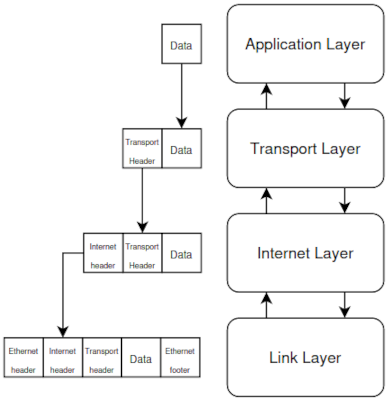
Like for the GUI implementing a TCP/IP stack is not a quick task, neither trivial, since networking is composed by many different components, but the biggest difference is that most of what we need to implement is very well standardized, and we just need to follow the documentation and the implementation part should be less difficult.
Now we’re really at the end of our kernel development notes. We tried to cover all the topics so that you can have a bare but complete-enough kernel. We had an overview on all the core components of an operating system explaining how they should be implemented, and what are the key concepts to be understood. We tried to stay focused on the implementation part of the development, using theory only when it was strictly necessary. We provided lot of code examples to help explain some of the trickier parts of the kernel. At the same time the purpose was not to provide some ready-to-use code, our intention was to give the readers enough knowledge to get started implementing it themselves.
The solutions proposed are optimized for the simplicity of the explanation. You will likely find ways to improve the code in your implementation! Finding better (or perhaps more interesting) solutions is all a part of your kernel development journey.
If you’re still reading and are wondering what’s next, it’s up to you. If you’ve followed all the previous chapters you may wish to take a look at some of the topics mentioned in this chapter, implement some more device drivers (for more hardware compatibility) or rewrite a core system with renewed understanding. A CLI and then libc will greatly boost what you can do with your kernel, making it less of a toy and more of a tool.
We’ve also provided some appendices with some extra information that you might find useful. These are things we wanted to include that didn’t fit elsewhere. We hope you found our notes useful and enjoyed reading them.
If you find any errors/issues (or horrors) with the notes please feel free to open a PR to fix them, or create an issue and let us fix it.
Thanks again!
Ivan G. and Dean T.
This short part will explore some future ideas for our kernel development, if all the previous parts in the book were completed.
It will present them with a high level explanation of the steps and the prerequisites needed for the implementation.
Below the list of chapters:
A collection of unrelated potential issues.
This is a not a definitive solution, but it’s an easy to run into. This can commonly be caused by the compiler generating sse (or sse2, 3dnow, or even mmx - I’m just going to refer to them as sse for now) instructions. If the cpu hasn’t been setup to handle extended state, it will fault and trigger an #UD.
To determine if this is happening, step through your code with gdb,
paying attention to any operations that involve an %xmm
register. If you have the qemu logs of the crash, you can also examine
the kernel binary near the address of the exception RIP.
These extensions existed before x86_64, but they were optional. The
OS had to support them, and then initialize the hardware into a valid
state for these instructions to run. This actually includes the x87
floating point unit as well, and any attempts to use it before executing
finit will result in #UD. Now if you’re used to programming
with more recent cpu extensions, like avx512 for example, you normally
have to enable these features explicitly before the compiler will
generate instructions. Not so here. The important thing to note is that
when AMD create x86_64, they wanted to reduce the fragmentation of cpu
feature sets, so they made these extensions architectural.
Every x86_64 cpu is required to support them. This means the XMM (sse
128 bit wide registers) are always present, and your compiler knows
this. Hence it might use them for storing data, which results in the
#UD.
Any operation that touches the extended cpu registers, extended control registers, or uses an extension opcode will result in #UD.
Tell your compiler not to generate these instructions, simply add
these flags to your favourite gcc/clang compiler of choice:
-mno-80387 -mno-sse -mno-sse2 -mno-3dnow -mno-mmx
Disclaimer here, I’ve never tested this, but I see no reason it shouldnt work.
If your kernel begins in an assembly stub, you could setup the cpu for these extended states before executing any compiler-generated code. The x87 fpu and SSE are the main ones, most compilers wont output 3dnow or mmx, especially since sse replaces most of their functionality. First you’ll went to set some flags in cr0 for the fpu:
You’ll likely want to ensure bit 3 is clear. This is the TS/task
switched bit, which if set will generate a #NM/device missing exception
when the cpu thinks you’ve switched tasks. Not worth the hassle. The FPU
can now be initialized by a simple finit instruction.
SSE is a little trickier, but still straight forward enough You’ll want to set the following bits in cr4:
If the cpu supports XSAVE (check cpuid), you can also set bit 18 here to enable it, otherwise leave it as is. There is more work to setting up xsave as well, for running in a single-task state where you don’t care about saving/loading registers, not having xsave setup is fine.
That’s it, that should enable your compiler-generated code with sse instructions to work.
Unions may not see as much use as structs (or classes), but they can
be useful. For example if we have a packed struct of 8
uint8_ts that are from a single hardware register. Rather
than reading a uint64_t, and then breaking it up into the
various fields of a struct, use a union.
Let’s look at some examples and see how they can be useful. While
this technique is useful, it has to be used carefully. If accessing MMIO
using a volatile instance of a union, be sure to read about
access requirements for the underlying hardware. For example a device
may expose a 64-bit register, consisting of 8 8-bit fields. However the
device may require that perform 64-bit reads and writes to the
register, in which we will have to read the whole register, and create
the union from that value. If the device doesn’t have such a
requirement, we could instead use a volatile union and
access it normally.
Imagine we have a function that reads a register and returns its
value as uint64_t:
uint64_t read_register();If we want to use a struct and populate it with the value returned by the function, we will have something similar to the following code:
struct BadIdea
{
uint8_t a;
uint8_t b;
uint8_t c;
uint8_t d;
uint8_t e;
uint8_t f;
uint8_t g;
uint8_t h;
};
uint64_t reg = read_register();
BadIdea bi;
bi.a = reg & 0xFF;
bi.b = (reg >> 8) & 0xFF;
bi.c = (reg >> 16) & 0xFF; //T AND is not necessary, but it makes the point.
etc...Now let’s see what happens instead if we are using a union approach:
union GoodIdea
{
//each item inside of union shares the same memory.
//using an anonymous struct ensures these fields are treated as 'a single item'.
struct
{
uint8_t a;
uint8_t b;
uint8_t c;
uint8_t d;
uint8_t e;
uint8_t f;
uint8_t g;
uint8_t h;
};
uint64_t squished;
};
GoodIdea gi;
gi.squished = read_register();
//now the fields in gi will represent what they would in the register.
//assuming a is bits 7:0, b is bits 16:8, etc ...In this way we moved the struct declaration inside the union. This means that now that the struct and the union share the same memory location, using an anonymous structure it ensures that the fields are treated as a single item
In this way we can either access the uint64_t value of
the register squished, or the single fields a, b, …,
h.
__attribute__((packed))
struct BitfieldExample
{
uint8_t _3bits : 3;
uint8_t _5bits : 5;
uint8_t _6bits : 6;
uint8_t _2bits : 2;
};Bitfields can be very useful, as they allow access to oddly sized bits of data. However there’s big issue that can lead to unexpected bugs:
Consider the example above. This struct would form 16bits of data in
memory, and while _3bits and _5bits would
share 1 byte, same with _6bits and _2bits, the
compiler makes no guarantees about which field occupies the least or
most significant bits. Byte order of fields is always guaranteed by the
spec to be in the order they were declared in the source file. Bitwise
order is not.
It is worth noting that relying on this is usually okay, most compilers will do the right thing, but optimizations can get a little weird sometimes. Especially -O2 and above.
There’s no easy replacement for bitfields. A suggestion is doing the
maths by ourselves, and store data in a uint8_t or whatever
size is appropriate. Until the day some compiler extensions come along
to resolve this.
Memory Addresses are expressed using numbers, so pointers are basically numbers, that means that we can do some basic arithmetic with them.
With pointers we have 4 basic operations that can be done:
++, +, -- and -
For example let’s say that we have a variable ptr that points to an uint32_t location.
uint32_t *ptr;Now for our example let’s assume that the base address of ptr is
0x2000.
This means that we have a 32 bit integer, which is 4 bytes, stored at
the address 0x2000.
Let’s see now how does the arithmetic operations above works:
1 * sizeof(uint32_t) = 4 bytes. That because the
pointer is an uint32_t. If the pointer is a
char, the next location is given by:
1 * sizeof(char) = 1 bytea * sizeof(uint32_t) = a * 4 bytesThe result of the arithmetic operation depends on the size of the variable the pointers point to, and the general rule is:
x * sizeof(variable_type)Pointers can be compared too, with the operators:
==, <=, >=, <, >, of course the comparison is
based on the address contained in the pointer.
The inline assembly instruction has the following format:
asm("assembly_template"
: output_operand
: input_operand
: list of clobbered registers
)rdmsr which places data in registers
without the compiler knowing, we’ll want to mark those as clobbered. If
we specify eax/edx as output operands, the compiler is smart enough to
work this out.c expression
pair. A constraint can also have a modifier itselfBelow is the list of the constraint modifiers:
| Symbol | Meaning |
|---|---|
| = | Indicates that this is an output operand, whatever was the previous value, it will be discarded and replaced with something else |
| + | It indicates that the operand is both read and written by the instruction. |
| & | It indicates that the operand can be modified before the instruction completion. |
| % | It means that the instruction is commutative for this operand and the following, so the compiler may interchange the two operands |
The constraints are many and they depends the architecture too. Usually they are used to specify where the value should be stored, if in registers or memory, for more details see the useful links section.
The list below contains some constraints that are worth an explanation:
An example of an inline assembly instruction of this type is:
asm("movl %2, %%rcx;"
"rdmsr;"
: "=a" (low), "=d" (high)
: "g" (address)
);Note here how eax and ecx are clobbered here, but since they’re specified as outputs the compiler implicitly knows this.
Let’s dig into the syntax:
It is worth mentioning that inline assembly syntax is the At&t
syntax, so the usual rules for that apply, for example if we want to use
immediate values in an instruction we must prefix them with the
$, symbol so for example if we want to mov 5 into rcx
register:
asm("movl $5, %rcx;");There are some subtle bugs that can be encountered when when using immediate values in C, due to operator precedence and integer promotion rules.
Let’s imagine we have a 64 bit variable, and we need to do a bitwise
operation like setting the bit at the position
x, this is easily achieved using the left shift
(<<) operator combined with a or
(|=), like in the following example:
uint64_t example_var |= (1 << x);We make few tests, for x=1, 2, 10, 20, 31, everything
works fine, so what is the issue? The issue is when the shift is above
31, because of the C Integer promotion rule.
In the above example, 1 is a literal, and by default C
converts it to int, the bitwise operation is executed using
the type of the left operand, so we are trying to shift left a bit of a
lower size type by a number of positions that is higher than than the
size of the variable, causing an undefined behavior.
Then what are the solutions? Below few example of how to potentially fix it:
#define ONE 1ULL
const uint64_t one = 1;
uint64_t example_one |= one << 42;
uint64_t example_two |= ONE << 42;
uint64_t example_three |= 1ULL << 42;Different C compilers feature a number of calling conventions, with different ones having different defaults. GCC and clang follow the system V ABI (which includes the calling convention). This details things like how arguments are passed to functions, how the stack is organised and other requirements. Other compilers can follow different conventions (MSVC has its own one - not recommended for osdev though), and the calling convention can be overridden for a specific function using attributes. Although this is not recommended as it can lead to strange bugs!
For x86 (32 bit), function calling convention is pretty simple. All
arguments are passed on the stack, with the right-most (last arg), being
pushed first. Stack pushes are 32 bits wide, so smaller values are sign
extended. Larger values are pushed as multiple 32 bit components. Return
values are left in eax, and functions are expected to be
called with the call instruction, which pushes the current
rip onto the stack, so the callee can use ret
to pop the saved instruction pointer, and return to caller function. The
callee function also usually creates a new ‘stack frame’ by pushing
ebp onto the stack, and then setting
ebp = esp. The callee must undo this before returning. This
allows things like easily walking a call stack, and looking at the local
variables if we have debug info. The caller is expected to save eax, ecx
and edx if they have values stored there. All other functions are
expected to be maintained by the callee function if used.
For x86_64 (64 bit), function calling is a little more complicated.
64 bit arguments (or smaller, signed extended values) are passed using
rdi, rsi, rdx, rcx, r8, r9 in that order (left to right).
Floating point or sse sized arguments have their own registers they get
passed in, see the sys x x86_64 spec for that. Any arguments that don’t
fit in the above registers are passed on the stack, right to left - like
in 32 bit x86.
Like in x86, functions are expected to run by using the
call instruction, which pushes the return instruction
pointer onto the stack, so the callee can use ret to
return. The callee usually forms a stack frame here as well, however the
spec also allows a 128 byte space known as the ‘red zone’. This area is
reserved by the compiler for stuff. What it does here is
unspecified, but its usually for efficiency purposes: i.e running
smaller functions in this space without the need for a new stack frame.
However this is best disabled in the compiler (using
-mno-red-zone) as the cpu is unaware of this, and will run
interrupt handlers inside of the red zone by accident.
There’s 2 parts:
To call c functions from assembly, we’ll need to make use of the above info, making sure the correct values are they need to be. It’s worth noting that a pointer argument is just an integer that contains the memory address of what it’s pointing to. These are passed as integer args (registers, than the first if not enough space).
To call an assembly function from C is pretty straight forward. If
our assembly function takes arguments in the way described above, we can
define a c prototype marked as extern, and call it like any
other function. In this case it’s worth respecting the calling
convention, and creating a new stack frame (enter/leave
instructions). Any value placed in eax/rax will be returned
from the c-function if it has a return type. It is otherwise
ignored.
volatileNote from the author of this section: volatile is always a hot topic from c/c++ developers. The first page of any search involving it will usually have at least a few results like ‘use of volatile considered harmful’ thoroughly complaining about its existence. The next page is usually filled with an equal number of results of blog posts by people complaining about the previous people’s complaining, and so on. I’m not interested in that, and instead will explain how I’ve found it a useful tool.
A bit of background on why it can be necessary first:
Compilers treat our program’s source code as a description of what we want the executable to do. As long as the final executable affects external resources in the way that our code describes, the compiler’s job is done. It makes certain promises about data layouts in memory (fields are always laid out in the order declared in source), but not about others (what data is cached, stored in a register or stored in cold memory). The exact code that actually runs on the cpu can be as different the compiler deems necessary, as long as the end result is as expected.
Suddenly there’s a lot of uncertainties about where data is actually stored at runtime. For example a local variable is likely loaded from ram into a register, and than only accessed in the register for the duration of that chunk of code, before finally being written back to memory when no longer needed. This is done because registers have access times orders of magnitude faster than memory.
Some variables never even exist in memory, and are only stored in registers.
Caching then adds more layers of complexity to this. Of course we can invalidate cache lines manually, however we’ll pretty quickly find ourselves fighting our compiler going this route. Best to stick to language constructs if we can.
volatile tells the compiler ‘this variable is now
observable behaviour’, meaning it can still do clever tricks around this
variable, but at any point the variable must exist in the exact
state as described by the source code, in the expected location (ram,
not a cpu register). Meaning that updates to the variable are written to
memory immediately.
This removes a lot of options for both the compiler and cpu in terms of what they can do with this data, so it’s best used with care, and only when needed.
volatile is not always the best tool for a job.
Sometimes it is, sometimes there are more precise, but platform
specific, solutions to the job.
One example of a good place to use volatile is calibrating the local APIC timer on x86. This is usually done by using the PIT to determine how fast the APIC timer ticks. The usual way this is done is by starting both timers, and then stopping them both after a known number of PIT ticks had passed. Since we know the PITs frequency, we can calculate the APIC timer’s frequency.
It would look something like this:
#define APIC_CALIBRATE_MS 25
uint64_t pit_ticks;
//volatile uint64_t pit_ticks;
void pit_interrupt_handler()
{
pit_ticks++;
send_eoi();
}
void calibrate_apic_timer()
{
[ ... ] //setup apic timer to max value, and setup pit to known frequency.
unmask_pit_and_reset_ticks();
while (pit_ticks < APIC_CALIBRATE_MS);
stop_apic_timer();
[ ... ] //now apic current count register can be used to determine apic timer frequency.
}The issue with this example is that pit_ticks is being
constantly accessed inside the loop, and we never modify it inside the
loop (its modified in unrelated code, the interrupt handler). With
optimizations enabled the compiler will deduce that
pit_ticks will always be its initial value, and will always
be its initial value of 0, therefore the loop is infinite. If we change
the variable declaration to be volatile uint64_t pit_ticks
the compiler assumes nothing, and that this variable can be modified at
any time.
Therefore it must do a valid read from memory each time it accesses the variable. This causes the above code to work as expected, although with increased latency, as memory must be accessed each cycle of the loop.
Authors note: This is actually not technically true on more modern CPUs, as there are mechanisms for caches to talk to each other, and share fresh data without going to memory. See the MESI protocol. This skips the full roundtrip of going to memory and back.
Another example would be an mmio based framebuffer on x86. Normally
this results in a lot of smaller accesses, all nearby (think about
drawing a line of pixels for example). volatile could be
used to ensure each write to the framebuffer actually happens, and is
not cached in a register and written later. This would work perfectly
fine, but it also limits the compiler’s options.
However in this case, the platform has a built in solution to this problem: write-combine cache mode.
If unfamiliar with caching, each page can have a set of caching attributes applied to it. These are designed to greatly improve performance in certain situations, however they are specific in application. One of these is write-combine. It works by queueing up writes to nearby areas of memory, until a buffer is full, and then flushing them to main memory in a single access. This is much faster than accessing main memory each write.
However if we’re working with an older x86 cpu, or another platform,
this solution is not available. Hence volatile would do the
job.
There are some cases where writing some assembly code is preferred/needed to do certain operations (i.e. interrupts handling).
Nasm has a macro processor that supports conditional assembly, multi-level file inclusion, etc. A macro start with the ‘%’ symbol.
There are two types of macros: single line (defined with
%define) and multiline wrapped around
%macro and %endmacro. In this paragraph we
will explain the multi-line macros.
A multi-line macro is defined as follows:
%macro my_first_macro 1
push ebp
mov ebp, esp
sub esp %1
%endmacroA macro can be accessed from C if needed, in this case we need to add a global label to it, for example the macro above will become:
%macro my_first_macro 1
[global my_first_macro_label_%1]
my_first_macro_label_%1:
push ebp
mov ebp, esp
sub esp %1
%endmacroIn the code above we can see few new things:
my_first_macro_label_%1 has to
be set as global, this is pretty straightforward to understand.%1 in the label definition, let us create different
label using the first parameter passed in the macro.So if now we add a new line with the following code:
my_first_macro 42It creates the global label: my_first_macro_label_42,
and since it is global it will be visible also from our C code (of
course if the files are linked)
Basically defining a macro with nasm is similar to use C define statement, these special “instruction” are evaluated by nasm preprocessor, and transformed at compile time.
So for example my_first_macro 42 is transformed in the following statement:
my_first_macro_label_42:
push ebp
mov ebp, esp
sub esp 42In Nasm if we want to declare a “variable” initialized we can use the following directives:
| Directive | Description |
|---|---|
| DB | Allocate a byte |
| DW | Allocate 2 bytes (a word) |
| DD | Allocate 4 bytes (a double word) |
| DQ | Allocate 8 bytes (a quad word) |
These directive are intended to be used for initialized variables. The syntax is:
single_byte_var:
db 'y'
word_var:
dw 54321
double_var:
dd -54321
quad_var:
dq 133.463 ; Example with a real numberIf we want to declare a string we need to use a different syntax for db:
string_var:
db "Hello", 10The above code means that we are declaring a variable
(string_variable) that starts at ‘H’, and fill the
consecutive bytes with the next letters. And what about the last number?
It is just an extra byte, that represents the newline character, so what
we are really storing is the string “Hello\n”
What we have seen so far is valid for a variable that can be initialized with a value, but what if we don’t know the value yet, but we want just to “label” it with a variable name? Well is pretty simple, we have equivalent directives for reserving memory:
| Directive | Description |
|---|---|
| RESB | Rserve a byte |
| RESW | Rserve 2 bytes (a word) |
| RESD | Rserve 4 bytes (a double word) |
| RESQ | Rserve 8 bytes (a quad word) |
The syntax is similar as the previous examples:
single_byte_var:
resb 1
word_var:
resw 2
double_var:
resd 3
quad_var:
resq 4One moment! What are those number after the directives? Well it’s
pretty simple, they indicate how many bytes/word/dword/qword we want to
allocate. In the example above: * resb 1 Is reserving one
byte * resw 2 Is reserving 2 words, and each word is 2
bytes each, in total 4 bytes * resd 3 Is reserving 3
dwords, again a dword is 4 bytes, in total we have 12 bytes reserved *
resq 4 Is reserving… well you should know it now…
In the asm code, if in 64bit mode, a call to cld is required before calling an external C function.
So for example if we want to call the following function from C:
void my_c_function(unsigned int my_value){
printf("My shiny function called from nasm worth: %d\n", my_value);
}First thing is to let the compiler know that we want to reference an
external function using extern, and then just before
calling the function, add the instruction cld.
Here an example:
[extern my_c_function]
; Some magic asm stuff that we don't care of...
mov rdi, 42
cld
call my_c_function
; other magic asm stuff that we don't care of...As mentioned in the multiboot chapter, argument passing from asm to C
in 64 bits is little bit different from 32 bits, so the first parameter
of a C function is taken from rdi (followed by:
rsi, rdx, rcx, r8,
r9, then the stack), so the mov rdi, 42 is
setting the value of my_value parameter to 42.
The output of the printf will be then:
My shiny function called from nasm worth: 42Variable sizes are always important while coding, but while coding in asm they are even more important to understand how they works in assembly, and since there is no real type you can’t rely on the variable type.
The important things to know when dealing with assembly code:
mov rax, [memory_location_label]is different from:
mov eax, [memory_location_label]And it could potentially lead to two different values in the register. That because the size of rax is 8 bytes, while eax is only 4 bytes, so if we do a move from memory to register in the first case, the processor is going to read 8 memory locations, while in the second case only 4, and of course there can be differences (unless we are lucky enough and the extra 4 bytes are all 0s).
This is kind of misleading if we usually do mostly register to memory, or value to register, value to memory, where the size is “implicit”.
Below an example showing a possible solution to a complex if
statement. Let’s assume that we have the following if
statement in C and we want to translate in assembly:
if ( var1==SOME_VALUE && var2 == SOME_VALUE2){
//do something
}In asm we can do something like the following:
cmp [var1], SOME_VALUE
jne .else_label
cmp [var2], SOME_VALUE2
jne .else_label
;here code if both conditions are true
.else_label:
;the else partAnd in a similar way we can have a if statement with a logic OR:
if (var1 == SOME_VALUE || var2 == SOME_VALUE){
//do_something
}in asm it can be rendered with the following code
cmp [var1], SOME_VALUE
je .true_branch
cmp [var2], SOME_VALUE
je .true_branch
jmp .else_label
.true_branch
jne .else_labelThe usual switch statement in C:
switch(variable){
case SOME_VALUE:
//do something
break;
case SOME_VALUE2:
//do something
break;
case SOME_VALUE3:
//do something
break;
}can be rendered as:
cmp [var1], SOME_VALUE
je .value1_case
cmp [var1], SOME_VALUE2
je .value2_case
cmp [var1], SOME_VALUE3
je .value3_case
jmp .item_not_needed
.value1_case
;do stuff for value1
jmp .item_not_needed
.value2_case
;do stuff for value2
jmp .item_not_needed
.value3_case:
;do stuff for value3
.item_not_needed
;rest of the codeAnother typical scenario are loops. For example imagine we have the following while loop in C:
unsigned int counter = 0;
while (counter < SOME_VALUE) {
//do something
counter++;
}Again in assembly we can use the jmp instructions
family:
mov ecx, 0 ; Loop counter
.loop_cycle
; do sometehing
inc ecx
cmp ecx, SOME_VALUE
jne loop_cycleThe inc instruction increase the value contained by the
ecx register.
Every language supports accessing data as a raw array of bytes, C provides an abstraction over this in the form of structs. NASM also happens to provide us with an abstraction over raw bytes, that is similar to how C does it.
This section will just introduce quickly how to define a basic struct, for more information and use cases is better to check the netwide assembler official documentation (see the useful links appendix)
Let’s for example assume we have the following C struct:
struct task {
uint32_t id;
char name[8];
};How nasm render a struct is basically declaring a list of offset
labels, in this way we can use them to access the field starting
from the struct memory location (Authors note: yeah it is a
trick…) To create a struct in nasm we use the struc
and endstruc keywords, and the fields are defined between
them. The example above can be rendered in the following way:
struc task
id: resd 1
name: resb 8
endstrucWhat this code is doing is creating three symbols: id as
0 representing the offset from the beginning of a task structure and
name as 4 (still the offset) and the task
symbol that is 0 too. This notation has a drawback, it defines the
labels as global constants, so you can’t have another struct or label
declared with same name, to solve this problem you can use the following
notation:
struc task
.id: resd 1
.name: resb 8
endstrucNow we can access the fields inside our struct in a familiar way:
struct_name.field_name. What’s really happening here is the
assembler will add the offset of field_name to the base address of
struct_name to give us the real address of this variable.
Now if we have a memory location or register that contains our structure, for example let’s say that we have the pointer to our structure stored in the register rax and we want to copy the id field in the register rbx:
mov rbx, dword [(rax + task.id)]This is how to access a struct, basically we add the label
representing an offset to its base address. What if we want to create an
instance of it? Well in this case we can use the macros
istruc and iend, and using at to
access the fields. For example if we want create an instance of task
with the values 1 for the id field and “hello123” for the name field, we
can use the following syntax:
istruc task
at id dd 1
at name db 'hello123'
iendIn this way we have declared a struc for the first of
the two examples. But again this doesn’t work with the second one,
because the labels are different. In that case we have to use the full
label name (that means adding the prefix task):
istruc task
at task.id dd 1
at task.name db 'hello123'
iendThis appendix looks at how and why we might want to build a cross compilation toolchain, and how to build some other tools like gdb and qemu. These tools include:
For most of these tools (except clang/LLVM) we’ll need to build them specifically for the target architecture we want to support. The building processes covered below are intended to be done on a unix-style system, if developing in a windows environment this will likely be different and is not covered here.
For the binary utils and compiler there are two main vendors: the GNU toolchain consisting of GCC and binutils, and the LLVM toolchain of the same name which uses clang as a frontend for the compiler.
A fair question to ask! If we’re building our kernel for x86_64 and
our host is the same architecture, why not use our host compiler and
linker? Well it’s very doable, but your distribution may ship modified
versions of these tools (that have been optimized to target this
distribution or architecture). Our compiler may also choose the wrong
file if conflicting names are chosen: if we create our own
stdint.h (not recommended) the host compiler may keep
including the ones for the host system. This could be fine, until we
move to another system or target a different architecture - at which
point things may break in unexpected ways.
It’s also considered good practice to take a clean room
approach to building software for bare metal environments.
In order to build GNU binutils and GCC there are a few dependencies that need to be satisfied. The exact names of these packages depend on the distribution we’re using. The minimal set of dependencies is listed below:
There’s three environment variables we’re going to use during the build process:
export PREFIX="/your/path/to/cross/compiler"
export TARGET="x86_64-elf"
export PATH="$PREFIX/bin:$PATH"The PREFIX environment variable stores the directory we
want to install the toolchain into after building, TARGET
is the target triplet of our target and we also modify the shell
PATH variable to include the prefix directory. To
permanently add the cross compiler to your path, you may want to add
this last line (where we updated PATH) to your shell’s
configuration. If you’re unsure what shell you use, it’s probably bash
and you will want to edit your .bashrc. As for where to
install this up to personal preference, but if unsure a ‘tools’
directory under our home folder should work. This is nice because the
install process doesn’t require root permissions. If we want all users
on the system to be able to access it, we could install somewhere under
/usr/ too.
The process of building binutils and GCC follows a pattern:
These are a set of tools to create and manage programs, including the
linker (ld), the GNU assembler (as, referred
to as GAS), objcopy (useful for inserting non-code files into binaries)
and readelf.
The flags we’ll need to pass to the configure script are:
--prefix=$PREFIX: this tells the script where we want
to install programs after building. If omitted this will use a default
value, but this is not recommended.--target=$TARGET: tells the script which target triplet
we want to use.--with-sysroot: the build process needs a system root
to include any system headers from. We don’t want it to use the host
headers so by just using the flag we point the system root to an empty
directory, disabling this functionality - which is what we want for a
freestanding toolchain.--disable-nls: this helps reduce the size of the
generated binaries by disabling native language support. If you want
these tools to support non-english languages you may want to omit this
option (and keep nls enabled).--disable-werror: tells the configure script not to add
-Werror to the compile commands generated. This option may
be needed depending on if you have any missing dependencies.Before we can do this however we’ll need to obtain a copy of the source code for GNU binutils. This should be available on their website or can be downloaded from the ftp mirror: https://ftp.gnu.org/gnu/binutils/.
Once downloaded extract the source into a directory, then create a new directory for holding the temporary build files and enter it. If unsure of where to put this, a sibling directory to where the source code was extracted works well. An example might be:
mkdir binutils_build
cd binutils_buildFrom this temporary directory we can use the configure script to generate the build files, like so:
/path/to/binutils_src/configure --prefix=$PREFIX --target=$TARGET --with-sysroot --disable-nls --disable-werrorAt this point the configure script has generated a makefile for us with our requested options, now we can do the usual series of commands:
make
make installThat’s it! Now all the binutils tools are installed in the
PREFIX directory and ready to be used.
The process for building GCC is very similar to binutils. Note that
we need to have a version of binutils for our target triplet before
trying to build GCC. These binaries must also be in the path, which we
did before. Let’s create a new folder for the build files
(build_gcc) and move into it.
Now we can use the configure command:
/path/to/gcc_sources/configure --target=$TARGET --prefix=$PREFIX --disable-nls --enable-languages=c,c++ --without-headersFor brevity we’ll only explain the new flags:
--enable-languages=c,c++: select which language
frontends to enable, these two are the default. We can disable c++ but
if we plan to cross compile more things than our kernel this can be nice
to have.--without-headers: tells the compiler not to rely on
any headers from the host and instead generate its own.It will download the missing dependencies for us. Now is possible to
re-run the configure command. Once the script is finished
we can run a few make targets to build the compiler and its support
libraries. By default running make/make all is
not recommended as this builds everything for a full userspace compiler.
We don’t need all that and it can take a lot of time. For a freestanding
program like a kernel we only need the compiler and libgcc.
make all-gcc
make all-target-libgcc
make install-gcc
make install-target-libgccLibgcc contains code the compiler might add calls to for certain operations. This happens mainly when an operation the compiler tries to perform isn’t supported by the target hardware and has to be emulated in software. GCC states that it can emit calls to libgcc functions anywhere and that we should always link to it. The linker can remove the unused parts of the code if they’re not called. This set up is specific to GCC.
In practice we can get away with not linking to libgcc, but this can result in unexpected linker errors. Best practice here is to build and link with libgcc.
Building LLVM from source is a much more significant task than building the gcc/binutils toolchain. It takes a fair amount more time to build all the required tools from scratch. However there is an upside to this, LLVM (which clang is just one frontend to) is designed to be modular and ships with backend modules for most supported architectures. This means a default install of clang (from your distribution’s package manager) can be used as a cross compiler.
To tell clang to cross compile, there is a special flag you’ll need
to pass it: --target. It takes the target triplet for the
target. Most LLVM tools like lld (the llvm linker) support it and will
switch their modules to use ones that match the target triplet.
As an example lets say you wanted to use clang as a cross compiler
for x86_64-elf triplet or x86_64-unknown-elf
you would invoke clang like clang --target=x86_64-elf or
--target=x86_64-unknown-elf. Let’s say you wanted to build
your kernel for riscv64 you would do something like
clang --target=riscv64.
Since clang and lld are compatible with the
gcc/binutils versions of these tools you can pass the same
flags and compilation should go as expected.
Of course we can use any emulator we want, but in our example we rely on qemu. This tool to be compiled requires some extra dependencies:
As usual let’s create a new folder called build_qemu and
move into it. The configure command is:
/path/qemu_src/configure --prefix=$PREFIX --target-list=riscv64-softmmu,x86_64-softmmu --enable-gtk --enable-gtk-clipboard --enable-tools --enable-vhost-netwhere:
--target-list=riscv64-softmmu,x86_64-softmmu: is a
comma separated list of platforms we want to support.--enable-tools: will build support utilities that comes
with qemu--enable-gtk: it will enable the gtk+ interface--enable-vhost-net : it will enable the vhost-net
kernel acceleration supportAfter the configuration has finished, to build qemu the commands to install it:
make -j $(nproc)
make installQemu is quite a large program, so it’s recommended to make use of all cores when building it.
The steps for building GDB are similar to binutils and GCC. We’ll create a temporary working directory and move into it. Gdb has a few extra dependencies we’ll need (name can be different depending on the distribution used, the names below are for Debian based distributions):
path/to/gdb_sources/configure --target=$TARGET --host=x86_64-linux-gnu --prefix="$PREFIX" --disable-werror --enable-tui --enable-source-highlightThe last two options enable compiling the text-user-interface
(--enable-tui) and source code highlighting
(--enable-source-highlight) which are nice-to-haves. These
flags can be safely omitted if these aren’t features we want.
The --target= flag is special here in that it can also
take an option all which builds gdb with support for every
single architecture it can support. If we’re going to develop on one
machine but test on multiple architectures (via qemu or real hardware)
this is nice. It allows a single instance of gdb to debug multiple
architectures without needing different versions of gdb. Often this is
how the ‘gdb-multiarch’ package is created for distros that have it.
The --host= flags specify the host system running gdb,
in the example above an x86_64-linux-gnu system, this
should be changed depending on the system used.
After running the configure script, we can build and install our custom gdb like so:
make all-gdb
make install-gdbFirst thing Qemu needs to be launched telling it to accepts connections from gdb, it needs the parameters: -s and -S added to the command, where:
target remote localhost:1234And then we can load the symbols (if we have compiled our os with debugging symbols):
symbol-file path/to/kernel.binBelow a list of some useful gdb commands
info register reg where reg is
the register we needbreak 0xaddressx/nfu addr where:
n is the number of iterations f the format (x
= hex) and the addr we want to showx/h ($rax) shows the content of memory address pointed by
raxc/continue can be used to continue the program until
the next breakpoint is reached.fin/finish will run until the end of the current
function.s/step will run the next line of code, and if the next
line is a function call, it will ‘step into’ it. This will leave us on
the first line on the new function.n/next similar to step, but will ‘step over’ any
function calls, treating them like the rest of the lines of code.si/ni step instruction/next instruction. These are like
step and next, but work on instructions, rather than lines of code.p/print symbol can be used to used to print almost
anything that makes sense in our program. Lets say we have an integer
variable i, p i will print what i currently is. This takes
a c-like syntax, so if we print a pointer, gdb will simply tell us its
address. To view its contents we would need to use p *i,
like in c.x address is similar to print, but takes a memory
address instead of a symbol.Both commands accept format specifiers which change the
output. For example p/x i will print i, formatted as
hexadecimal number. There are a number of other ones /i
will format the output as cpu instructions, /u will output
unsigned, and /d signed decimal numbers. /c
will interpret an ASCII character, and /s will interpret it
as a null terminated ASCII string (just a c string).
The format specifier can be prefixed with a number of repeats. For
example if we want to examine 10 instructions at address 0x1234, we
could do: x/10i 0x1234, and gdb would show us that (i is
the identifier for the instruction format), this is pretty useful if we
want to look at raw areas of memory. In case we need to print raw memory
instead we can use x/10xb 0x1234(where x is the
format (hexadecimal) and b the size (bytes).
Here a collection of useful command to keep track of the call stack.
bt/backtrace/info stack will show us the current call
stack, with lower numbers meaning deeper (current breakpoint is stack
frame 0).up/down can be used to move up and down the
callstack.frame x will jump directly to frame number x (view
frame numbers with bt)info args will display the arguments passed into the
function. It’s worth nothing that the first few instructions of a
function set up the stack frame, so we may need to si a few
times when entering a function for this to return correct values.info locals displays local variables (on the stack).
Any variables that have no yet been declared in the source code will
have junk values (keep this in mind!).info variables is similar to info global and static
variablesinfo args list the arguments of the current stack
frame, name and values.A breakpoint can be set in a variety of ways! The command is
b/break symbol, where symbol can be a number of things:
break init or
break init() will break at any function named
init.break main.c:42 will break just
before the first instruction of line 42 (in main.c) is executed.break 0x1234 will break whenever
the cpu’s next instruction is at address 0x1234.Breakpoints can be enabled/disabled at runtime with
enable x/disable x where x is the breakpoint
number (displayed when we first set it).
Breakpoints can also take conditions if we’re trying to debug a
commonly-run function. The syntax follows a c-like style, and is pretty
forgiving. For example: break main if i == 0 would break at
the function main() whenever the variable i is
equal to 0. This syntax supports all sorts of things, like casts and
working with pointers.
Breakpoints can also be issued contextually too! If we’re at a
breakpoint main.c:123, we can simply use b 234
to break at line 234 in the same file.
It is possible at any time to print the list of breakpoints using the
command: info breakpoint
And finally breakpoints can be deleted as well using
delete [breakpoints]
It’s worth noting if debugging a kernel running with kvm, is not
possible to use software breakpoints (above) like normal. GDB does
support hardware breakpoints using hb instead of
b for above, although their functionality can be limited,
depending on what the hardware supports. Best to do serious debugging
without kvm, and only use hardware debugging when absolutely
necessary.
In case we want to watch the behaviour of a variable, and interrupt
the code every time the variable changes, we can use
watchpoints they are similar to breakpoints, but instead of
being set for lines of code or functions, they are set to watch variable
behaviour.
For example imagine to have the following simple function:
int myVar2 = 3;
int test_function() {
int myVar = 0;
myVar = 5;
myVar2 = myVar
return myVar;
}If we want to interrupt the execution when myVar2 changes value this can be easily done with:
watch myVar2As soon as myVar2 changes from 0 to 5, the execution
will stop. This works pretty well for global variables. But what about
local variables? Like myVar, the workflow is pretty similar
but to catch the watchpoint we need first to set a breakpoint when the
variable is in-scope (inside the test_function).
We can use conditions on watchpoint too, in the same way they are used for breakpoints.
While debugging with gdb, we can change the value of the variables in the code being executed. To do that we just need the command:
set variable_name=valuewhere variable_name is a variable present in the code
being debugged. This is extremely useful in the cases where we want to
test some edge cases, that are hard to reproduce.
This area of gdb is hilariously undocumented, but still really useful. It can be entered in a number of ways:
layout xyz, will drop into a 1 window tui with the
specified data in the main window. This can be ‘src’ for the source
code, ‘regs’ for registers, or ‘asm’ for assembly.tui enable will do the same the first option, but
defaults to asm layout.Tui layouts can be switched at any time, or we can return to our
regular shell at any time using tui disable, or exiting
gdb.
The layouts offer little interaction besides the usual terminal in/out, but can be useful for quickly referencing things, or examining exactly what instructions are running.
If we are using debian, we most-likely need to install the gdb package, because by default gdb-minimal is being installed, which doesn’t contain the TUI.
Currently these are the type of tui layouts available in gdb:
asm - shows the asm code being executedsrc - shows the actual source code line executedregs - shows the content of the cpu registerssplit - generate a split view that shows the asm and
the src layoutWhen in a view with multiple windows, the command
focus xyz can be used to change which window has the
current focus. Most key combinations are directed to the currently
focused window, so if something isn’t working as expected, that might be
why. For example to get back the focus to the command view just type:
focus cmd
vboxmanage list vmsIt will show for every virtual machine, its label and its UUID
virtualboxvm --startvm vmnameThe virtual machine name, or its uuid can be used.
To run a VM with debug two things are needed:
VBOX_GUI_DBG_ENABLED or
VBOX_GUI_DBG_AUTO_SHOW set to true--debug
option:virtualboxvm --startvm vmname --debugthis will open the Virtual Machine with the Debugger command line and ui.
If using qemu, a good idea is to dump registers when an exception occurs, we just need to add the following option to qemu command:
qemu -d intSometime could be needed to avoid the emulator restart on triple fault, in this case to catch the “offending” exception, just add:
qemu -d int -no-rebootWhile debugging with gdb, we may want to keep qemu hanging after a
triple fault (when the cpu should reset), to do some more investigation,
in this case we need to add also -no-shutdown (along with)
-no-reboot
Qemu monitor is a tool used to send complex commands to the Qemu emulator, is useful to add/remove media images to the system, freeze/unfreeze the VM, and inspect the virtual machine’s state without using an external debugger.
One way to start Qemu monitor on a unix system is using the following parameter when starting Qemu:
qemu-system-i386 [..other params..] -monitor unix:qemu-monitor-socket,server,nowaitthen on another shell, on the same folder where we started the emulator launch the following command:
socat -,echo=0,icanon=0 unix-connect:qemu-monitor-socketAnother method is to use Telnet to start the monitor. This is handy for easier, cross-platform or remote use (albeit less secure).
qemu-system-i386 [..other params..] -monitor telnet::45454,server,nowaitThis enables the monitor to listen on a specified port (ie, 45454). You can then connect to the QEMU monitor from another terminal or a remote machine (with networking setup) using Telnet:
telnet localhost 45454Both of these will prompt with a shell similar to the following:
QEMU 6.1.0 monitor - type 'help' for more information
(qemu)Once the monitor is running, it is possible to send commands directly to the emulator, below is a list of useful commands:
help This is the first command to get some help using
the monitor.info xxxx It will print information, depending on xxxx
for example: info lapic will show the current status of the
local apic, info mem will print current virtual memory
mappings, info registers will print the content of the
registers.x /cf address where c is the number of items we want to
display in decimal, f is the format (x for hex,
c for char, etc) display the content of c virtual memory
locations starting from address.xp /cf address same as above, but for physical
memory.These commands are very useful when we need to debug memory related
issues, the first command info mem will print the list of
active virtual memory mappings, the output format depends on the
architecture, for example on x86-64, it will be similar to
the following:
info mem
ffff800000000000-ffff800100491000 0000000100491000 -rw
ffff800100491000-ffff800100498000 0000000000007000 -r-
ffff800100498000-ffff80010157a000 00000000010e2000 -rw
ffffffff80000000-ffffffff80057000 0000000000057000 -r-
ffffffff80057000-ffffffff8006b000 0000000000014000 -rwWhere every line describes a single virtual memory mapping. The
fields are (ordered left to right): base address,
limit, size and the three common flags (user,
read, write).
The other command, info tlb, shows the state of the
translation lookaside buffer. In qemu this is shown as individual
address translations, and can be quite verbose. An example of what the
output might look like is shown below:
info tlb
ffffffff80062000: 000000000994a000 XG------W
ffffffff80063000: 000000000994b000 XG------W
ffffffff80064000: 000000000994c000 XG--A---W
ffffffff80065000: 000000000994d000 XG-DA---W
ffffffff80066000: 000000000994e000 XG-DA---W
ffffffff80067000: 000000000994f000 XG-DA---W
ffffffff80068000: 0000000009950000 XG-DA---W
ffffffff80069000: 0000000009951000 XG-DA---W
ffffffff8006a000: 0000000009952000 XG-DA---WIn this case the line contains: virtualaddress: physicaladdress
flags. The command is not available on all architectures, so if
developing on an architecture different from x86-64 it
could not be present.
Qemu (and several other emulators - bochs for example) support
something called debugcon. It’s an extremely simple protocol, similar to
serial - but with no config, where anything written to port 0xE9 in the
VM will appear byte-for-byte at where we tell qemu to put it. Same is
true with input (although this is quite buggy, best to use serial for
this). To enable it in qemu add this to the qemu flags
-debugcon where. Where can be anything really, a log file
for example. We can even use -debugcon /dev/stdout to have
the output appear on the current terminal.
It’s worth noting that because this is just a binary stream, and not a serial device emulation, its much faster than usual port i/o. And there’s no state management or device setup to worry about.
This appendix is a collection of useful strategies for memory protection. This mainly serves as a reminder that these features exist, and are worth looking into!
On x86_* platforms, we have the R/W bit in our page
tables. This flag must be enabled in order for a page to be written to,
otherwise the page is read-only (assuming the page is present at
all).
However this is not actually true! Supervisor accesses (rings 0/1/2 - not ring 3) can write to readonly pages by default. This is not as bad as it might seem, as the kernel is usually carefully crafted to only access the memory it needs. However when we allow user code to access the kernel (via system calls for example), the kernel can be ‘tricked’ into writing into areas it wouldn’t normally, via software or hardware bugs.
One helpful mitigation for this is to set the WP bit, which is bit 16 of cr0. Once written to cr0, any attempts to write to a read-only page will generate a page fault, like a user access would.
Two separate features that serve similar enough purposes, that they’re often grouped together.
SMEP (Supervisor Memory Execute Protection) checks that while in a supervisor ring the next instruction isn’t being fetched from a user page. If the cpu sees that the cpl < 3 and the instruction comes from a user page, it will generate a page fault, allowing the kernel to take action.
SMAP (Supervisor Memory Access Protection) will generate a page fault
if the supervisor attempts to read or write to a user page. This is
quite useful, but it brings up an interesting problem: how do the kernel
and userspace programs communicate now? Well the engineers at Intel
thought of this, and have repurposed the AC (alignment check) bit in the
flags register. When AC is cleared, SMAP is active and will generate
faults. When AC is set SMAP is temporarily disabled and supervisor rings
can access user pages until AC is cleared again. Like most of the other
flag bits, AC has dedicated instructions to set (stac) and
clear (clac) it.
Support for SMEP can be checked via cpuid, specifically leaf 7 (sub-leaf 0) bit 7 of the ebx register. SMAP can be checked for via leaf 7 (sub-leaf 0) bit 20 of ebx. These features were not introduced at the same time, so it’s possible to find a cpu that supports one and not the other. Furthermore, they were introduced relatively recently (2014-2015), so unlike other features (NX for example) they can’t safely be assumed to be supported.
Authors Note: Some leaves of cpuid have multiple subleaves, and the subleaf must be explicitly specified. I ran into a bug while testing this where I didn’t specify that the subleaf was 0, and instead the last value in rax was used. The old phrase ‘garbage in, garbage out’ holds true here, and cpuid returned junk data. Be sure to set the subleaf!
Once these features are known to be supported, they can be enabled like so:
Unlike the previous features which are simple feature flags, this is a more advanced solution. It’s really focused on detecting buffer overruns: when too much data is written to a buffer, and the data ends up writing into the next area of memory. This section assumes we’re comfortable writing memory allocators, and familiar with how virtual memory works. It’s definitely an intermediate topic, one worth being aware of though!
Now while this technique is useful for tracking down a rogue memcpy or memset, it does waste quite a lot of physical memory and virtual address space, as will be shown. Because of this it’s useful to be able to swap this with a more traditional allocator for when debugging features are not needed.
A page heap (named after the original Microsoft tool), is a heap where each allocator is rounded up to the nearest page. This entire memory region is dedicated to this allocation, and the two pages either side of the allocation are unmapped. The memory region is padded at the beginning, so that the last byte of the allocated buffer is the last byte of the last mapped page.
This means that when we attempt to read or write beyond the end of the array, we cause a page fault! Now is possible to track any buffer overruns from inside the page fault handler. If the kernel doesn’t have any page fault handling logic yet, it can simply panic and print the faulting address, and using this information to track down the overrun.
What about buffer underruns? This is even easier!
Instead of padding the memory region at the beginning, pad it at the end. The code will just end up returning the first byte of the first page, and now any attempts to access data before the buffer will trigger a page fault like before. Unfortunately underruns and overruns cannot be detected with a single page heap.
Now that’s a lot of words, let’s have a look at a quick example of how it might work:
malloc or similar), and
rounds this up to the nearest page: 4096 bytes.An example in c might look like (note these functions are made up for the example, and must be implemented yourself):
void* page_heap_alloc(size_t size, bool detect_overrun) {
const size_t pages_required = (size / PAGE_SIZE_IN_BYTES) + 1;
void* pages = pmm_alloc_pages(pages_required);
uint64_t next_alloc_address = get_next_addr();
//unmap either side of region
vmm_ensure_unmapped(next_alloc_address - PAGE_SIZE_IN_BYTES);
vmm_ensure_unmapped(next_alloc_address + pages_required);
vmm_map(next_alloc_address, pages);
//if we don't want to detect overruns, detect underruns instead.
if (!detect_overrun)
return pages;
return (void*)((uint64_t)pages + (pages_required * PAGE_SIZE_IN_BYTES - size));
}This appendix is a collection of links we found useful developing our own kernels and these notes.
An interesting github repository with a lot of resources about
operating systems like guides, tutorials, hobby kernels, is the
awesome-os project by @jubalh available here: https://github.com/jubalh/awesome-os
First of all a big thank you goes to Koobin Bingku who created the cover image for the printed book.
And then a special thanks to all the contributors who helped by fixing errors, spelling mistakes or providing critique.
In no particular order:
Here you can find all changes across book editions/revisions.
Release date: Jun, 2023. First book release.
Release date: August, 2023. Second book release.
Release date: December 2023. Third Book release
Release date: April 2024. Fourth book release
Release date: Sept 2024 Fifth book release
Relase date: Jan 2025 Sixth Book Release
Release date: Feb 2026 Seventh Book Release